1. Introduction
Welcome to your Muvit Msound Stereo Bluetooth Wireless Headset. This manual provides comprehensive instructions for the proper setup, operation, and maintenance of your new headset to ensure optimal performance and longevity. Please read this guide thoroughly before using the product.
2. Product Overview
2.1 Package Contents
- Muvit Msound Stereo Bluetooth Wireless Headset
- USB Charging Cable
- Wall Adapter
- User Manual

2.2 Headset Components
The Muvit Msound headset features a foldable, neckband design for portability and comfort. It includes integrated controls for easy management of audio and calls.
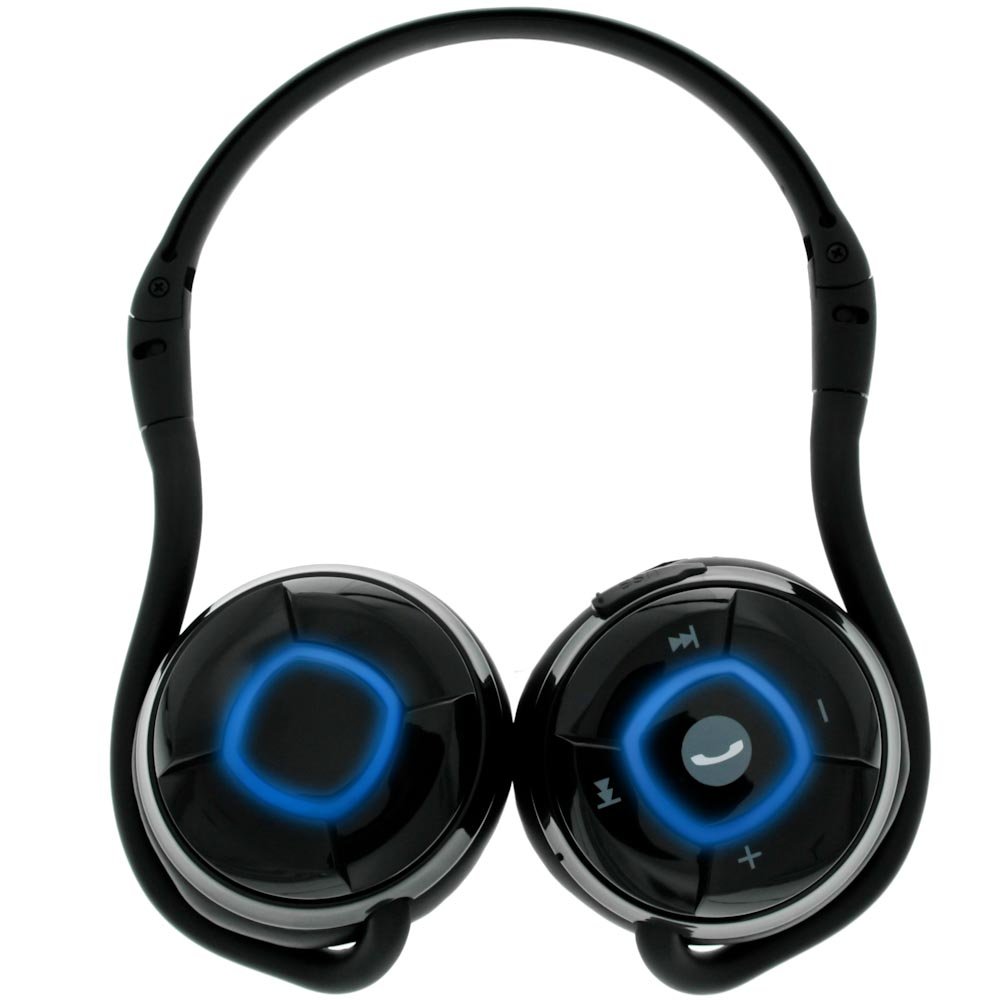


Control Buttons:
- Multifunction Button: Located centrally, used for power on/off, play/pause music, and answering/ending calls.
- Volume Up (+): Increases audio volume.
- Volume Down (-): Decreases audio volume.
- Next Track (>>|): Skips to the next audio track.
- Previous Track (|<<): Skips to the previous audio track.
Other Features:
- LED Indicator: Provides status information (e.g., power, pairing, charging).
- USB Charging Port: For connecting the charging cable.
- Built-in Microphone: Omni-directional microphone for hands-free calls.
3. Setup
3.1 Charging the Headset
Before initial use, fully charge your Muvit Msound headset. The headset is powered by a Li-ion battery.
- Connect the small end of the USB charging cable to the USB charging port on the headset.
- Connect the larger end of the USB charging cable to the provided wall adapter.
- Plug the wall adapter into a power outlet.
- The LED indicator will show the charging status (e.g., red for charging, blue for fully charged).
- Once fully charged, disconnect the charging cable.
3.2 Pairing with a Bluetooth Device
The Muvit Msound headset connects wirelessly via Bluetooth to your mobile device or other Bluetooth-enabled audio sources.
- Ensure the headset is turned off.
- Press and hold the Multifunction Button until the LED indicator flashes rapidly (e.g., alternating red and blue), indicating pairing mode.
- On your mobile device, navigate to the Bluetooth settings and ensure Bluetooth is enabled.
- Search for available devices. The headset should appear as "Muvit Msound" or similar.
- Select "Muvit Msound" from the list to initiate pairing.
- Once successfully paired, the LED indicator will change (e.g., slow blue flashes) and you may hear an audible confirmation.
- The headset has an operating range of up to 10 meters from the paired device.
4. Operation
4.1 Power On/Off
- To Power On: Press and hold the Multifunction Button for approximately 3 seconds until the LED indicator lights up and you hear a power-on tone.
- To Power Off: Press and hold the Multifunction Button for approximately 5 seconds until the LED indicator turns off and you hear a power-off tone.
4.2 Music Playback
After pairing, you can control music playback directly from the headset.
- Play/Pause: Press the Multifunction Button once.
- Next Track: Press the Next Track (>>|) button once.
- Previous Track: Press the Previous Track (|<<) button once.
- Volume Up: Press the Volume Up (+) button.
- Volume Down: Press the Volume Down (-) button.
4.3 Call Management
The built-in microphone allows for hands-free calling.
- Answer Call: When a call comes in, press the Multifunction Button once.
- End Call: During a call, press the Multifunction Button once.
- Reject Call: When a call comes in, press and hold the Multifunction Button for approximately 2 seconds.
- Redial Last Number: In standby mode, double-press the Multifunction Button.
5. Maintenance
Proper care ensures the longevity and performance of your headset.
- Cleaning: Use a soft, dry cloth to clean the headset. Do not use abrasive cleaners or solvents.
- Storage: When not in use, store the headset in a cool, dry place, away from direct sunlight and extreme temperatures. The foldable design allows for compact storage.
- Battery Care: Avoid fully discharging the battery frequently. Charge the headset regularly, even if not in use for extended periods, to maintain battery health.
- Water Exposure: This headset is not waterproof. Avoid exposure to water or excessive moisture.

6. Troubleshooting
If you encounter issues with your Muvit Msound headset, refer to the following common solutions:
| Problem | Possible Cause | Solution |
|---|---|---|
| Headset does not power on | Low battery | Charge the headset fully. |
| Cannot pair with device | Headset not in pairing mode / Bluetooth off on device / Device out of range | Ensure headset is in pairing mode (rapid LED flash). Turn on Bluetooth on your device. Move device closer to headset (within 10m). |
| No sound or poor sound quality | Volume too low / Headset not connected / Interference | Increase volume on both headset and device. Re-pair the headset. Move away from other wireless devices. |
| Microphone not working | Headset not selected as audio input / Microphone blocked | Ensure headset is selected as the input device in your phone's call settings. Check for any obstructions near the microphone. |
7. Specifications
- Model Number: Msound
- Manufacturer: Muvit
- Product Dimensions: 15.01 x 11 x 6.5 cm
- Item Weight: 160 g
- Connectivity Technology: Wireless
- Wireless Communication: Bluetooth
- Special Feature: Neckband design
- Cable Feature: Without Cable
- Bluetooth Range: Up to 10 meters (33 feet)
- GTIN: 03700165374912
8. Warranty & Support
For warranty information and customer support, please refer to the documentation provided with your purchase or contact the retailer. Keep your proof of purchase for any warranty claims.