
Introduction
Welcome to the user manual for your Saeco Incanto Deluxe Espresso Machine A-ID-SS. This guide provides comprehensive instructions for the safe and efficient operation, maintenance, and troubleshooting of your super-automatic espresso machine. Please read this manual thoroughly before first use and keep it for future reference.
Important Safety Instructions
- Electrical Safety: Ensure the machine is connected to a grounded power outlet. Do not immerse the machine, cord, or plug in water or other liquids.
- Hot Surfaces: The brewing unit, steam wand, and hot water dispenser can become very hot during operation. Avoid direct contact and use handles or knobs.
- Children: Keep the appliance out of reach of children. Supervise children to ensure they do not play with the appliance.
- Maintenance: Unplug the machine before cleaning or performing any maintenance. Do not attempt to repair the machine yourself; contact authorized service personnel.
- Water Tank: Only fill the water tank with fresh, cold drinking water.
Components Overview
Familiarize yourself with the main components of your Saeco Incanto Deluxe Espresso Machine:
- Water Tank
- Bean Hopper
- Grinder Adjustment Knob
- Control Panel (buttons, display)
- Coffee Spout
- Drip Tray and Grinds Container
- Steam/Hot Water Wand
- Brewing Unit (internal)
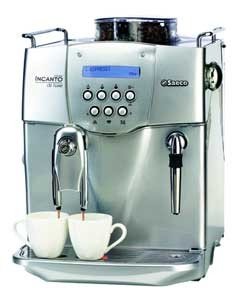
Image: Front view of the Saeco Incanto Deluxe Espresso Machine A-ID-SS, showing the control panel, coffee spout, and drip tray.
Setup and First Use
1. Unpacking and Placement
- Remove all packaging materials.
- Place the machine on a stable, level surface, away from heat sources and water.
- Ensure adequate ventilation around the machine.
2. Filling the Water Tank
- Remove the water tank from the machine.
- Rinse the tank with fresh water.
- Fill the tank with fresh, cold drinking water up to the MAX level indicator.
- Reinsert the water tank securely into the machine.
3. Filling the Bean Hopper
- Open the lid of the bean hopper.
- Pour fresh whole coffee beans into the hopper. Do not use ground coffee, instant coffee, or caramelized beans.
- Close the lid.
4. Initial Rinse Cycle
- Plug the machine into a grounded power outlet.
- Place a container under the coffee spout and the steam/hot water wand.
- Follow the on-screen prompts or refer to the specific instructions for your model to initiate the initial rinse cycle. This primes the system and cleans internal circuits.
Operating Instructions
Making Espresso
- Ensure the water tank is filled and the bean hopper contains fresh beans.
- Place a cup under the coffee spout.
- Select your desired coffee strength (aroma) and volume using the control panel.
- Press the espresso button. The machine will grind the beans, brew, and dispense the coffee.
- To adjust the grind setting, turn the grinder adjustment knob inside the bean hopper. Only adjust the grinder while it is operating.
Using the Steam/Hot Water Wand
- Place a pitcher with cold milk (for frothing) or a cup (for hot water) under the wand.
- Select the steam or hot water function on the control panel.
- For frothing milk, immerse the wand tip just below the surface of the milk. Open the steam valve. Move the pitcher up and down to create foam.
- For hot water, open the hot water valve.
- Close the valve and clean the wand immediately after use.
Maintenance and Cleaning
Daily Cleaning
- Empty and rinse the drip tray and grinds container.
- Wipe down the exterior of the machine with a damp cloth.
- Clean the steam/hot water wand after each use.
Weekly Cleaning (Brewing Unit)
- Turn off and unplug the machine.
- Remove the brewing unit (refer to your machine's specific instructions for removal).
- Rinse the brewing unit thoroughly under lukewarm running water until no coffee residue is visible.
- Allow the brewing unit to air dry before reinserting.
Descaling
The machine will prompt you when descaling is required. Use only Saeco descaling solution and follow the instructions provided with the descaler or on the machine's display.
Troubleshooting
| Problem | Possible Cause | Solution |
|---|---|---|
| No coffee dispenses. | Water tank empty, brewing unit clogged, or machine not primed. | Fill water tank, clean brewing unit, perform initial rinse cycle. |
| Coffee is too weak. | Grind setting too coarse, insufficient coffee dose, or oily beans. | Adjust grind to finer setting (while grinder is running), increase aroma setting, use non-oily beans. |
| Machine displays "Descaling Required". | Mineral buildup in the system. | Perform a descaling cycle using Saeco descaling solution. |
| Water leaks from machine. | Water tank not seated correctly, or internal component issue. | Ensure water tank is properly inserted. If problem persists, contact customer support. |
Specifications
- Brand: Saeco
- Model: Incanto Deluxe A-ID-SS
- Type: Super-Automatic Espresso Machine
- ASIN: B002N6MNBS
- Manufacturer: Saeco
- First Available: August 28, 2009
- Material: See Item (typically plastic, stainless steel)
- Color: See Item (typically silver/black)
Warranty and Support
For detailed warranty information, please refer to the warranty card included with your product or visit the official Saeco website. If you encounter issues not covered in the troubleshooting section, please contact Saeco customer support for assistance.
Saeco Official Website: www.saeco.com


