Introduction
This manual provides detailed instructions for the safe and efficient operation, maintenance, and troubleshooting of your De'Longhi ESAM6700 Gran Dama Avant Super-Automatic Espresso Machine. Please read all instructions carefully before using the appliance and retain this manual for future reference.

Image: Front view of the De'Longhi ESAM6700 espresso machine, showcasing its sleek design and touch-screen interface, with a prepared latte macchiato in a glass.
Product Overview
The De'Longhi ESAM6700 is designed to deliver a variety of coffee beverages with ease. Key features include:
- "Single Touch" Hot Milk System: Easily prepares latte, cappuccino, and Italian macchiato.
- Digital Touch Screen Control Panel: Offers programmable menu settings for start time, auto-off, clock, water temperature, coffee strength (5 settings), and cup size (4 settings).
- "Direct-to-Brew" System: Grinds beans instantly for fresh espresso. The brewing system is compact and removable for cleaning.
- Accommodates Latte Cups: Features a unique flip-up drip tray.
- Long Coffee Function: Replicates the taste of drip coffee by elongating the brewing process.
- Integrated Conical Burr Grinder: Adjustable fineness settings for whole coffee beans.
- 60-ounce Removable Water Tank: For convenient refilling.
- Double Boiler System: Ensures optimal temperature for brewing and steaming.
- Cup Warmer: Located on top of the machine to pre-heat cups.
Control Panel

Image: Close-up of the digital touch-screen control panel displaying menu options and settings for coffee preparation.
The touch-screen interface allows for intuitive control over various functions, including beverage selection, strength adjustment, and system settings.
Coffee Bean Hopper and Grinder
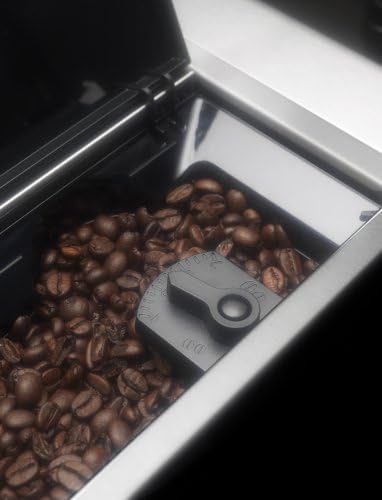
Image: View into the coffee bean hopper of the De'Longhi ESAM6700, showing whole coffee beans and the fineness adjustment dial for the integrated burr grinder.
The integrated conical burr grinder ensures fresh coffee by grinding beans just before brewing. The fineness of the grind can be adjusted to suit your preference.
Milk Container and Frothing System

Image: The removable milk container attached to the De'Longhi ESAM6700, showing the frothing nozzle and milk level. Steam is visible, indicating active frothing.
The removable milk container integrates with the machine to automatically froth or steam milk for lattes, cappuccinos, and macchiatos. It features a clean button for easy maintenance.
Cup Warmer

Image: Two ceramic cups inverted on the cup warming tray located on top of the De'Longhi ESAM6700 espresso machine.
The cup warmer on top of the machine helps to keep your espresso cups at an ideal temperature, ensuring your coffee stays hot longer.
Setup
- Unpacking: Carefully remove all packaging materials. Ensure all components are present.
- Initial Cleaning: Before first use, wash the water tank, milk container, drip tray, and grounds container with warm water and mild detergent. Rinse thoroughly.
- Water Tank: Fill the 60-ounce removable water tank with fresh, cold water. Insert it securely into the machine.
- Coffee Beans/Ground Coffee: Open the coffee bean hopper lid and fill with whole coffee beans. If using ground coffee, use the dedicated pre-ground coffee funnel.
- Power On: Plug the machine into a suitable power outlet. The machine will perform an initial heating cycle and rinse.
Operating Instructions
Making Espresso
- Ensure the water tank is filled and coffee beans are in the hopper.
- Place one or two cups under the coffee spouts.
- Select your desired coffee strength and cup size using the touch screen.
- Press the single or double espresso button. The machine will grind the beans and brew the coffee.
Preparing Milk-Based Beverages (Latte, Cappuccino, Macchiato)

Image: A glass of latte macchiato being prepared by the De'Longhi ESAM6700, showing distinct layers of milk, espresso, and foam.
- Fill the milk container with fresh, cold milk.
- Slide the milk container onto the front of the machine until it clicks into place.
- Place a suitable cup under the milk and coffee spouts.
- Select your desired beverage (Latte, Cappuccino, Macchiato) from the touch screen. The machine will automatically froth the milk and brew the coffee.
- After use, press the "Clean" button on the milk container to rinse the system.
Hot Water Function
To dispense hot water for tea or instant beverages:
- Place a cup under the hot water spout.
- Select the hot water function from the touch screen.
- Press the start button to dispense hot water.
Maintenance
Regular cleaning and maintenance ensure optimal performance and longevity of your espresso machine.
Daily Cleaning
- Drip Tray and Grounds Container: Empty and clean daily. The machine will prompt you when the grounds container needs emptying.
- Milk Container: After each use, press the "Clean" button on the milk container. Periodically disassemble and wash all parts with warm water and mild detergent.
- Brewing Unit: The brewing unit is removable. Rinse it under running water at least once a week. Ensure it is completely dry before reinserting.
Descaling
The machine features an automatic decalcification system. The display will indicate when descaling is required. Follow the on-screen instructions and use a suitable descaling solution recommended by De'Longhi. Regular descaling prevents mineral buildup and maintains machine efficiency.
Troubleshooting
If you encounter issues with your machine, refer to the following common problems and solutions:
| Problem | Possible Cause | Solution |
|---|---|---|
| "Fill Tank!" message persists after refilling. | Float in water tank is stuck or dirty. | Remove water tank, locate the float mechanism, and rinse it thoroughly to ensure free movement. |
| Coffee is lukewarm. | Temperature setting is too low; cups are cold. | Adjust water temperature setting to high via the menu. Use the cup warmer to pre-heat cups. |
| Milk is not frothing correctly. | Milk container or frothing nozzle is dirty; milk is not cold enough. | Clean the milk container and frothing nozzle thoroughly. Ensure milk is fresh and cold. |
| Brewing unit is jammed. | Incorrect reinsertion or coffee grounds buildup. | Remove the brewing unit, clean it, and reinsert gently but firmly until it clicks into place. Refer to the manual for correct reinsertion. |
| Machine not grinding beans. | Bean hopper empty; grinder clogged. | Check bean level. If beans are present, ensure no foreign objects are in the grinder. Contact customer support if the issue persists. |
For issues not listed here, please consult the full user manual or contact De'Longhi customer support.
Specifications
- Brand: De'Longhi
- Model Name: ESAM6700
- Coffee Maker Type: Super-Automatic Espresso Machine
- Operation Mode: Fully Automatic
- Human Interface Input: Buttons, Touchscreen
- Coffee Input Type: Ground coffee, Whole coffee beans
- Water Tank Capacity: 1.8 Liters (approx. 60 ounces)
- Included Components: Milk Frother (removable milk container)
- Product Dimensions: 16.81 x 11.06 x 14.81 inches (Height x Width x Depth)
- Item Weight: 30 pounds
- Color: Silver
- Special Feature: Programmable settings
- GTIN/UPC: 044387167000, 759284150375
Warranty and Support
The De'Longhi ESAM6700 Gran Dama Avant Super-Automatic Espresso Machine comes with a two-year limited warranty. For warranty claims, technical support, or service inquiries, please refer to the contact information provided in your product packaging or visit the official De'Longhi website.


