
Introduction
This manual provides detailed instructions for the safe and correct installation and operation of your AVF EL401B-A Tilt TV Wall Mount. The EL401B-A is designed for 32-55 inch flat panel televisions, supporting weights up to 66 lbs (30 kg). It features a low profile of 2.48 inches from the wall and is compatible with VESA mounting patterns from 50x50mm to 400x400mm. This mount helps secure your TV to the wall, preventing accidental tipping and optimizing viewing angles with its tilt functionality.
Safety Information
WARNING: Read all instructions carefully before installation. If you do not understand these instructions or have doubts about the safety of the installation, please contact a qualified installer.
- Do not exceed the maximum weight capacity of 66 lbs (30 kg).
- Ensure the mounting surface (wall) can safely support the combined weight of the mount and the television.
- Always locate and secure the mount to a wall stud or suitable solid wall structure.
- Use appropriate tools and follow all drilling and fastening instructions.
- Keep children and pets away during installation.
- Check all connections and fasteners regularly to ensure they remain secure.
- This product is intended for indoor use only.
Package Contents
Verify that all components are present before beginning installation.
- TV Wall Mount Assembly
- Assembly Hardware Kit (various screws, washers, spacers)
- Instruction Manual (this document)
Note: Some hardware may not be used depending on your specific TV model and wall type.
Setup and Installation
The AVF EL401B-A mount features an "Easy-Click" system for quick and secure installation. Follow these steps carefully.
Step 1: Prepare Your TV
Identify the VESA mounting holes on the back of your TV. The EL401B-A supports VESA patterns from 50x50mm up to 400x400mm. Select the appropriate screws, washers, and spacers from the hardware kit that fit your TV's mounting holes.
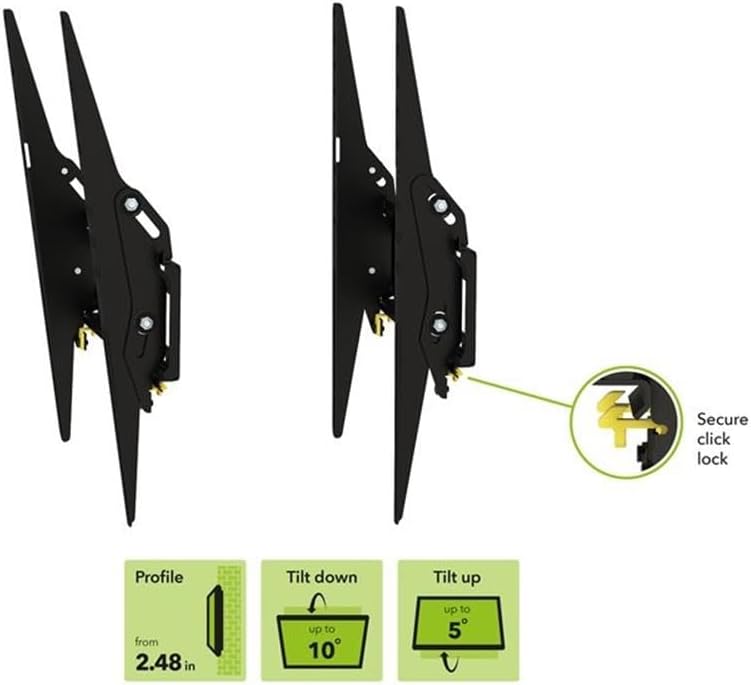
Image: VESA Mounting Patterns. This diagram illustrates common VESA dimensions (width x height) in millimeters and inches, ranging from 50x50mm to 400x400mm, compatible with the EL401B-A mount.
Attach the TV plates (vertical brackets) to the back of your TV using the selected hardware. Ensure they are securely fastened and aligned.

Image: Fix the TV plate to the back of your TV. This image shows the vertical TV mounting brackets being attached to the VESA holes on the rear of a television.
Step 2: Attach Wall Plate to Wall
Locate a suitable position on your wall. Use a stud finder to identify wooden studs or ensure you are mounting into a solid concrete/brick wall. Mark the drilling points for the wall plate. Drill pilot holes as recommended for your wall type and the chosen fasteners. Securely attach the wall plate to the wall using the provided lag bolts and washers. Use a level to ensure the wall plate is perfectly horizontal.

Image: Attach the wall plate to your wall. This image depicts the horizontal wall mounting plate being fastened to the wall using screws.
Step 3: Hang and Secure Your TV
With assistance, carefully lift the TV and hook the TV plates onto the wall plate. Ensure the TV is properly seated on the wall plate. The "Easy-Click" tabs will engage to secure the TV. Push the bottom of the TV towards the wall until the yellow "Easy-Click" tabs lock into place. This secures the TV to the mount.

Image: Hang and secure your TV. This image shows the television being carefully placed onto the installed wall mount, with the secure click lock mechanism highlighted.

Image: Secure Click Lock. A detailed view of the yellow "Easy-Click" tab, which provides a secure locking mechanism for the TV on the mount.
The mount maintains a low profile of 2.48 inches from the wall.

Image: Mount Side Profile. This image displays the slim side profile of the EL401B-A TV wall mount, illustrating its minimal distance from the wall.
Operating the Tilt Feature
The AVF EL401B-A allows for tool-free tilt adjustment to achieve optimal viewing angles and reduce glare.
- The mount allows for a downward tilt of up to 10 degrees and an upward tilt of up to 5 degrees.
- To adjust the tilt, gently push or pull the top or bottom of the TV to the desired angle. The friction-based mechanism will hold the TV in place.
- Ensure the TV is stable after adjustment.

Image: Tilt Functionality. This image displays the side profile of the mount with the TV tilted, demonstrating the adjustable viewing angles.
Maintenance
Regular maintenance ensures the longevity and safe operation of your TV wall mount.
- Cleaning: Wipe the mount with a soft, dry cloth. Avoid abrasive cleaners or solvents.
- Periodic Checks: Every 6-12 months, check all screws and bolts to ensure they are tight and secure.
- Damage: If any part of the mount appears damaged or worn, discontinue use and contact customer support.
Troubleshooting
If you encounter issues during or after installation, refer to the following common solutions.
| Problem | Possible Cause | Solution |
|---|---|---|
| TV is not level after installation. | Wall plate not level; TV not properly seated. | Ensure the wall plate is level during installation. Re-hang the TV, ensuring it is fully seated on the wall plate. Some mounts allow for minor post-installation leveling adjustments. |
| TV feels loose or unstable. | Screws not tightened; "Easy-Click" tabs not engaged. | Verify all screws securing the TV plates to the TV and the wall plate to the wall are fully tightened. Ensure the yellow "Easy-Click" tabs are locked. |
| Difficulty tilting the TV. | Tilt mechanism too tight or obstructed. | The tilt mechanism is friction-based. Ensure no cables are obstructing movement. If the tilt is too stiff, check the pivot points for any overtightened bolts (refer to installation steps if applicable). |
| Missing parts. | Packaging error. | Contact AVF customer support immediately with your purchase details. |
Specifications
- Model Number: EL401B-A
- Brand: AVF
- Mounting Type: Tilt
- Movement Type: Tilt
- Material: Steel
- Color: Black
- Compatible TV Sizes: 32 - 55 inches
- Maximum Load Capacity: 66 lbs (30 kg)
- VESA Compatibility: 50x50mm to 400x400mm
- Mounting Profile: 2.48 inches (from wall)
- Maximum Tilt Angle: 10 degrees (downward), 5 degrees (upward)
- Product Dimensions: 16.54 x 16.93 x 2.48 inches
- Item Weight: 2.4 pounds

Image: Product Compatibility Overview. This graphic summarizes the key specifications: compatible TV sizes (32-55"), maximum load (66 lbs / 30 kg), and VESA compatibility (up to 400x400mm).
Warranty Information
For detailed warranty information regarding your AVF EL401B-A Tilt TV Wall Mount, please refer to the warranty card included with your product or visit the official AVF website. Warranty terms and conditions may vary by region and retailer. Please retain your proof of purchase for any warranty claims.
Customer Support
If you have any questions, require assistance with installation, or need to report a missing/damaged part, please contact AVF customer support. You can typically find contact information on the AVF website or on the product packaging.
Visit the AVF Store on Amazon


