
1. Introduction
The TANITA WB-3000 Digital Physicians Scale is designed for accurate weight measurement in medical and fitness environments. This scale features a high weight capacity, dual-line display for weight and Body Mass Index (BMI), and various functions to support professional use. It is built for durability and ease of use, providing reliable measurements for adults.
2. Safety Information
- Ensure the scale is placed on a firm, level surface to guarantee accurate readings.
- Do not exceed the maximum weight capacity of 660 lbs (300 kg).
- Keep the scale away from water and extreme temperatures.
- Clean the scale with a damp cloth; do not use abrasive cleaners.
- For individuals with mobility issues, ensure assistance is available when using the scale.
3. Package Contents
Verify that all components are present before assembly:
- TANITA WB-3000 Scale Platform
- Display Unit
- Pillar (for display and height rod)
- Mechanical Height Rod
- AC Adapter
- User Manual (this document)
- Note: Four AA batteries are not included and must be purchased separately for battery operation.
4. Setup and Assembly
The WB-3000 scale is designed for easy assembly without special tools. Follow these steps:
- Unpack Components: Carefully remove all parts from the packaging.
- Attach Pillar to Platform: Securely connect the pillar to the scale platform. Ensure all connections are firm.
- Mount Display Unit: Attach the display unit to the top of the pillar.
- Install Height Rod: Insert the mechanical height rod into its designated slot on the pillar.
- Power Connection: Connect the AC adapter to the scale and a power outlet, or insert four AA batteries into the battery compartment.

Figure 4.1: Assembled Tanita WB-3000 Digital Physicians Scale with height rod.
5. Operating Instructions
5.1 Powering On and Off
The scale features instant activation. Simply step onto the platform to turn it on. The scale will automatically turn off after several seconds of inactivity once the user steps off.
5.2 Weighing Procedure
- Ensure the scale is on a flat, stable surface.
- Step onto the center of the platform. The display will activate and show your weight.
- Remain still until the weight reading stabilizes. The scale retains the last recorded weight measurement after the user steps off.
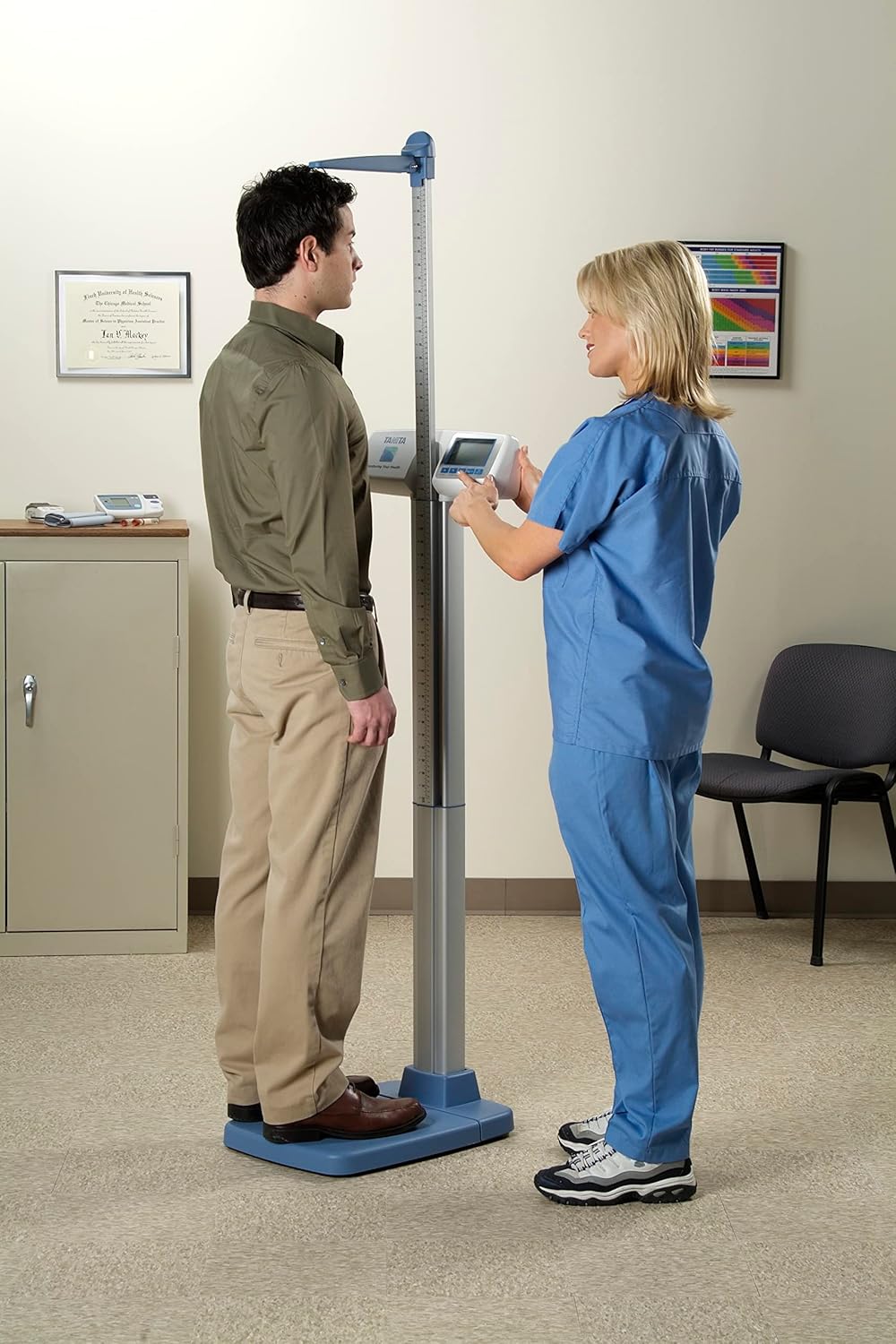
Figure 5.1: Proper use of the Tanita WB-3000 scale for weighing and height measurement.
5.3 Body Mass Index (BMI) Calculation
The dual-line display simultaneously presents weight and BMI. To calculate BMI:
- Measure the user's height using the integrated mechanical height rod.
- Input the height into the scale (refer to the display unit's specific button functions for height input, typically labeled "Height" or "Set").
- Step onto the scale. The display will show both weight and the calculated BMI.

Figure 5.2: Dual-line display showing weight and BMI.
5.4 Tare Function
The tare function allows you to subtract the weight of an object (e.g., a mat or clothing) before weighing a person. Consult the display unit's buttons for the specific "Tare" button and its operation.
5.5 Unit Selection (kg-only option)
The scale can display weight in pounds (lbs) or kilograms (kg). A kg-only option is available. Refer to the display unit's controls for switching between units or setting the kg-only mode.
5.6 Data Output
The WB-3000 includes RS-232 and USB Type B computer interfaces for data output. These ports allow for integration with Electronic Medical Records (EMR) or Electronic Health Records (EHR) systems. An optional Bluetooth adapter is available for wireless connectivity.
6. Maintenance and Care
- Cleaning: Wipe the scale surface with a soft, damp cloth. Do not use harsh chemicals or abrasive materials.
- Storage: When not in use, store the scale in a dry, stable environment. The scale can be broken down into three modules (display, platform, pillar) for easier transport or storage.
- Battery Replacement: If using batteries, replace all four AA batteries when the low battery indicator appears on the display.
- Calibration: Regular calibration is not typically required for this model under normal use. If you suspect inaccuracies, contact customer support.
7. Troubleshooting
| Problem | Possible Cause | Solution |
|---|---|---|
| Scale does not turn on. | No power (AC adapter unplugged, dead batteries). | Check AC adapter connection or replace AA batteries. |
| Inaccurate readings. | Scale on uneven surface; user not standing still; weight capacity exceeded. | Place on a flat surface; stand still during measurement; ensure weight is within 660 lbs. |
| Display shows "Err" or similar error. | Overload; internal error. | Step off the scale and try again. If error persists, contact support. |
8. Specifications
| Model: | WB-3000 |
| Brand: | TANITA |
| Weight Capacity: | 660 lbs (300 kg) |
| Display Type: | LCD, Dual-line |
| Functions: | Weight, BMI, Tare, kg-only option |
| Power Source: | AC Adapter (included) or 4x AA Batteries (not included) |
| Connectivity: | RS-232, USB Type B (optional Bluetooth adapter) |
| Material: | Metal, Plastic |
| Item Weight: | 25 Pounds |
9. Warranty and Support
The TANITA WB-3000 Digital Physicians Scale comes with a four-year warranty. For technical support, service, or warranty claims, please contact TANITA customer service. Refer to the official TANITA website or your purchase documentation for contact details.
For more information, visit the official TANITA Store.


