Introduction
This manual provides instructions for the KODAK Easyshare C190 Digital Camera. Please read this manual thoroughly before using your camera to ensure proper operation and to maximize its features. Keep this manual for future reference.
Setup
1. Unpacking the Camera
Carefully remove all components from the packaging. Ensure the following items are present:
- KODAK Easyshare C190 Digital Camera
- Wrist strap
- USB cable
- User manual (this document)
- Note: Batteries and SD/SDHC memory card are not included and must be purchased separately.
2. Installing Batteries
The KODAK Easyshare C190 uses AA batteries. Locate the battery compartment on the bottom or side of the camera. Open the compartment cover, insert two fresh AA batteries, ensuring correct polarity (+/-), then close the cover securely.
3. Inserting a Memory Card
The camera supports SD and SDHC memory cards. Open the memory card slot cover, typically located near the battery compartment. Insert the memory card with the metal contacts facing the correct direction (refer to the diagram inside the compartment). Push until it clicks into place. Close the cover.
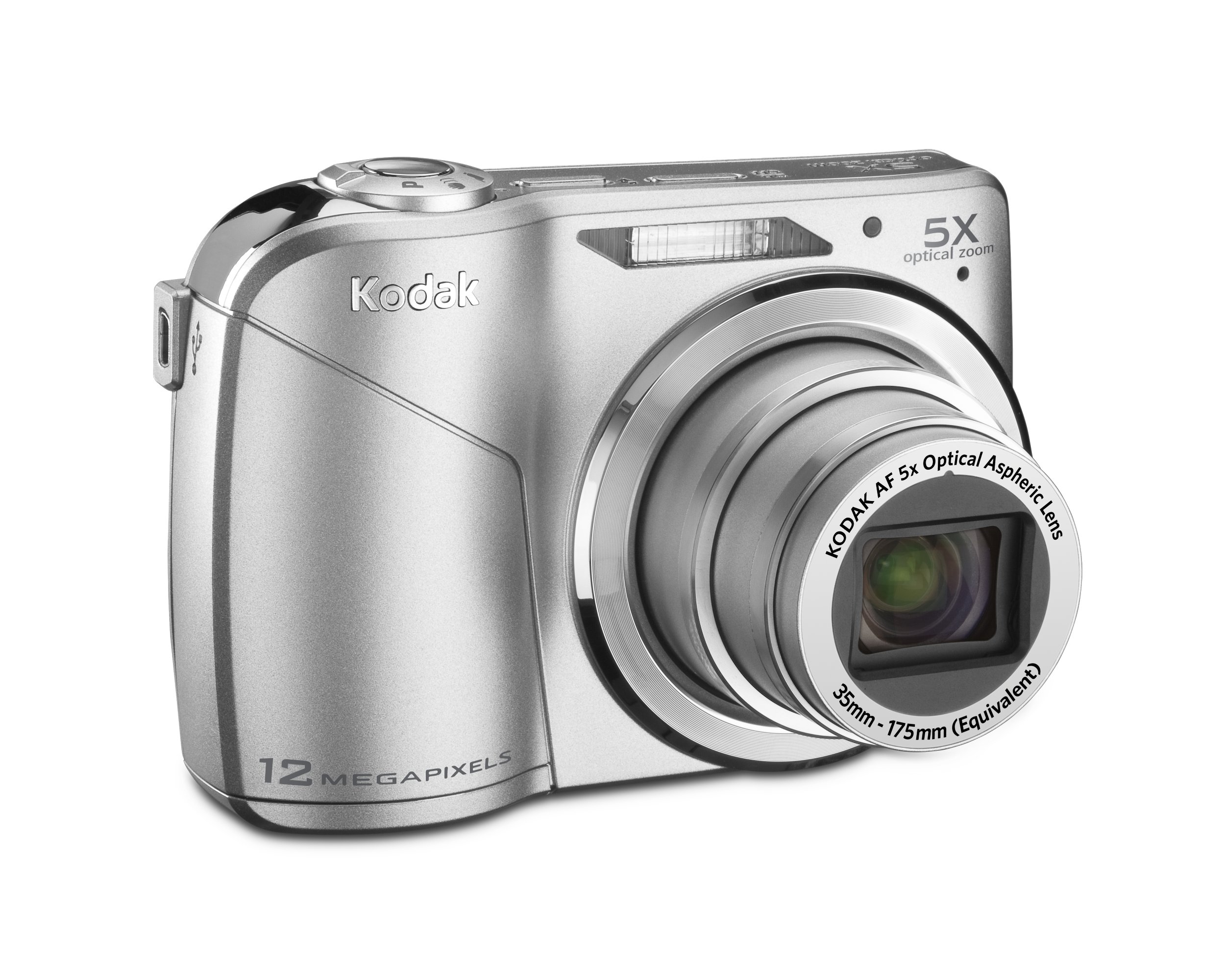
Image: KODAK Easyshare C190 Digital Camera. This image shows the overall design of the camera, including the lens and LCD screen.
Operating the Camera
1. Powering On/Off
Press the Power button, usually located on the top of the camera, to turn it on. Press and hold the button again to turn it off.
2. Taking Photos
- Select Mode: Use the mode dial (if present) or menu to select a shooting mode (e.g., Auto, Program, Scene). The camera features Smart Capture, which automatically identifies the scene and adjusts settings for optimal results.
- Frame Your Shot: Use the 2.7-inch LCD screen to compose your image.
- Zoom: Use the zoom lever/buttons to adjust the 5x optical zoom.
- Focus: Press the shutter button halfway down to allow the camera to focus. The camera will confirm focus, often with a green box or beep.
- Capture: Press the shutter button fully down to take the picture. The camera has a 12-megapixel resolution for detailed images.
3. Recording Videos
Switch the camera to video mode (if available via a dedicated button or mode dial). Press the shutter button to start recording and press it again to stop. Videos are recorded without sound during zoom operations.
4. Viewing and Managing Photos/Videos
Press the Review or Playback button to view your captured images and videos on the 2.7-inch LCD screen. Use the directional pad to navigate through your media. Options for deleting, protecting, or sharing may be available through the menu.
5. Transferring Files to a Computer
Connect the camera to your computer using the provided USB cable. The camera should appear as a removable drive. You can then copy photos and videos directly to your computer. KODAK Easyshare software may be available for enhanced management and sharing features.
Maintenance
1. Cleaning the Camera
- Lens: Use a soft, lint-free cloth specifically designed for camera lenses. Gently wipe in a circular motion. Avoid harsh chemicals.
- LCD Screen: Use a soft, dry cloth. For stubborn smudges, a specialized LCD screen cleaner can be used sparingly.
- Camera Body: Wipe with a soft, dry cloth. Do not use water or cleaning solutions directly on the camera.
2. Battery Care
Remove batteries when the camera will not be used for an extended period to prevent leakage. Store batteries in a cool, dry place. Dispose of used batteries according to local regulations.
3. Storage
Store the camera in a dry, dust-free environment, away from extreme temperatures and direct sunlight. Use a camera case for protection during transport.
Troubleshooting
| Problem | Possible Cause / Solution |
|---|---|
| Camera does not power on. |
|
| "Memory Card Error" message. |
|
| Photos are blurry. |
|
| LCD screen is difficult to see in bright light. |
|
Specifications
- Model Name: KODAK Easyshare C190
- Resolution: 12-megapixel
- Optical Zoom: 5x
- LCD Screen: 2.7-inch
- Image Stabilization: Digital, Optical
- Photo Sensor Technology: CCD
- Supported File Format: JPEG
- Maximum Focal Length: 175 Millimeters
- Maximum Aperture: 2.8 Millimeters
- Expanded ISO Minimum: 64
- Metering: Multi, Center-weighted, Spot
- Memory Card Support: SD/SDHC (not included)
- Product Dimensions: 3.78 x 0.75 x 2.32 inches
- Item Weight: 4.8 ounces
- Manufacturer: Kodak
- Item Model Number: 8871840
Warranty and Support
For warranty information and technical support, please refer to the documentation provided at the time of purchase or visit the official KODAK support website. Keep your proof of purchase for warranty claims.
Official KODAK Store: KODAK Store on Amazon


