
1. Introduction
The Epson Value Card is designed to facilitate the activation of Epson Cover Plus contracts. This card serves as the exclusive method for recharging and initiating these service agreements, ensuring your Epson products receive extended support and coverage.
This manual provides comprehensive instructions on how to use your Value Card to activate your desired Epson services.
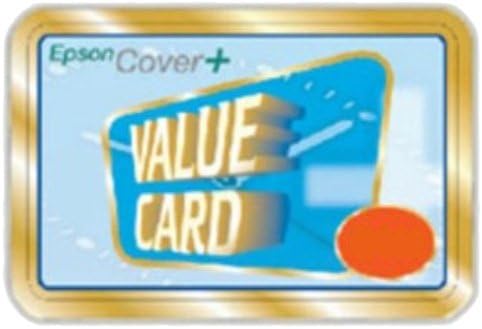
Figure 1: Front view of the Epson Value Card. The card features the "Epson Cover+" logo in the top left corner and prominent "VALUE CARD" text in the center, indicating its purpose for service activation.
2. Setup and Activation
Activating your Epson Cover Plus contract using the Value Card is a straightforward process. Please follow these steps carefully:
- Purchase the Correct Value Card: Ensure that the Epson Value Card you have purchased corresponds to the specific Epson Cover Plus contract you intend to activate. Different services may require different card types or values.
- Locate Activation Instructions: Refer to the documentation provided with your Epson Cover Plus contract or visit the official Epson support website for detailed activation instructions specific to your region and service.
- Access the Activation Portal: Navigate to the designated Epson service activation portal online. This URL is typically provided with your contract or found on the Epson support site.
- Enter Value Card Details: During the activation process, you will be prompted to enter the unique code or serial number found on your Epson Value Card. This code validates your purchase and initiates the service activation.
- Confirm Activation: Follow the on-screen prompts to complete the activation. You should receive a confirmation email or notification once your Epson Cover Plus contract is successfully activated.
Note: The Epson Value Card is a one-time use item for activating a specific service. Keep your card details secure until activation is complete.
3. Operating the Activated Service
Once your Epson Cover Plus contract is activated using the Value Card, the service operates according to the terms and conditions of that specific contract. This typically includes:
- Service Period: The duration for which the service is active.
- Covered Products: The specific Epson products covered by the contract.
- Service Scope: Details on what types of support, repairs, or replacements are included.
- Contacting Support: Procedures for initiating a service request or contacting Epson support.
For detailed information regarding your activated service, please refer to your Epson Cover Plus contract documentation or the Epson official website.
4. Maintenance and Care
While the Epson Value Card itself does not require maintenance, it is important to handle it with care prior to activation. Keep the card in a safe place to prevent damage or loss of the activation code. Once the service is activated, the physical card is no longer needed, but it is advisable to retain it and any associated documentation for your records.
5. Troubleshooting
If you encounter issues during the activation process or with your Epson Value Card, consider the following troubleshooting steps:
- Invalid Code: Double-check that you have entered the activation code correctly, paying attention to any similar-looking characters (e.g., '0' and 'O', '1' and 'I').
- Card Damage: If the activation code on the card is unreadable due to damage, contact your point of purchase or Epson support immediately.
- Activation Errors: Ensure you are using the correct activation portal for your region and service. Clear your browser's cache and cookies, or try a different browser.
- Service Not Active After Confirmation: Allow some time for the activation to process. If the service is still not active after a reasonable period, contact Epson support with your activation confirmation details.
- Lost Card: If the card is lost before activation, it may not be possible to recover the value. Contact your retailer or Epson support for advice, providing proof of purchase if available.
6. Specifications
| Attribute | Detail |
|---|---|
| Brand | Epson |
| Manufacturer | Epson |
| Model Number | SEEIS0066 |
| Item Weight | 81.6 grams |
| Package Dimensions | 24.8 x 12.2 x 2.2 cm |
| ASIN | B002JJLS3I |
| First Available Date | September 23, 2010 |
7. Warranty and Support
The Epson Value Card itself does not carry a separate warranty beyond its intended function as an activation key for Epson Cover Plus contracts. The warranty and support terms are governed by the specific Epson Cover Plus contract you activate.
For any inquiries regarding your Epson Cover Plus contract, technical support for your Epson products, or assistance with the activation process, please visit the official Epson support website or contact Epson customer service directly. You can find contact information and support resources at the Epson Store or through your regional Epson website.