
Introduction
This manual provides comprehensive instructions for the safe and effective use of your CampCo UZI-MP-50W 50-Watt Megaphone. Please read this manual thoroughly before operating the device and retain it for future reference.
The UZI-MP-50W megaphone is designed for clear and powerful voice projection, featuring recording and playback capabilities, a siren, and a detachable microphone. It is suitable for various outdoor activities, events, and emergency situations where a loud and clear voice is essential.
Safety Information
- Do not expose the megaphone to extreme temperatures, direct sunlight, or high humidity.
- Avoid dropping the megaphone or subjecting it to strong impacts.
- Keep the megaphone away from water and other liquids. If it gets wet, turn it off immediately and allow it to dry completely before reuse.
- Do not attempt to disassemble or modify the megaphone. This will void the warranty and may cause damage or injury.
- Use only the specified battery type (8 D batteries). Ensure correct polarity when inserting batteries.
- Remove batteries if the megaphone will not be used for an extended period to prevent leakage.
- Do not point the megaphone directly at people's ears at close range when operating at high volume or using the siren, as this may cause hearing damage.
Package Contents
Verify that all items are present in the package:
- UZI-MP-50W Megaphone Unit
- Detachable Microphone
- Shoulder Strap
Note: 8 D batteries are required for operation and are not included.
Product Features
- 50-Watt output for powerful sound projection.
- Built-in microphone for direct use.
- Detachable wired handheld microphone for flexible operation.
- Siren function for emergency signaling or attention-grabbing.
- Recording function to capture and store messages.
- Repeat playback function for continuous message broadcasting.
- Adjustable volume control.
- LED light indicator for power and function status.
- Approximate range of 600 meters.
- Foldable handle for compact storage.
- Ergonomic pistol grip for comfortable handling.
- Shoulder strap for easy portability.
Setup
1. Battery Installation
- Locate the battery compartment on the rear of the megaphone.
- Open the battery compartment cover.
- Insert 8 D-size batteries, ensuring correct polarity (+/-) as indicated inside the compartment.
- Close the battery compartment cover securely.
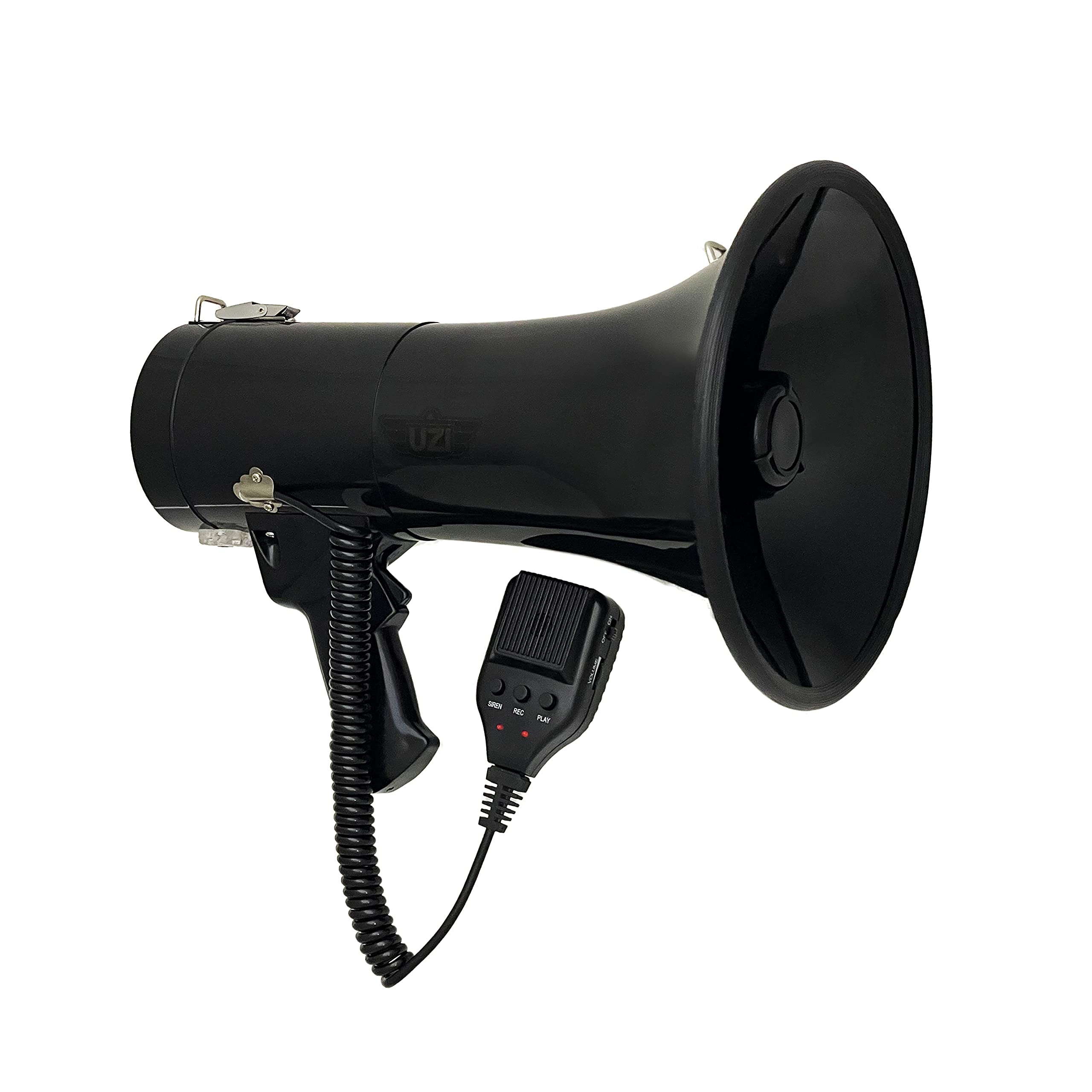
Figure 1: UZI-MP-50W Megaphone with its detachable microphone and foldable handle. The main unit is black with a flared horn, and the microphone is connected via a coiled cord.
2. Attaching the Detachable Microphone
The megaphone comes with a detachable microphone for extended reach and control.
- Locate the microphone input port on the megaphone unit.
- Align the connector of the detachable microphone with the input port.
- Gently push and twist until the microphone is securely connected.

Figure 2: Close-up view of the detachable microphone, showing its compact design and the coiled cord for connection to the megaphone unit.

Figure 3: Detailed view of the detachable microphone, highlighting the Siren, Record, Play buttons, the volume control slider, and the On/Off switch.
3. Attaching the Shoulder Strap
For convenient carrying, attach the provided shoulder strap.
- Locate the two strap attachment points on the megaphone unit.
- Thread each end of the shoulder strap through the attachment points and secure them.

Figure 4: The UZI-MP-50W Megaphone shown with its adjustable shoulder strap attached, demonstrating how it can be carried for portability.
Operating Instructions
Overview of Controls

Figure 5: Labeled diagram of the megaphone's controls, including the microphone, On/Off switch, volume control, record, play, and siren buttons, and the trigger to speak.
1. Power On/Off
To turn the megaphone on, slide the ON/OFF switch on the detachable microphone to the ON position. The red LED indicator will illuminate.
To turn off, slide the switch to the OFF position. The LED indicator will turn off.
2. Adjusting Volume
Use the VOLUME CONTROL slider on the side of the detachable microphone to increase or decrease the sound output. Adjust to a comfortable and effective level.
3. Using the Microphone (Speaking)
Press and hold the TRIGGER TO SPEAK button located on the handle of the megaphone or on the detachable microphone. Speak clearly into the microphone. Release the button to stop speaking.
4. Recording Function
- Ensure the megaphone is powered on.
- Press the REC (Record) button on the detachable microphone. The red LED indicator will blink, indicating recording is active.
- Speak clearly into the microphone to record your message.
- Press the REC button again to stop recording. The LED will stop blinking.
5. Playback Function
- After recording a message, press the PLAY button on the detachable microphone to listen to your recorded message.
- To repeat the playback, press the PLAY button again. The megaphone will continuously play the last recorded message until the button is pressed again or the unit is turned off.
6. Siren Function
To activate the siren, press the SIREN button on the detachable microphone. The siren will sound continuously until the button is pressed again to deactivate it.

Figure 6: Visual representation of the megaphone's sound range, illustrating its capability to project sound up to approximately 600 meters.
Maintenance
- Cleaning: Wipe the megaphone with a soft, dry cloth. Do not use abrasive cleaners or solvents.
- Storage: Store the megaphone in a cool, dry place when not in use. Remove batteries if storing for extended periods.
- Battery Replacement: Replace all 8 D batteries when the sound output becomes weak or distorted, or if the LED indicator fails to light up.
Troubleshooting
| Problem | Possible Cause | Solution |
|---|---|---|
| No sound output. |
|
|
| Weak or distorted sound. |
|
|
| Recording not working. |
|
|
Specifications
| Feature | Detail |
|---|---|
| Model Name | UZIMP50W |
| Output Power | 50 Watts |
| Range | Approximately 600 meters |
| Power Source | 8 x D Batteries (not included) |
| Included Components | Megaphone Unit, Detachable Microphone, Shoulder Strap |
| Material | Synthetic |
| Item Weight | 0.2 Kilograms (without batteries) |
| Item Dimensions (LxWxH) | 9.2 x 15.5 x 10.9 inches |
| Control Type | Volume Control, Record, Play, Siren |
| Special Features | Recording, Repeat Playback, Siren, Detachable Microphone, LED Indicator, Foldable Handle, Shoulder Strap |
Product Video
Video: Official product video demonstrating the UZI Loud Wireless Bullhorn Megaphone with Recording features and usage. This video provides a visual guide to the megaphone's functions and capabilities.
Warranty and Support
This product comes with a Manufacturer Warranty. For specific details regarding warranty coverage, duration, and claims, please refer to the warranty information provided with your purchase or contact CampCo customer support.
For further assistance, technical support, or inquiries, please visit the official CampCo website or contact their customer service department.
Manufacturer: Campco for Hunting