
Introduction
Thank you for choosing the SPT SD-350 Mini Dehumidifier. This manual provides important information regarding the installation, operation, maintenance, and troubleshooting of your new dehumidifier. Please read it thoroughly before use and retain it for future reference.
The SPT SD-350 utilizes Peltier (Thermo-Electric) technology for quiet operation, making it suitable for small spaces such as nurseries, bedrooms, closets, and small offices up to 130 sq. ft. It features a 2-liter water tank and an automatic shut-off function when the tank is full or removed.
Safety Instructions
To ensure safe operation, please observe the following precautions:
- Always place the dehumidifier on a firm, level surface.
- Do not block the air inlet or outlet. Maintain at least 4 inches (10 cm) clearance around the unit.
- Do not immerse the unit, power cord, or plug in water or other liquids.
- Ensure the power supply matches the rating label on the unit.
- Unplug the unit before cleaning or performing any maintenance.
- Do not operate the unit if the power cord or plug is damaged.
- This appliance is not intended for use by persons (including children) with reduced physical, sensory, or mental capabilities, or lack of experience and knowledge, unless they have been given supervision or instruction concerning use of the appliance by a person responsible for their safety.
- Keep children away from the appliance.
Product Overview

Figure 1: Front view of the SPT SD-350 Mini Dehumidifier. Shows the main control knob and indicator lights.
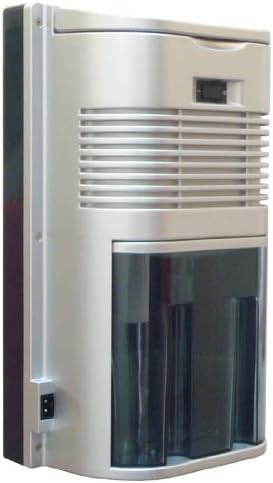
Figure 2: Side view of the dehumidifier, highlighting the transparent 2-liter water tank and rear power input.

Figure 3: Side view illustrating the compact dimensions: 8 inches (W) x 4.9 inches (D) x 13 inches (H).
Key Components:
- Power Indicator Light: Illuminates when the unit is operating.
- Full Tank Indicator Light: Illuminates when the water tank is full or incorrectly placed.
- ON/OFF Switch: Rotary knob to power the unit on or off.
- Air Inlet: Located at the back, where moist air enters.
- Air Outlet: Located at the top, where dry air exits.
- Water Tank: Transparent, removable tank for collecting condensed moisture.
- Power Adapter Port: Connection point for the 12V DC power adapter.
- Handle: Integrated handle for easy portability.
Setup
- Unpacking: Carefully remove the dehumidifier from its packaging. Retain all packaging materials for future storage or transport.
- Placement:
- Place the unit on a firm, level surface in the desired location.
- Ensure there is at least 4 inches (10 cm) of clear space around the air inlet and outlet for proper airflow.
- Avoid placing the unit near heat sources or in direct sunlight.
- Do not place the unit in areas where the temperature may drop below 41°F (5°C), as this can affect performance and cause frost buildup.
- Power Connection:
- Connect the provided 12V DC power adapter to the power adapter port on the back of the dehumidifier.
- Plug the power adapter into a suitable electrical outlet (100-240V AC, 50/60Hz).
- Water Tank: Ensure the water tank is correctly inserted into the unit. If the tank is not properly seated, the "Full Tank" indicator light may illuminate, and the unit will not operate.
Operating Instructions
- Turning On: Rotate the ON/OFF switch clockwise to the "ON" position. The Power Indicator Light will illuminate, and the dehumidifier will begin operation.
- Dehumidification Process: The unit will draw in moist air, pass it over a cooling element, condense the moisture, and then release drier air back into the room. The condensed water will collect in the water tank.
- Full Tank Shut-off: When the water tank is full, the unit will automatically shut off, and the Full Tank Indicator Light will illuminate.
- Emptying the Water Tank:
- Gently pull out the water tank from the front of the unit.
- Carefully empty the collected water into a sink or drain.
- Rinse the tank with clean water if necessary.
- Reinsert the empty water tank firmly back into the dehumidifier. Ensure it clicks into place.
- The unit will resume operation automatically once the tank is reinserted and the Full Tank Indicator Light turns off.
- Turning Off: Rotate the ON/OFF switch counter-clockwise to the "OFF" position. The Power Indicator Light will turn off.
Maintenance
Regular maintenance ensures optimal performance and extends the lifespan of your dehumidifier.
- Cleaning the Exterior:
- Always unplug the unit before cleaning.
- Wipe the exterior surfaces with a soft, damp cloth. Do not use abrasive cleaners or solvents.
- Ensure no water enters the internal components.
- Cleaning the Water Tank:
- Empty and rinse the water tank regularly to prevent mold and mildew growth.
- For thorough cleaning, use a mild detergent and warm water, then rinse thoroughly.
- Ensure the tank is completely dry before reinserting it.
- Air Filter (if applicable): This model does not feature a removable air filter. Keep the air inlet and outlet clear of dust and debris. You may gently vacuum the grilles if dust accumulates.
- Storage: If storing the unit for an extended period, ensure it is clean and dry. Store it in a cool, dry place, preferably in its original packaging.
Troubleshooting
| Problem | Possible Cause | Solution |
|---|---|---|
| Unit does not turn on. |
|
|
| No water collected / Low dehumidification. |
|
|
| Full Tank Indicator Light is on, but tank is not full. |
|
|
Specifications
| Model: | SD-350 |
| Brand: | SPT |
| Dehumidification Capacity: | 350 ml (11.8 oz) per day (at 86°F, 80% RH) |
| Water Tank Capacity: | 2 Liters (2000 ml) |
| Applicable Area: | Up to 130 sq. ft. |
| Power Supply: | 12V DC Adaptor (UL listed) |
| Power Consumption: | 60 (±5) Watts |
| Dimensions (W x D x H): | 8" x 4.9" x 13" (20.3 cm x 12.4 cm x 33 cm) |
| Weight (without adaptor): | 3.65 lbs (1.66 kg) |
| Technology: | Peltier (Thermo-Electric) |
| Special Features: | Compact design, Quiet operation, Auto cut-off when tank is full or removed, Power and Full tank indicator lights, Convenient handle, Transparent water tank. |
Note: Dehumidification capacity may vary based on actual room ambient temperature and humidity conditions.
Warranty and Support
For warranty information and customer support, please refer to the warranty card included with your product or visit the official SPT website. Please have your model number (SD-350) and purchase date available when contacting support.
Manufacturer: SPT
Contact Information: Please refer to the contact details provided in your product packaging or on the official SPT website for the most up-to-date support information.