
1. Introduction
This manual provides essential information for the safe and efficient use of your JB Systems SP10/150 Bass Loudspeaker. Please read these instructions carefully before installation and operation, and retain them for future reference. This 10-inch bass loudspeaker is designed for integration into a larger audio system, providing robust low-frequency sound reproduction.
2. Safety Instructions
- Electrical Safety: Ensure all connections are made correctly and securely to an appropriate amplifier. Do not exceed the speaker's rated power handling of 150W music power at 8 Ohms.
- Placement: This loudspeaker is designed for floor-standing placement. Ensure it is placed on a stable, level surface to prevent tipping.
- Environmental Conditions: The speaker is not water-resistant. Avoid exposure to moisture, rain, or excessive humidity. Do not operate in extreme temperatures.
- Ventilation: Ensure adequate airflow around the speaker, especially if it is enclosed, to prevent overheating of connected components.
- Cleaning: Disconnect from power before cleaning. Use a soft, dry cloth. Do not use liquid cleaners or aerosols.
- Handling: The speaker weighs approximately 2 kg. Handle with care to avoid damage to the cone or frame.
3. Package Contents
Upon unpacking, please verify that the following item is included:
- 1x JB Systems SP10/150 Bass Loudspeaker
Note: Additional cables or an amplifier are not included and must be purchased separately.
4. Product Overview
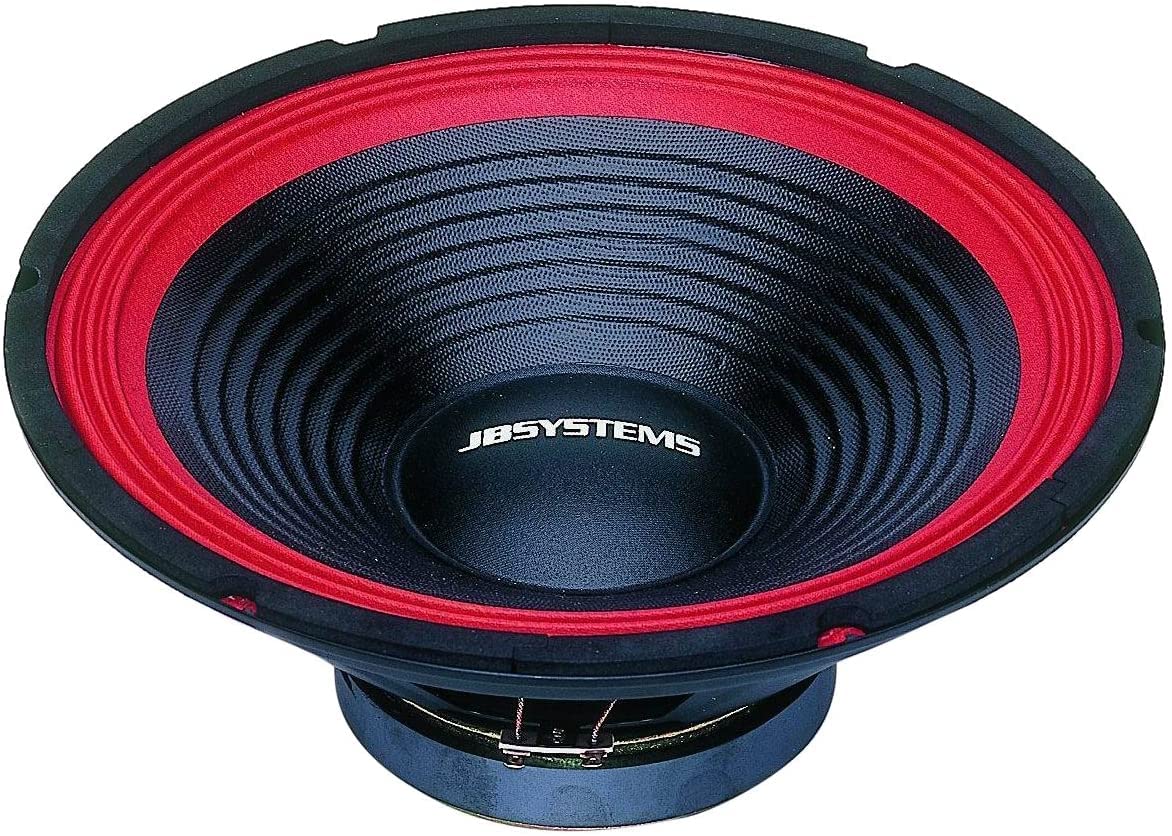
Figure 1: Front view of the JB Systems SP10/150 Bass Loudspeaker. This image shows the 10-inch woofer cone and the robust steel basket construction.
The JB Systems SP10/150 is a 10-inch bass loudspeaker (woofer) designed for powerful low-frequency sound reproduction. It features a durable steel basket and a cone made from plastic or thermoplastic polyurethane (TPU) for optimal performance and longevity.
Key Features:
- Driver Type: 10-inch Dynamic Woofer
- Construction: Steel basket, plastic/TPU cone
- Connectivity: AUX (wired)
- Audio Output: Mono (when used as a single unit)
- Dimensions: Approximately 25 cm (D) x 25 cm (W) x 8 cm (H)
- Weight: Approximately 2 kg
Note: This is a passive loudspeaker and requires an external amplifier for operation. The mention of "Remote control" and "Touch" as control methods in some specifications refers to the capabilities of compatible audio systems, not direct controls on the speaker itself.
5. Setup
- Unpacking: Carefully remove the loudspeaker from its packaging. Inspect for any signs of damage during transit.
- Placement: Position the SP10/150 on a stable, flat surface. It is designed for floor-standing applications. Ensure there is sufficient space around the speaker for optimal sound dispersion and to prevent any obstruction.
- Connection to Amplifier:
- Identify the speaker terminals on the back of the SP10/150 and on your amplifier.
- Using appropriate speaker wire (not included), connect the positive (+) terminal of the loudspeaker to the positive (+) terminal of the amplifier's output channel.
- Connect the negative (-) terminal of the loudspeaker to the negative (-) terminal of the amplifier's output channel.
- Ensure all connections are secure to prevent signal loss or short circuits.
- Power Source: The loudspeaker itself does not require a direct power connection. Its power is supplied by the connected amplifier. Ensure your amplifier is connected to a corded electric power source as per its own instruction manual.
- System Integration: This speaker is compatible with various audio sources such as desktops, laptops, smartphones, tablets, and televisions when connected through a suitable amplifier.
6. Operating
The JB Systems SP10/150 is a passive loudspeaker, meaning it does not have its own controls. All operational adjustments are made via the connected amplifier or audio system.
- Power On: Turn on your amplifier and audio source.
- Volume Control: Adjust the volume level using the controls on your amplifier or audio system. Start with a low volume and gradually increase it to a comfortable listening level.
- Audio Settings: Use your amplifier's equalizer or bass/treble controls to fine-tune the sound output to your preference.
- Power Off: Always turn off your amplifier before disconnecting the speaker or making any changes to the wiring.
Caution: Avoid operating the speaker at excessively high volumes for prolonged periods, as this can lead to damage to the speaker or your hearing.
7. Maintenance
- Cleaning: Regularly wipe the exterior of the speaker with a soft, dry, lint-free cloth. Do not use abrasive cleaners, solvents, or chemical sprays, as these can damage the finish or materials.
- Dust Removal: Use a soft brush or a vacuum cleaner with a brush attachment to gently remove dust from the speaker cone and grille (if applicable).
- Storage: If storing the speaker for an extended period, place it in a dry, cool environment, away from direct sunlight and extreme temperatures. Cover it to protect against dust.
- Inspection: Periodically check speaker wire connections for tightness and corrosion.
8. Troubleshooting
| Problem | Possible Cause | Solution |
|---|---|---|
| No sound from speaker |
|
|
| Distorted or unclear sound |
|
|
| Speaker sounds weak or lacks bass |
|
|
If the problem persists after attempting these solutions, please contact JB Systems customer support or a qualified technician.
9. Specifications
| Model Number | SP10/150 |
| Speaker Type | Woofer (Bass Loudspeaker) |
| Woofer Diameter | 10 Inch |
| Power Handling (Music) | 150 Watts |
| Impedance | 8 Ohm |
| Frequency Response | 70 - 5000 Hz |
| Average Sound Pressure (1W/1m) | 96 dB |
| Connectivity Technology | AUX (Wired) |
| Audio Output Mode | Mono |
| Mounting Type | Floor Standing |
| Material | Plastic or Thermoplastic Polyurethane (TPU) cone, Steel basket |
| Product Dimensions (D x W x H) | 25 cm x 25 cm x 8 cm |
| Item Weight | 2 kg |
| Water Resistant | No |
10. Warranty and Support
The JB Systems SP10/150 Bass Loudspeaker comes with a Limited Warranty. Please refer to the warranty card included with your purchase or visit the official JB Systems website for detailed terms and conditions regarding warranty coverage and duration.
For technical support, service, or inquiries about your product, please contact JB Systems customer service through their official channels. Contact information can typically be found on the manufacturer's website or in your product documentation.
Manufacturer: JB Systems
Model Number: SP10/150