1. Introduction
The Bosch DS151i Exit Detector is designed for Request-to-Exit (REX) applications within security systems. This device detects motion within its designated coverage area and transmits a signal to an access control system or door control device, facilitating egress. This manual provides essential information for the proper installation, operation, and maintenance of your DS151i detector.
2. Safety Information
- Read all instructions carefully before installation and operation.
- Installation should be performed by qualified personnel only.
- Ensure power is disconnected before performing any wiring or maintenance.
- Do not expose the device to extreme temperatures, moisture, or direct sunlight beyond its specified operating conditions.
3. Product Overview
The DS151i is a compact, black-colored motion detector. It features a detection lens and an indicator light, typically green, to show operational status or detection events.

Figure 1: Front view of the Bosch DS151i Exit Detector, showing the detection lens and a green indicator light.
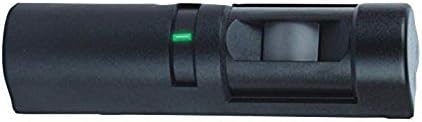
Figure 2: Side view of the Bosch DS151i Exit Detector, illustrating its compact form factor.
4. Setup and Installation
4.1 Mounting
The DS151i is designed for wall mount installation. Select a mounting location that provides optimal coverage for the desired exit path, typically above the door frame or adjacent to the door.
- Choose a suitable wall location, ensuring it is free from obstructions that could block the detection area.
- Securely mount the detector to the wall using appropriate fasteners.
- Adjust the detector's angle to cover the intended exit zone effectively.
4.2 Wiring
The DS151i operates on a corded electric power source and integrates with access control systems or door control devices. Refer to the specific wiring diagram provided with your product packaging for detailed connection instructions. Ensure all connections are secure and comply with local electrical codes.
- Power Connection: Connect the detector to its specified power supply.
- Output Connection: Connect the detector's output terminals to the input of your access control panel or door control device. This signal will trigger the door release mechanism upon detection.
5. Operating Instructions
Once properly installed and powered, the DS151i Exit Detector operates automatically. It continuously monitors its coverage area for motion.
- When a person moves within the detector's field of view, the sensor will detect this motion.
- Upon detection, the detector sends a signal to the connected access control system or door control device.
- The access control system then initiates the door unlock sequence, allowing for egress.
- The green indicator light on the detector typically illuminates when motion is detected, providing visual confirmation of operation.
6. Maintenance
- Cleaning: Periodically clean the detector's lens with a soft, dry cloth to ensure optimal performance. Avoid using abrasive cleaners or solvents.
- Inspection: Regularly inspect the wiring and mounting for any signs of wear or damage.
- Testing: Periodically test the detector's functionality by walking through its coverage area to ensure it triggers the exit mechanism correctly.
7. Troubleshooting
| Problem | Possible Cause | Solution |
|---|---|---|
| Detector not responding to motion. | No power; incorrect wiring; obstructed lens; detector malfunction. | Check power supply and connections. Verify wiring against diagram. Clean the lens. If issues persist, contact support. |
| False motion detections. | Improper mounting angle; environmental factors (e.g., drafts, heat sources); interference. | Adjust mounting angle to narrow detection zone. Ensure no heat sources or strong air currents are in the detection area. Re-evaluate placement. |
| Door does not unlock after detection. | Issue with access control system; wiring fault between detector and access control. | Verify the access control system is functioning correctly. Check the wiring connections between the detector and the access control panel. |
| Indicator light not working. | No power; LED malfunction. | Check power supply. If power is present and the unit functions otherwise, the LED may be faulty. |
8. Specifications
- Model: DS151I
- Brand: Bosch
- Color: Black
- Power Source: Corded Electric
- Item Weight: 3.52 ounces
- Mounting Type: Wall Mount
- Compatible Devices: Access control systems or doors designed to work with motion sensors
- Operating Temperature: 68 Degrees Fahrenheit
- Antenna Location: Indoor
- Manufacturer: BOSCH SECURITY VIDEO
- UPC: 792285400780, 782695276112
9. Warranty and Support
For warranty information and technical support, please refer to the documentation included with your product packaging or visit the official Bosch Security Systems website. Keep your purchase receipt for warranty claims.
Contact Information:
- Brand: Bosch
- Manufacturer: BOSCH SECURITY VIDEO
- Website: www.boschsecurity.com (Note: This is a generic link, actual support link may vary.)


