
Campbell Hausfeld WS099001AV
Contents
Arc Stick Welder User Manual
Model: WS099001AV | Brand: Campbell Hausfeld
Introduction
The Campbell Hausfeld 115-volt stick welder (WS099001AV) is a portable and easy-to-use arc stick welder designed for various home and shop applications. Its transformer design ensures an easy-starting and smooth arc, making it suitable for both beginners and experienced users. This manual provides essential information for safe operation, setup, maintenance, and troubleshooting of your welder.
Safety Information
Always prioritize safety when operating welding equipment. Failure to follow safety guidelines can result in serious injury or property damage.
- Electric Shock: Welding can cause electric shock. Do not touch live electrical parts. Wear dry welding gloves and protective clothing. Ensure your work area is dry.
- Fumes and Gases: Welding fumes and gases can be hazardous to your health. Work in a well-ventilated area. Use a fume extractor if necessary.
- Arc Rays: Arc rays can injure eyes and burn skin. Always wear a welding helmet with appropriate shade filter and protective clothing.
- Fire and Explosion: Welding sparks and hot metal can cause fires. Keep flammable materials away from the welding area. Have a fire extinguisher readily available.
- Burns: Hot metal and equipment can cause severe burns. Wear protective gloves and clothing. Allow welded materials to cool before handling.
- Thermal Overload Protection: This welder is equipped with thermal overload protection, which automatically shuts off the unit to prevent overheating. Allow the unit to cool down if this occurs.
Package Contents
Upon unpacking, ensure all items listed below are present and undamaged:
- Campbell Hausfeld WS099001AV Arc Stick Welder Unit
- Welding Shield
- Hammer/Brush Combination Tool
- Starter Pack of Electrodes
- Quick Start Guide (this manual serves as a comprehensive guide)
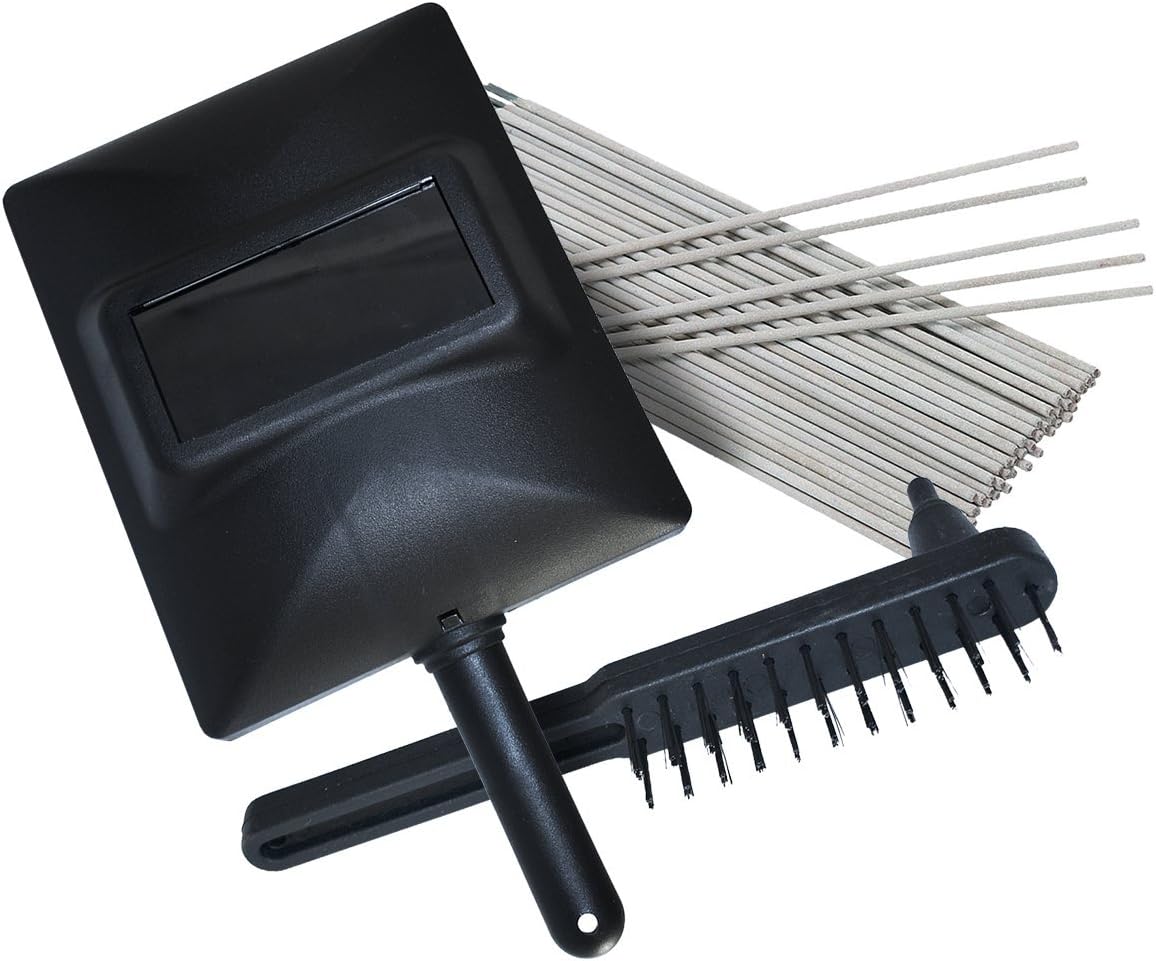
Image: Included accessories such as the welding shield, hammer/brush, and a starter pack of electrodes.
Setup
Before operating the welder, ensure proper setup for safety and optimal performance.
- Power Connection: Connect the welder to a standard 115-volt household circuit. For 1/16-inch electrodes, a 15-amp circuit is sufficient. For 5/64-inch electrodes, a 20-amp circuit is required. Ensure the outlet is properly grounded.
- Work Clamp Connection: Attach the work clamp (ground clamp) securely to the workpiece or the metal workbench that is in direct contact with the workpiece. Ensure a clean, bare metal connection for effective grounding.
- Electrode Holder Connection: Insert the desired electrode into the electrode holder. Ensure it is firmly gripped.
- Work Area Preparation: Clear the welding area of all flammable materials. Ensure adequate ventilation.

Image: The Campbell Hausfeld Arc Stick Welder, showing the main unit, electrode holder, and work clamp.
Operating Instructions
Follow these steps for safe and effective welding.
- Power On: Plug the welder into the appropriate 115V outlet. Turn the power switch to the "ON" position.
- Select Heat Setting: The welder features dual heat settings: "LOW" and "HIGH".
- LOW Setting: Recommended for 1/16-inch electrodes and thinner materials (e.g., 18-gauge steel). Requires a 15-amp circuit.
- HIGH Setting: Recommended for 5/64-inch electrodes and thicker materials (up to 1/8-inch steel). Requires a 20-amp circuit.
- Prepare for Welding: Don your welding helmet and protective gear. Position yourself comfortably and safely.
- Strike an Arc: Gently tap or scratch the electrode against the workpiece to initiate the arc. Once the arc is established, maintain a consistent arc length and travel speed.
- Welding: Move the electrode along the joint, maintaining the arc. The welder has a duty cycle of 20% at 50A output. This means it can weld for 2 minutes out of every 10-minute period at 50 amps before needing to cool down. If the "DUTY CYCLE EXCEEDED WHEN LIT" indicator illuminates, allow the welder to cool.
- Post-Weld: Once welding is complete, turn off the welder. Allow the workpiece to cool before handling. Use the hammer/brush tool to remove slag from the weld bead.
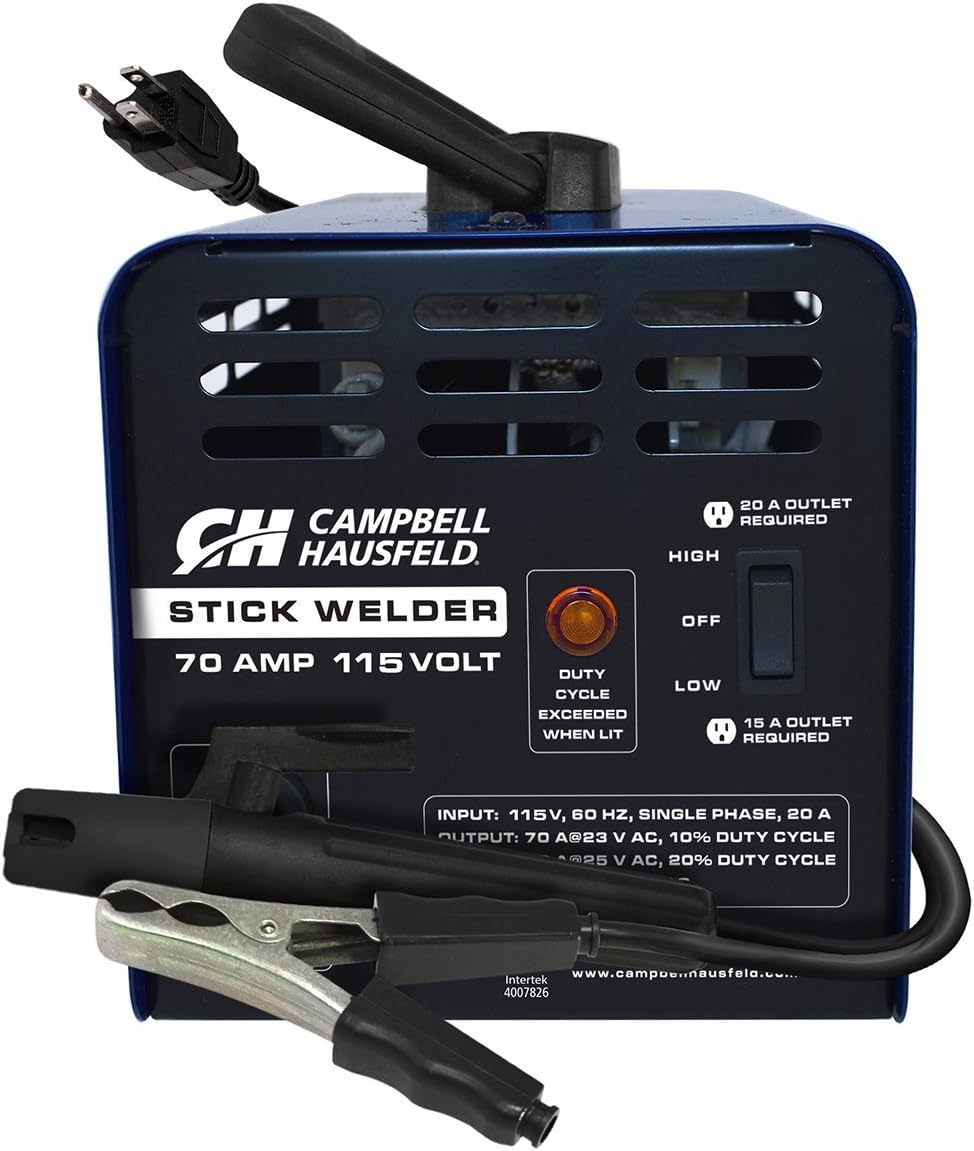
Image: Controls on the welder, including the power switch, low/high heat settings, and the duty cycle indicator light.

Image: An example of the stick welder in operation, demonstrating the arc and welding process.
Maintenance
Regular maintenance ensures the longevity and safe operation of your welder.
- Cleaning: Keep the welder clean and free of dust and debris. Use a dry cloth to wipe down the exterior. Do not use solvents.
- Cable Inspection: Regularly inspect the weld and ground cables for cuts, fraying, or damaged insulation. Replace damaged cables immediately. The weld and ground cable length is 6 feet.
- Electrode Holder and Work Clamp: Ensure the electrode holder and work clamp are clean and free of spatter. A clean connection ensures good electrical contact.
- Storage: Store the welder in a dry, clean environment when not in use. Utilize the built-in cord management and storage clips to keep cables organized.
Troubleshooting
Refer to this section for common issues and their solutions.
| Problem | Possible Cause | Solution |
|---|---|---|
| Welder does not turn on. | No power to outlet; power switch off; internal fault. | Check power cord and outlet. Ensure power switch is ON. If problem persists, contact support. |
| Arc is difficult to strike or maintain. | Improper electrode size/type; poor ground connection; incorrect heat setting; dirty workpiece. | Use recommended electrodes (1/16" or 5/64"). Ensure ground clamp is on clean, bare metal. Adjust heat setting (LOW/HIGH) as needed. Clean workpiece surface. |
| "DUTY CYCLE EXCEEDED" light is on. | Welder has overheated due to exceeding duty cycle. | Allow the welder to cool down for several minutes until the light turns off. Reduce continuous welding time. |
| Poor weld quality (e.g., porosity, lack of penetration). | Incorrect arc length; improper travel speed; wrong electrode; dirty material. | Adjust arc length and travel speed. Ensure correct electrode for material thickness. Clean workpiece thoroughly. |
Specifications
| Feature | Detail |
|---|---|
| Model Number | WS099001AV |
| Input Voltage | 115 Volts AC |
| Output Amperage | 70 Amps (Max) |
| Wattage | 8050 Watts |
| Duty Cycle | 20% @ 50A |
| Weldable Material Thickness | 18-gauge to 1/8-inch (mild or stainless steel) |
| Recommended Electrode Sizes | 1/16-inch (15A circuit), 5/64-inch (20A circuit) |
| Cable Length (Weld & Ground) | 6 feet |
| Item Weight | 24 Pounds |
| Dimensions (Approx.) | 15.25 Inches (Length) |
| Special Features | Portable, Thermal Overload Protection, Dual Heat Setting |
Warranty and Support
The Campbell Hausfeld WS099001AV Arc Stick Welder is backed by a 5-year limited warranty. This warranty covers defects in material and workmanship under normal use.
For warranty claims, technical assistance, or to purchase replacement parts, please contact Campbell Hausfeld customer support. Refer to the official Campbell Hausfeld website or the quick start guide included in your package for the most current contact information.
You can also visit the Campbell Hausfeld Store on Amazon for more product information and support resources.
Ask a question about this manual
Ask about setup, troubleshooting, compatibility, parts, safety, or missing instructions. Manuals+ will review the question and use this page’s manual context to help answer it.