Hoover UH70120 T-Series WindTunnel Rewind Plus Upright Vacuum Cleaner Instruction Manual
Model: UH70120
Important Safety Instructions
When using an electrical appliance, basic precautions should always be followed, including the following:
- Read all instructions before using this appliance.
- Always unplug from outlet when not in use and before cleaning or servicing.
- Do not use outdoors or on wet surfaces.
- Do not allow to be used as a toy. Close attention is necessary when used by or near children.
- Use only as described in this manual. Use only manufacturer's recommended attachments.
- Do not use with damaged cord or plug. If appliance is not working as it should, has been dropped, damaged, left outdoors, or dropped into water, return it to a service center.
- Do not pull or carry by cord, use cord as a handle, close a door on cord, or pull cord around sharp edges or corners. Do not run appliance over cord. Keep cord away from heated surfaces.
- Do not unplug by pulling on cord. To unplug, grasp the plug, not the cord.
- Do not handle plug or appliance with wet hands.
- Do not put any object into openings. Do not use with any opening blocked; keep free of dust, lint, hair, and anything that may reduce air flow.
- Keep hair, loose clothing, fingers, and all parts of body away from openings and moving parts.
- Turn off all controls before unplugging.
- Use extra care when cleaning on stairs.
- Do not use to pick up flammable or combustible liquids, such as gasoline, or use in areas where they may be present.
- Do not pick up anything that is burning or smoking, such as cigarettes, matches, or hot ashes.
- Do not use without dust cup and/or filters in place.
Product Overview
The Hoover UH70120 T-Series WindTunnel Rewind Plus Upright Vacuum Cleaner is designed for effective cleaning across various floor types. It features WindTunnel technology for powerful suction and a HEPA media filter to capture fine particles. The retractable cord offers convenient storage.

Image: Front view of the Hoover UH70120 T-Series WindTunnel Rewind Plus Upright Vacuum Cleaner. The vacuum is green and gray, featuring a clear dirt cup and a retractable cord system.
Assembly Instructions
Your Hoover UH70120 vacuum cleaner comes partially assembled. Follow these steps to complete the assembly:
- Attach the Handle: Insert the handle assembly into the top of the vacuum body until it clicks securely into place. Ensure it is firmly seated.
- Attach the Hose: Connect the flexible hose to the hose inlet on the back of the vacuum. Twist to secure.
- Store Accessories: Place the included cleaning tools (extension wand, crevice tool, upholstery/dusting brush, powered hand tool) onto their designated storage clips on the vacuum body.

Image: The Hoover UH70120 vacuum cleaner with its handle and various cleaning attachments stored on the unit.
Operating the Vacuum Cleaner
Powering On/Off
To turn the vacuum cleaner on or off, locate the power switch on the main body of the unit. Press the switch to activate or deactivate the vacuum.
Height Adjustment
The vacuum features 5 height adjustment settings to optimize cleaning for different floor types. Rotate the dial on the front of the cleaner head to select the appropriate setting:
- Low: For bare floors and low-pile carpets.
- Medium: For medium-pile carpets.
- High: For high-pile carpets and shag rugs.

Image: A hand adjusting the height adjustment dial on the cleaner head of the Hoover UH70120 vacuum. The dial shows settings for different carpet heights.

Image: The Hoover UH70120 vacuum cleaner operating on a carpeted surface, with a hardwood floor visible adjacent to it, demonstrating its versatility.
Retractable Cord
To extend the power cord, pull it out from the back of the vacuum until the desired length is reached. To retract the cord, gently pull the cord out a short distance, then release it. The cord will automatically rewind into the unit.

Image: The Hoover UH70120 vacuum cleaner with its power cord fully extended from the retractable cord mechanism.
Using Attachments
The Hoover UH70120 comes with several on-board tools for specialized cleaning tasks:
- Extension Wand: Provides extended reach for high areas or under furniture.
- Crevice Tool: Ideal for cleaning tight spaces, corners, and along edges.
- Upholstery/Dusting Brush: For cleaning delicate surfaces, upholstery, and removing dust.
- Powered Hand Tool: For deep cleaning stairs, upholstery, and pet hair.
To use an attachment, ensure the vacuum is in the upright position and turn it off. Detach the hose from the main unit and connect the desired tool to the end of the hose. Turn the vacuum on to begin cleaning.

Image: A woman carrying the Hoover UH70120 vacuum cleaner up a carpeted staircase, demonstrating its portability for stair cleaning.
Maintenance
Emptying the Dirt Cup
The UH70120 features a bagless design with an easy-to-empty dirt cup. For optimal performance, empty the dirt cup when debris reaches the MAX fill line.
- Ensure the vacuum is unplugged.
- Press the dirt cup release button and lift the dirt cup away from the vacuum.
- Hold the dirt cup over a trash receptacle and press the bottom release latch to open the bottom flap and empty contents.
- Close the bottom flap securely and reattach the dirt cup to the vacuum.
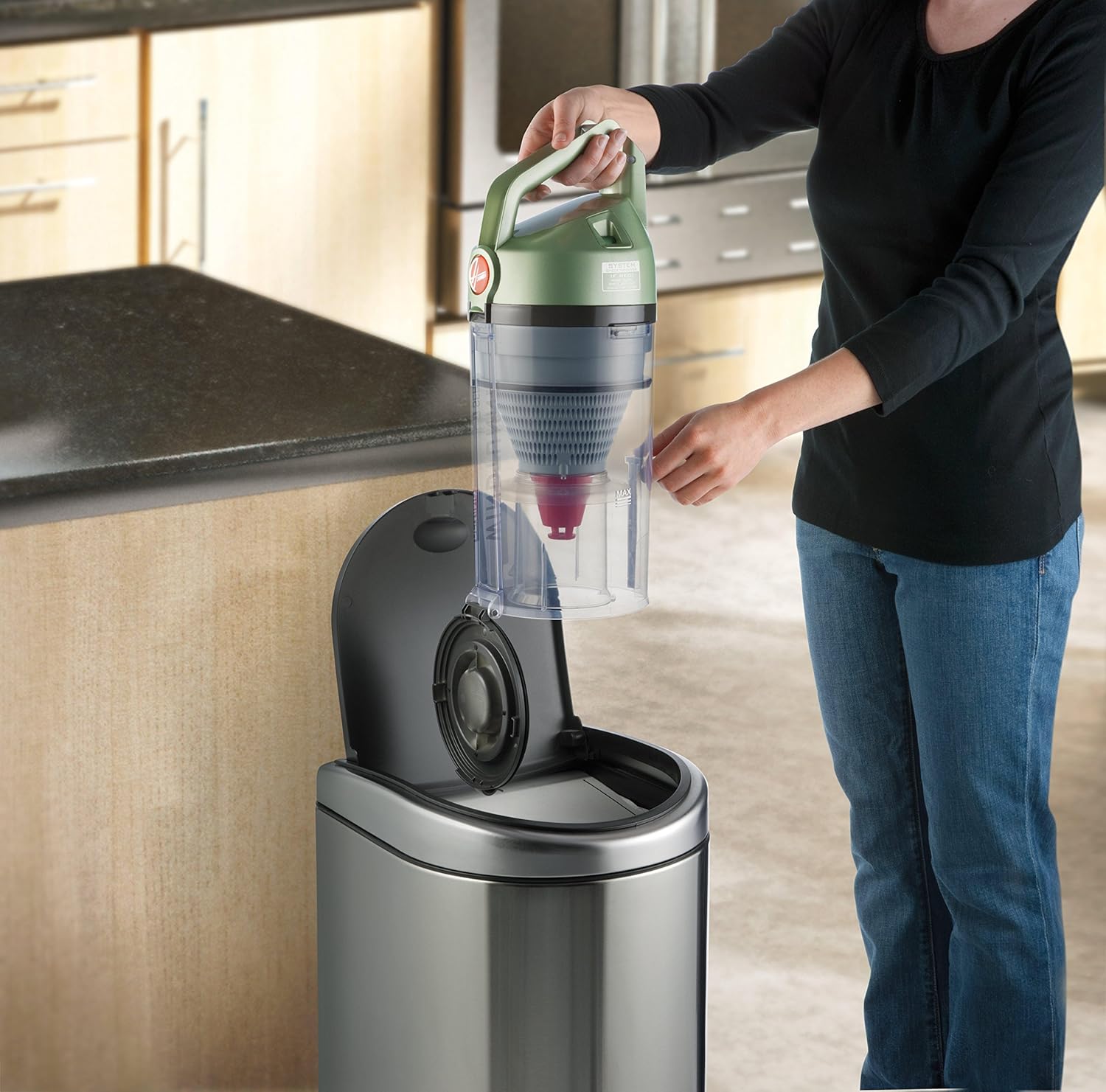
Image: A woman demonstrating how to empty the clear dirt cup of the Hoover UH70120 vacuum cleaner into a trash can.
Cleaning Filters
Regular filter cleaning is essential for maintaining suction power and air quality. The UH70120 includes a rinsable filter and a HEPA media filter.
- Rinsable Filter: This filter is located inside the dirt cup. Remove it and rinse under running water until clean. Allow it to air dry completely for at least 24 hours before reinserting. Do not use the vacuum without a dry filter.
- HEPA Media Filter: This filter is located near the bottom of the dirt cup assembly. Tap it gently over a trash can to remove loose dirt. The HEPA filter is not rinsable and should be replaced periodically (refer to product packaging or Hoover website for replacement schedule).
Image: A close-up view of the Hoover UH70120 vacuum cleaner showing the compartment for the HEPA filter, which is accessible for cleaning or replacement.
Brush Roll Maintenance
Periodically check the brush roll for tangled hair, strings, or debris. Turn off and unplug the vacuum. Use scissors to carefully cut away any obstructions from the brush roll. This ensures effective cleaning and prevents damage to the motor.
Troubleshooting
| Problem | Possible Cause | Solution |
|---|---|---|
| Vacuum will not turn on. | No power to outlet; Plug not firmly inserted. | Check fuse or breaker; Ensure plug is fully inserted into outlet. |
| Loss of suction. | Dirt cup full; Filters clogged; Hose or nozzle clogged. | Empty dirt cup; Clean or replace filters; Clear any obstructions from hose or nozzle. |
| Brush roll not spinning. | Obstruction in brush roll; Belt broken or stretched. | Remove obstruction from brush roll; Inspect and replace belt if necessary. |
| Vacuum not picking up. | Height adjustment incorrect; Dirt cup not properly installed. | Adjust height setting for floor type; Reinstall dirt cup securely. |
Specifications
- Brand: Hoover
- Model Name: T-Series Windtunnel Rewind Plus
- Model Number: UH70120
- Form Factor: Upright
- Special Feature: HEPA Media Filtration
- Included Components: Extension Wand, Crevice Tool, Upholstery/Dusting Brush, Powered Hand Tool
- Power: Corded, 12 Amps / 1440 Watts
- Hose Length: 8 Feet
- Item Weight: 16.5 pounds
- Product Dimensions: 16 x 12 x 32.5 inches
- Noise Level: 79 Decibels
- Usage: Indoor, for Carpet, Hardwood Floors, Pet hairs, Tile Floors
Warranty Information
This Hoover UH70120 T-Series WindTunnel Rewind Plus Upright Vacuum Cleaner is covered by a 2-year limited warranty. For detailed terms and conditions, please refer to the warranty card included with your product or visit the official Hoover website.
Customer Support
For further assistance, replacement parts, or service inquiries, please contact Hoover Customer Service:
- Website: www.hoover.com
- Phone: Refer to your product documentation for the most current contact number.
Official Product Videos
No official seller-created product videos were found for this model that meet the embedding criteria.