
Sanus LL11-B1
Sanus Systems LL11-B1 Ultra-Thin Flat Panel TV Mount User Manual
Model: LL11-B1
Product Overview
The Sanus Systems LL11-B1 is a super-slim, low-profile wall mount designed for flat panel televisions ranging from 51 inches to 80 inches. It provides a secure and aesthetically pleasing solution for mounting your TV close to the wall, with an ultra-thin design that positions the TV just 0.55 inches from the wall surface.
Key Features:
- Supports flat panel TVs from 51-Inch to 80-Inch.
- Maximum weight capacity of 150 lbs.
- Ultra-thin design mounts TV just 0.55-Inch from the wall.
- ProSet post-installation height and leveling adjustments for perfect positioning.
- Quick-release tabs and ClickStand feature to unlock TV and hold it away from the wall for easy cable access.
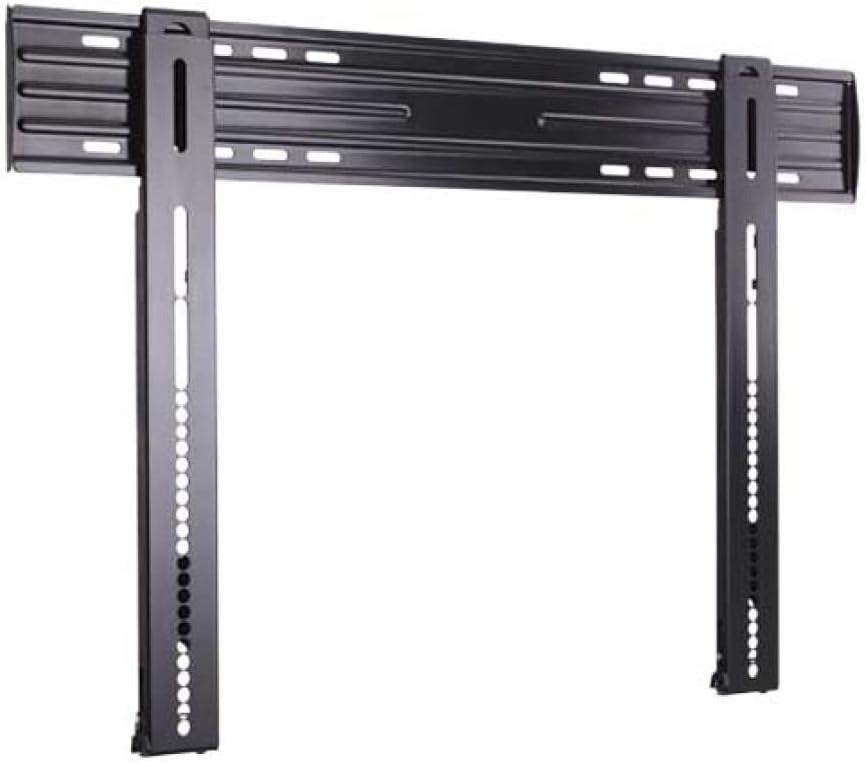
Figure 1: Front view of the Sanus LL11-B1 TV mount, illustrating the main components including the horizontal wall plate and the two vertical brackets that attach to the TV.
Setup and Installation
Proper installation is crucial for the safety and stability of your television. Always ensure you have the correct tools and understand each step before proceeding. It is recommended to have at least two people for installation, especially when lifting the TV.
Tools and Materials Required (Not Included):
- Stud finder
- Drill with appropriate drill bits
- Level
- Measuring tape
- Pencil
- Socket wrench or crescent wrench (for lag bolts)
- Phillips head screwdriver
Installation Steps:
- Locate Wall Studs: Use a stud finder to locate the center of two adjacent wall studs where you intend to mount the TV. Mark these locations precisely. Ensure the studs are strong enough to support the TV and mount's combined weight.
- Mount the Wall Plate: Position the wall plate against the wall, aligning its mounting holes with the marked stud centers. Use a level to ensure the plate is perfectly horizontal. Mark the drill points. Drill pilot holes into the studs as per the instructions provided with your specific hardware. Secure the wall plate to the wall using the provided lag bolts. Note: Some users have reported issues with included hex-head lag bolts stripping; consider using high-quality aftermarket lag bolts if you encounter difficulty.

Figure 2: Rear view of the Sanus LL11-B1 mount, highlighting the wall plate's design and how the vertical TV brackets are integrated.
- Attach TV Brackets: Attach the two vertical TV brackets to the back of your television using the appropriate screws and spacers from the included hardware kit. Ensure the brackets are securely fastened and evenly spaced. Refer to your TV's manual for specific VESA mounting patterns and screw sizes. Note: For Samsung TVs, M8x25mm bolts are often required and may need to be purchased separately if not included in the kit.

Figure 3: Side profile of one of the vertical TV brackets, demonstrating its slim form factor which contributes to the mount's low-profile design.
- Hang the TV: Carefully lift the television with the attached brackets and hook them onto the wall plate. Ensure both brackets are securely seated on the wall plate.
- Adjust and Secure: Once the TV is hung, use the ProSet post-installation height and leveling adjustments to fine-tune the TV's position. These adjustments allow for minor height and level corrections after the TV is on the wall. Secure the TV to the mount using the quick-release tabs or locking mechanisms as per the manual.
Operating Features
ProSet Height and Leveling Adjustments:
The LL11-B1 features integrated ProSet adjustments that allow for precise height and leveling modifications after the TV has been mounted. These adjustments are typically accessed via screws on the vertical brackets. Use the provided Allen key or an appropriate tool to make small adjustments until the TV is perfectly level and at the desired height. For very large TVs, accessing these screws once mounted can be challenging; consider pre-setting the adjustments to a neutral position or using a longer Allen key.
Quick-Release Tabs and ClickStand:
The mount includes quick-release tabs that allow you to easily unlatch the TV from the wall plate. Additionally, the ClickStand feature enables you to prop the bottom of the TV away from the wall, creating space for easier access to cables and ports behind the television. To engage the ClickStand, gently pull the bottom of the TV forward until it clicks into the stand position. To disengage, push the TV back towards the wall until it locks into place. On larger TVs, the ClickStand may be less effective as the top of the TV might hit the wall before the stand fully engages.

Figure 4: An example of a television mounted using the Sanus LL11-B1, demonstrating the minimal distance between the TV and the wall.
Maintenance
The Sanus LL11-B1 TV mount requires minimal maintenance. Periodically inspect all mounting hardware and connections to ensure they remain secure. Tighten any loose screws or bolts. Clean the mount with a soft, dry cloth. Avoid using abrasive cleaners or solvents, as they may damage the finish.
Troubleshooting
- TV is not level after installation: Use the ProSet leveling adjustments on the vertical brackets. If the included Allen key is difficult to use or strips, consider using a higher quality, longer Allen key for better leverage.
- Difficulty with lag bolts stripping during installation: This can occur if pilot holes are not drilled correctly or if the bolts are of lower quality. Ensure pilot holes are the correct size for your lag bolts. If stripping occurs, you may need to replace the bolts with higher-grade hardware (e.g., GRK 5/16 x 2-3/4-inch Star Drive screws as suggested by some users).
- Cannot access cables behind the TV: Utilize the ClickStand feature to temporarily prop the TV away from the wall. If the TV is too large for the ClickStand to provide sufficient space, you may need assistance to hold the TV away from the wall while connecting cables. Consider routing cables through the wall if possible for a cleaner look and easier access.
- TV feels unstable: Immediately remove the TV from the mount. Re-check all connections, ensuring the wall plate is securely fastened to wall studs and the TV brackets are tightly attached to the TV. Verify that the TV's weight does not exceed the mount's maximum capacity (150 lbs).
Specifications
| Model Number | LL11-B1 |
| Brand | Sanus |
| Compatible TV Sizes | 51 - 80 Inches |
| Maximum Weight Capacity | 150 lbs |
| Mounting Type | Wall Mount |
| Movement Type | Fixed |
| Distance from Wall | 0.55 Inches |
| Material | Acrylonitrile Butadiene Styrene (ABS) |
| Product Dimensions | 1 x 1 x 1 inches (Mount only) |
| Item Weight | 4.08 pounds |
| Date First Available | June 20, 2009 |
Warranty and Support
For specific warranty information, please refer to the documentation included with your product or visit the official Sanus website. Sanus typically offers a limited warranty on its products, covering defects in materials and workmanship.
If you require technical assistance, have questions about installation, or need to report a missing part, please contact Sanus customer support directly. Contact information can usually be found on the manufacturer's website or in the product packaging.
Official Sanus Website: www.sanus.com
Related documentsLL11-B1


Ask a question about this manual
Ask about setup, troubleshooting, compatibility, parts, safety, or missing instructions. Manuals+ will review the question and use this page’s manual context to help answer it.