
1. Introduction
This manual provides essential instructions for the safe and effective use of your SentrySafe G1455E Electronic Lock Safe. This 14-gun capacity security safe features an electronic lock, solid steel pry-resistant door with concealed hinges, and a carpeted interior designed to protect contents. It includes 3 steel live locking bolts and 3 dead bolts for enhanced security. The safe meets or exceeds the California Department of Justice requirements for an approved firearm safety device under CA Penal Code section 12087, et seq., and incorporates a hardened steel plate to protect against drill attacks.
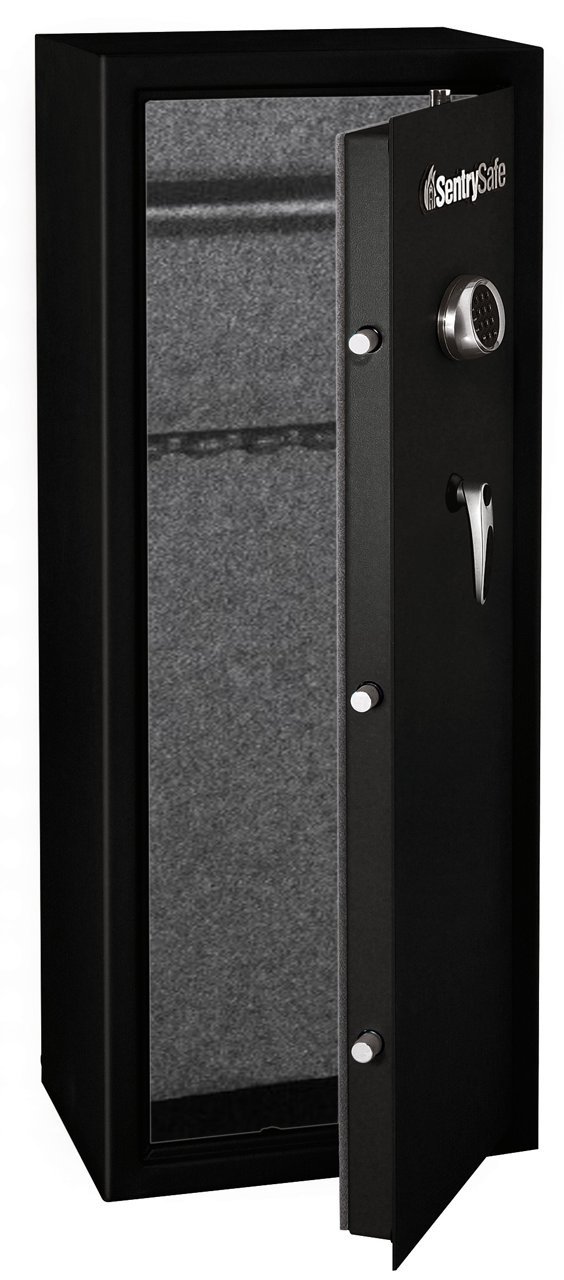
Figure 1: SentrySafe G1455E Electronic Lock Safe, front view with door slightly open.
2. Important Safety Information
Read all instructions carefully before operating your safe. Failure to follow these instructions may result in injury or damage to the safe or its contents.
- Secure Mounting: For optimal security, the safe should be securely bolted to the floor or wall. Refer to the 'Setup' section for mounting instructions.
- Code and Key Security: Always keep your electronic access code and override keys in a secure location, separate from the safe itself. Do not store override keys inside the safe.
- Child Safety: Never allow children to play with or around the safe. Keep the safe locked and the keys/codes out of reach of children at all times.
- Proper Storage: Do not store flammable liquids, explosives, or other hazardous materials inside the safe.
- Weight: The safe is heavy (approximately 174 pounds). Exercise caution and use proper lifting techniques or assistance when moving.
3. Setup
3.1 Unpacking
- Carefully remove the safe from its packaging. Inspect for any shipping damage.
- Locate the override keys and user manual, typically found taped to the exterior or inside a small compartment.
3.2 Battery Installation
The electronic lock requires batteries for operation. Batteries are included with the safe.
- Locate the battery compartment on the back of the electronic keypad.
- Slide the battery cover off.
- Insert the required number of new alkaline batteries, ensuring correct polarity (+/-).
- Replace the battery cover.
3.3 Initial Code Setup
Your safe comes with a factory-set code. It is highly recommended to change this to a personal code immediately.
- With the safe door open, press the red reset button located on the inside of the door near the hinge. You will hear a beep.
- Within 5 seconds, enter your desired 4-8 digit personal code on the keypad.
- Press the '#' (pound) button to confirm. You will hear two beeps, indicating the new code is set.
- Test the new code with the door open before closing it.

Figure 2: Electronic keypad and handle for the SentrySafe G1455E.
3.4 Mounting the Safe
The SentrySafe G1455E is designed for freestanding or tabletop mounting. Bolting the safe down significantly increases its security.
- Choose a suitable location, preferably against a solid wall or in a corner, where the safe can be discreetly secured.
- Mark the desired drilling points through the pre-drilled holes in the bottom or back of the safe onto the floor or wall.
- Move the safe and drill pilot holes using an appropriate drill bit for your surface (wood or concrete).
- Reposition the safe over the pilot holes.
- Secure the safe using the provided bolts or suitable anchoring hardware (not always included). Ensure all bolts are tightened securely.
4. Operating Instructions
4.1 Opening the Safe with Electronic Lock
- Enter your personal 4-8 digit code on the keypad.
- Press the '#' (pound) button. A green light will illuminate, and you will hear a beep.
- Within 4 seconds, turn the handle clockwise to open the safe door.
4.2 Opening the Safe with Override Key
In case of battery failure or forgotten code, the override key can be used.
- Locate the keyhole, usually concealed behind the SentrySafe logo plate or a small cover on the keypad assembly.
- Insert the override key and turn it clockwise.
- While holding the key turned, rotate the safe handle to open the door.
4.3 Closing and Locking the Safe
- Close the safe door firmly.
- Turn the handle counter-clockwise until it is fully engaged and the door is securely latched. The electronic lock will automatically engage.

Figure 3: Interior view of the SentrySafe G1455E with firearms stored.
5. Maintenance
5.1 Battery Replacement
The electronic lock will indicate low battery power with a series of warning beeps or a flashing light during operation. Replace batteries promptly to avoid being locked out.
- Open the safe.
- Follow the steps in Section 3.2 to replace the batteries. Always use new, high-quality alkaline batteries.
5.2 Cleaning
Clean the exterior of the safe with a soft, damp cloth. Avoid abrasive cleaners or solvents that could damage the finish or electronic components.
5.3 Inspection
Periodically inspect the door hinges, locking bolts, and electronic keypad for any signs of wear or damage. Ensure the door closes and locks smoothly.
6. Troubleshooting
| Problem | Possible Cause | Solution |
|---|---|---|
| Safe does not open with code. | Incorrect code entered. Low batteries. Keypad malfunction. | Re-enter code carefully. Replace batteries (Section 5.1). Use override key (Section 4.2). |
| Keypad does not respond. | Dead batteries. | Replace batteries (Section 5.1). |
| Safe beeps continuously or flashes light. | Low battery warning. | Replace batteries immediately (Section 5.1). |
| Door will not close or latch properly. | Obstruction. Misalignment. | Check for obstructions. Ensure safe is on a level surface. Inspect hinges and bolts for damage. |
7. Specifications
| Feature | Detail |
|---|---|
| Model | G1455E |
| Brand | SentrySafe |
| Lock Type | Electronic |
| Capacity | 14-Gun Capacity |
| Exterior Dimensions (H x W x D) | 55.1 inches x 21.0 inches x 17.8 inches |
| Interior Dimensions (H x W x D) | 54.9 inches x 20.8 inches x 12.9 inches |
| Item Weight | 174 pounds |
| Material | Steel with Satin finish |
| Mounting Type | Freestanding, Tabletop |
| Included Components | Bolt, Key |
| Alarm | Anti-theft |
| Water Resistance Level | Not Water Resistant |
| Batteries Required | Yes |
| UPC | 049074011857 |

Figure 4: Detailed interior view of the SentrySafe G1455E, highlighting the carpeted surfaces and internal shelf.
8. Warranty and Support
8.1 Warranty Information
The SentrySafe G1455E Electronic Lock Safe comes with a 1-Year limited warranty. Please refer to the warranty card included with your product for full terms and conditions.
8.2 Customer Support
For technical assistance, parts, or warranty claims, please contact SentrySafe customer support. Contact information can typically be found on the manufacturer's official website or on the product packaging.
When contacting support, please have your safe's model number (G1455E) and serial number (located on the safe) available.


