
1. Product Overview
The One For All URC 3940 is a universal remote control designed to simplify your home entertainment experience by consolidating control of up to four devices into a single unit. It is pre-programmed for easy setup and can replace lost or broken remotes, including those for Freeview/DVB-T systems.
Key features include:
- Pre-programmed for easy setup with various devices.
- Capable of operating up to 4 devices simultaneously.
- Includes dedicated Freeview/DVB-T special functions such as Info, Guide, and Exit.
- Compatible with a wide range of devices including TVs, plasma screens, LCDs, projectors, DVD/Blu-ray players, satellite receivers, cable boxes, DVB-T boxes, and VCRs.

This image displays the front of the One For All URC 3940 Universal Remote Control, highlighting its button layout including power, device selection, number pad, volume, channel, navigation, and special function buttons.
2. Setup Instructions
2.1. Battery Installation
- Locate the battery compartment on the back of the remote control.
- Slide the battery cover downwards or outwards to open.
- Insert two AAA batteries, ensuring the positive (+) and negative (-) terminals align with the markings inside the compartment.
- Replace the battery cover until it clicks securely into place.
2.2. Device Pairing (Code Setup)
The URC 3940 remote uses a code-based system to connect with your devices. Refer to the code list provided with your remote for specific manufacturer codes. If a code list is not available, a code search method can be used.
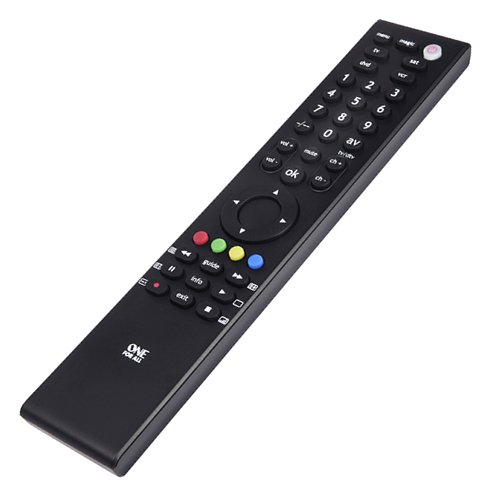
An angled perspective of the One For All URC 3940 Universal Remote Control, showing its slim profile and ergonomic design, with the button layout visible.
Method 1: Direct Code Entry
- Turn on the device you wish to control (e.g., TV, DVD player).
- Press and hold the MAGIC button until the LED light under the power button blinks twice and stays lit.
- Press the device button you want to program (e.g., TV, DVD, SAT, VCR). The LED will blink once and remain lit.
- Enter the 4-digit code for your device's brand from the code list. The LED will blink twice to confirm a valid code. If the LED shows a long blink, the code is invalid; re-enter the code.
- Point the remote at your device and test its functions (e.g., Power, Volume). If the device responds correctly, the setup is complete. If not, try the next code for your brand or proceed to Method 2.
Method 2: Code Search
- Turn on the device you wish to control.
- Press and hold the MAGIC button until the LED blinks twice and stays lit.
- Press the device button you want to program. The LED will blink once and remain lit.
- Press the POWER button once. The LED will blink once.
- Point the remote at your device and repeatedly press the POWER button (approximately every 3 seconds) until your device turns off.
- Once the device turns off, immediately press the MAGIC button to store the code. The LED will blink twice to confirm.
- Test other functions. If the device does not respond correctly, repeat the search process.
3. Operating the Remote Control
Once programmed, the URC 3940 remote allows you to control your devices using its various buttons.
- Device Buttons (TV, DVD, SAT, VCR): Press the corresponding button to select the device you wish to control. The remote will then send commands to that specific device.
- POWER Button: Turns the selected device on or off.
- Number Pad (0-9): Used for direct channel entry or inputting numbers for menus.
- VOL +/-: Adjusts the volume of the selected audio device (usually TV).
- CH +/-: Changes channels on the selected TV or set-top box.
- MUTE: Mutes the audio of the selected device.
- OK / Navigation Buttons: Used to navigate menus and confirm selections.
- AV / TV/DTV: Switches between input sources or TV/Digital TV modes.
- Colored Buttons (Red, Green, Yellow, Blue): These buttons often correspond to specific functions within menus or interactive services (e.g., Freeview/DVB-T).
- INFO, GUIDE, EXIT: Dedicated buttons for accessing information, electronic program guides, and exiting menus, particularly useful for Freeview/DVB-T devices.
4. Maintenance
4.1. Battery Replacement
The remote requires two AAA batteries. Replace them when the remote's response becomes sluggish or the LED indicator does not light up. The average battery life is approximately 12 months under normal usage. Follow the battery installation steps in Section 2.1.
4.2. Cleaning
To clean the remote, gently wipe it with a soft, dry cloth. Avoid using abrasive cleaners, solvents, or wet cloths, as these can damage the remote's surface or internal components.
5. Troubleshooting
- Remote not responding:
- Check if the batteries are correctly inserted and not depleted. Replace if necessary.
- Ensure there are no obstructions between the remote and the device's infrared receiver.
- Verify that the correct device button (TV, DVD, SAT, VCR) is selected for the device you intend to control.
- Device not responding after code entry:
- Try other codes listed for your device's brand.
- Perform the Code Search method (Section 2.2, Method 2) to find a compatible code.
- Ensure the device is powered on before attempting to program or control it.
- Some functions not working:
- Not all functions of an original remote may be available on a universal remote.
- The URC 3940 does not feature a learning mode, meaning it cannot learn commands directly from another remote.
- If specific functions are critical, try alternative codes for your device.
6. Specifications
- Brand: One For All
- Model: URC 3940 (FBA_URC3940)
- Manufacturer: Universal Electronics
- Compatible Devices: DVD/Blu-ray Player, Projector, Television, VCR
- Max Number of Supported Devices: 4
- Connectivity Technology: Infrared
- Special Features: Freeview/DVB-T Special Functions
- Batteries Required: 2 AAA batteries (not included)
- Battery Average Life: Approximately 12 Months
- Product Dimensions: 8.4 x 2.8 x 29.4 cm
- Item Weight: 18 g
7. Warranty and Support
Information regarding product warranty and customer support details is not available in the provided product data. Please refer to the product packaging or the manufacturer's official website for warranty terms and contact information.


