
HM Digital TDS-EZ
HM Digital TDS-EZ Water Quality TDS Tester Instruction Manual
Brand: HM Digital | Model: TDS-EZ
Product Overview
The HM Digital TDS-EZ is an economical and convenient digital tool designed to instantly check the overall quality of your water. TDS, which stands for Total Dissolved Solids, refers to any salts, metals, or minerals dissolved in water. This meter provides a quick readout of your water's purity level in parts per million (ppm). A lower TDS level generally indicates purer water, with 0 ppm representing pure H2O. The TDS-EZ is suitable for various applications including testing tap water, monitoring water filtration and purification systems, hydroponics (for nutrient testing), aquariums, Reverse Osmosis (RO) / Deionized (DI) systems, pools, and spas. Please note that this meter does not test for biological contaminants.
Setup and First Use
Battery Installation
The TDS-EZ meter comes with two 1.5V LR44 button cell batteries pre-installed. No initial battery installation is typically required. If replacement is needed, refer to the 'Maintenance' section.
Initial Power On
Press the ON/OFF button to turn on the meter. The display will show '0' indicating it is ready for measurement.
Removing the Protective Cap
Carefully remove the blue protective cap from the bottom of the meter to expose the electrodes. This cap can also be used as a small sample holder during testing.
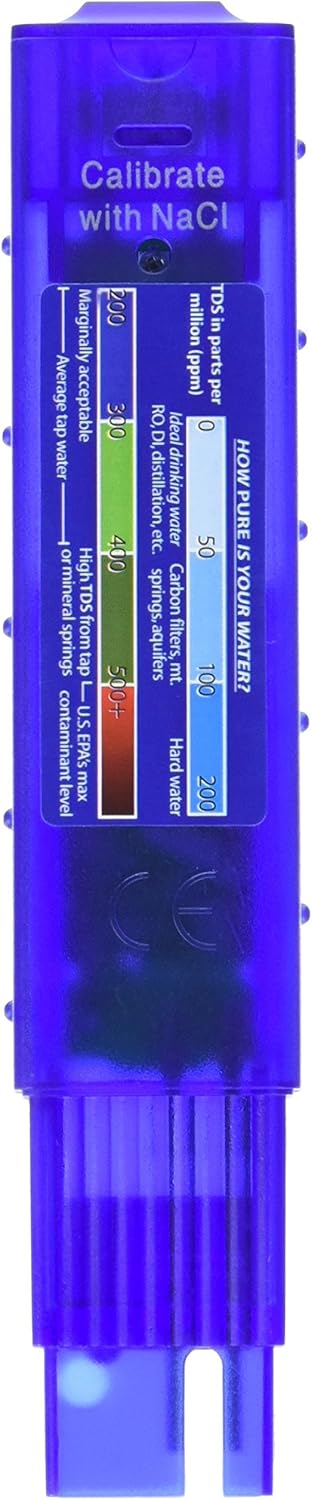
Figure 1: The HM Digital TDS-EZ meter with its protective cap removed, revealing the measurement electrodes.
Operating Instructions
Taking a Measurement
- Ensure the meter is clean and dry before use.
- Press the ON/OFF button to power on the meter. The display should show '0'.
- Dip the meter into the water sample up to the maximum immersion level (indicated on the meter, typically just above the electrodes). Ensure no air bubbles are trapped around the electrodes.
- Wait for the reading to stabilize (usually a few seconds). The display will show the TDS value in ppm.
- To hold the reading on the display after removing the meter from the water, press the HOLD button. Press it again to release the hold function.
- After use, shake off excess water and replace the protective cap. Press the ON/OFF button to turn off the meter, or it will automatically shut off after 10 minutes of non-use to conserve battery life.


Figure 2: Front view of the TDS-EZ meter (left) and its compact size when held (right).
Understanding TDS Readings
The TDS-EZ meter displays Total Dissolved Solids in parts per million (ppm). A lower ppm value indicates fewer dissolved impurities and generally purer water. The meter includes a convenient chart on its back for quick reference regarding water quality levels.

Figure 3: Back of the TDS-EZ meter with the integrated TDS chart for quick reference.
TDS Value Interpretation Chart:
| TDS (ppm) | Water Quality | Description |
|---|---|---|
| 0-50 | Ideal Drinking Water | Typically from carbon filters, RO/DI systems, or natural spring sources. |
| 50-100 | Good Quality Water | Often found in filtered water or some mountain springs. |
| 100-200 | Hard Water | Water with higher mineral content. |
| 200-400 | Average Tap Water | Typical range for municipal tap water. |
| >400 | Marginally Acceptable / Contaminated | Indicates a higher level of dissolved solids, potentially including contaminants. |
Maintenance
Cleaning
After each use, rinse the electrodes with distilled water and gently wipe them dry with a clean, soft cloth. Avoid using abrasive materials or harsh chemicals, as this may damage the electrodes. The product is designed for hand washing only.
Calibration
The TDS-EZ meters are factory-calibrated with a 342 ppm NaCl solution. If recalibration is necessary due to inconsistent readings or after prolonged use, it can be performed using a mini-screwdriver to adjust the calibration screw located on the meter. Use a known 342 ppm NaCl standard solution for accurate recalibration.
Battery Replacement
The meter is powered by two 1.5V LR44 button cell batteries. When the display dims or the meter fails to power on, it's time to replace the batteries. To replace, locate the battery compartment (usually at the top or back of the meter), open it, and insert new LR44 batteries, ensuring correct polarity. Battery life is approximately 1000 hours of usage.
Troubleshooting
Inaccurate or Fluctuating Readings
- Dirty Electrodes: Clean the electrodes thoroughly as described in the 'Maintenance' section.
- Air Bubbles: Ensure no air bubbles are trapped around the electrodes when immersed in water. Gently shake the meter to dislodge any bubbles.
- Calibration Needed: If readings are consistently off, recalibrate the meter using a standard solution.
- Temperature Differences: Significant temperature differences between the meter and the water sample can affect readings. Allow the meter to acclimate to the water temperature for a few moments.
No Display or Meter Not Turning On
- Dead Batteries: Replace the LR44 batteries.
- Incorrect Battery Installation: Check that batteries are inserted with the correct polarity.
- Auto-Off Function: The meter has an auto-off function after 10 minutes of non-use. Simply press the ON/OFF button again.
Specifications
| Feature | Detail |
|---|---|
| Model Number | TDS-EZ |
| Measurement Range | 0-9990 ppm (parts per million) |
| Resolution (0-999 ppm) | 1 ppm |
| Resolution (1000-9990 ppm) | 10 ppm (indicated by a blinking 'x10' image) |
| Readout Accuracy | ±3% |
| Power Source | 2 x 1.5V LR44 Button Cell Batteries (included) |
| Battery Life | Approx. 1000 hours of usage |
| Auto-Off Function | Yes, after 10 minutes of non-use |
| Hold Function | Yes, saves measurements for convenient reading |
| Calibration | Factory calibrated with 342 ppm NaCl solution; recalibratable with mini-screwdriver |
| Material | Plastic |
| Color | Purple |
| Dimensions (L x W x H) | 6.1 x 1.25 x 1 inches (15.5 x 3.2 x 2.5 cm) |
| Weight | 2 ounces (56.7 grams) |
| Included Components | TDS-EZ Meter |
Warranty and Support
For warranty information, technical support, or any inquiries regarding your HM Digital TDS-EZ Water Quality TDS Tester, please refer to the product packaging or contact HM Digital, Inc. directly through their official website or customer service channels. Keep your purchase receipt for warranty claims.
Related documentsTDS-EZ


Ask a question about this manual
Ask about setup, troubleshooting, compatibility, parts, safety, or missing instructions. Manuals+ will review the question and use this page’s manual context to help answer it.