
1. Product Overview
The OLYMPUS Voice-Trek V-62 is a slim and portable IC recorder designed for versatile audio recording and playback. It features a built-in 2GB memory, offering up to 544 hours of recording capacity. Its direct USB connection allows for easy data transfer to a computer and convenient charging of the included rechargeable battery.
Key features include:
- Built-in 2GB Memory: Stores up to approximately 544 hours of audio.
- Direct USB Connection: No cable needed for PC connection and charging.
- Audio Enhancement: Equipped with Noise Cancel, Low Cut Filter, and Voice Filter functions.
- High-Quality Recording: Supports WMA high-quality stereo recording.
- SRS WOW XT Technology: Enhances sound playback quality.
- Versatile Playback: Features fast and slow playback functions.
- User-Friendly Controls: All basic operation buttons are conveniently located on the front panel for easy one-handed use.
- High-Resolution LCD: Improved display for better readability and information display during music playback.
2. Package Contents
Upon opening your OLYMPUS Voice-Trek V-62 package, please verify that all the following items are included:
- OLYMPUS Voice-Trek V-62 IC Recorder Unit
- Earphones
- Carrying Case
- Instruction Manual (this document)
- Rechargeable AAA Battery (pre-installed or separate)


3. Setup
3.1 Battery Installation
- Locate the battery compartment on the back of the recorder.
- Open the battery compartment cover.
- Insert one AAA (LR03) battery, ensuring correct polarity (+/-).
- Close the battery compartment cover securely.

3.2 Initial Charging
The Voice-Trek V-62 includes a rechargeable battery and can be charged directly via a USB connection to a computer.
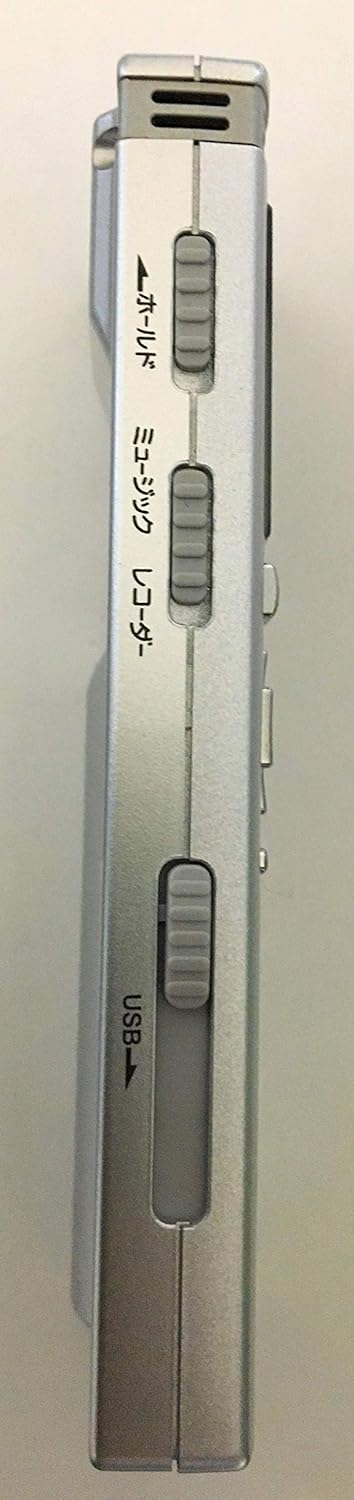
- Locate the USB slider on the side of the recorder.
- Slide the lever to extend the USB connector.
- Connect the recorder directly to an available USB port on your computer.
- The device will begin charging. Ensure the recorder is connected until fully charged.
3.3 Setting Date and Time
After installing batteries or if the batteries have been completely depleted, the date and time settings may reset. It is recommended to set the correct date and time for accurate file management.
- Power on the device.
- Navigate to the 'Menu' settings using the navigation buttons.
- Select 'Date/Time' and adjust the settings as required.
- Confirm your selections to save the settings.
4. Operating Instructions
The OLYMPUS Voice-Trek V-62 features intuitive controls located on its front panel.

4.1 Basic Operations
- Power On/Off: Press and hold the STOP button for a few seconds.
- Recording: Press the REC (red circle) button to start recording. Press STOP to end recording.
- Playback: Press the PLAY (triangle) button to start playback.
- Stop: Press the STOP button during recording or playback.
- Volume Adjustment: Use the Volume (+/-) buttons.
- Navigation: Use the directional buttons (up, down, left, right) and OK button to navigate menus and files.
4.2 Advanced Features
- Noise Cancellation: Activate the Noise Cancel function via the menu to reduce background noise during recording or playback.
- Low Cut Filter: Use the Low Cut Filter to minimize low-frequency sounds like wind noise.
- Voice Filter: Enhance human voice frequencies for clearer recordings.
- Fast/Slow Playback: Adjust playback speed for transcription or language learning. Access this feature through the menu or dedicated buttons if available.
- File Management: Connect the recorder to a computer via USB to transfer, organize, or delete recorded files. The device functions as a USB mass storage device.
5. Maintenance
Proper care ensures the longevity and optimal performance of your Voice-Trek V-62.
- Cleaning: Wipe the device with a soft, dry cloth. Do not use liquid cleaners or solvents.
- Battery Care: If the device will not be used for an extended period, remove the AAA battery to prevent leakage.
- Storage: Store the recorder in a cool, dry place, away from direct sunlight, high temperatures, and humidity.
- USB Port: Keep the USB connector clean and free from dust or debris.
6. Troubleshooting
If you encounter issues with your OLYMPUS Voice-Trek V-62, refer to the following common solutions:
| Problem | Possible Cause | Solution |
|---|---|---|
| Device does not power on. | Battery is depleted or incorrectly inserted. | Replace or recharge the AAA battery. Ensure correct polarity. |
| No sound during playback. | Volume is too low or earphones are not connected properly. | Increase volume. Check earphone connection. Ensure earphones are functional. |
| Recording quality is poor. | Microphone is obstructed or recording environment is noisy. | Ensure microphone is clear. Activate Noise Cancel or Low Cut Filter. Record in a quieter environment. |
| Date/Time resets frequently. | Battery is completely depleted or removed. | This is normal behavior when the battery runs out. Recharge or replace the battery and reset the date/time. |
| Cannot connect to computer via USB. | USB connector not fully extended or computer port issue. | Ensure the USB connector is fully extended. Try a different USB port on your computer. |
If the problem persists, please refer to the official OLYMPUS support resources or contact customer service.
7. Specifications
| Feature | Detail |
|---|---|
| Model Number | V-62 |
| Internal Memory | 2 GB |
| Maximum Recording Time | 544 hours (approx.) |
| Recording Format | WMA |
| Playback Formats | MP3, WAV, WMA |
| Battery Type | 1 x AAA (LR03) |
| Battery Life (Recording) | Up to 21 hours |
| Battery Life (Playback) | Up to 26 hours |
| Dimensions (H x W x D) | 9.48 x 3.8 x 1.1 cm (approx.) |
| Weight | 46 g (including battery) |
| Interface | USB 2.0 (Direct Connection) |
| Headphone Jack | 3.5 mm |
| Microphone | Built-in Stereo Microphone |
8. Warranty and Support
For warranty information, please refer to the documentation provided at the time of purchase or visit the official OLYMPUS website. If you require technical assistance or have questions not covered in this manual, please contact OLYMPUS customer support.
Official OLYMPUS Website: www.olympus-global.com

