
1. Introduction
The JOKARI 20050 Super 4 Plus is an automatic wire stripper designed for professional and DIY electrical applications. This tool provides efficient and precise stripping of various wire types, ensuring quality and safety in your electrical work. This manual provides essential information for the safe and effective use, maintenance, and troubleshooting of your wire stripper.
2. Safety Instructions
Always observe the following safety precautions when using the JOKARI 20050 Super 4 Plus wire stripper:
- Read the manual: Familiarize yourself with all instructions before use.
- Wear protective gear: Always wear appropriate eye protection to prevent injury from flying debris.
- Inspect the tool: Before each use, check the tool for any damage or wear. Do not use a damaged tool.
- Disconnect power: Ensure all circuits are de-energized before working on electrical wires. Failure to do so can result in electric shock or serious injury.
- Use for intended purpose: This tool is designed for stripping and cutting electrical wires. Do not use it for other purposes.
- Keep out of reach of children: Store the tool in a secure place away from children.
3. Product Components
The JOKARI 20050 Super 4 Plus wire stripper consists of the following main parts:
- Stripping Jaws: Automatic mechanism for gripping and removing wire insulation.
- Length Stop: Adjustable guide for consistent stripping lengths.
- Wire Cutter: Integrated blade for cutting wires.
- Ergonomic Handles: Fiberglass-reinforced polyamide handles for comfortable grip and operation.

Image 1: The JOKARI 20050 Super 4 Plus wire stripper, showing its main components including the stripping jaws, length stop, and ergonomic handles.
4. Setup
The JOKARI 20050 Super 4 Plus is designed for immediate use with minimal setup. It features an automatic adjustment mechanism for wire thickness, eliminating the need for manual calibration for different wire gauges.
- Unpacking: Remove the tool from its packaging.
- Initial Inspection: Verify that the tool is free from any visible damage from shipping.
- Adjusting Stripping Length: The integrated length stop can be adjusted to achieve desired stripping lengths between 6 mm and 15 mm. Slide the stop to the required position before inserting the wire.
5. Operating Instructions
Follow these steps for effective wire stripping and cutting:
5.1 Wire Stripping
- Prepare the wire: Ensure the wire to be stripped is clean and free from kinks.
- Set stripping length: Adjust the length stop to the desired stripping depth (6-15 mm).
- Insert wire: Place the end of the wire into the stripping jaws, ensuring it rests against the length stop. The tool automatically adjusts to wire cross-sections from 0.2 mm² to 6 mm².
- Squeeze handles: Firmly squeeze the handles together. The jaws will grip the insulation, cut it, and pull it away from the conductor.
- Release: Release the handles to open the jaws and remove the stripped wire.
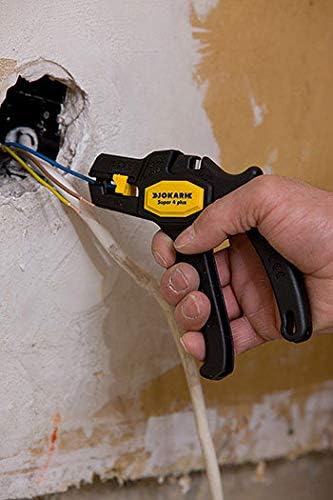
Image 2: A hand using the JOKARI Super 4 Plus wire stripper to strip wires within a wall opening, demonstrating its application in confined spaces.

Image 3: The wire stripper in use inside an electrical control cabinet, showing its suitability for precise work on multiple wires.
5.2 Wire Cutting
The tool includes an integrated wire cutter for wires up to 2.5 mm².
- Position wire: Place the wire to be cut into the designated cutting slot.
- Squeeze handles: Firmly squeeze the handles together to cut the wire.
6. Maintenance
Proper maintenance ensures the longevity and performance of your JOKARI wire stripper.
6.1 Cleaning
- After each use, remove any insulation debris or wire fragments from the stripping jaws and cutter.
- Use a dry cloth or soft brush for cleaning. Do not use solvents or abrasive cleaners.
6.2 Blade Replacement
The stripping blade may wear over time, especially with frequent use. The blade can be replaced with a genuine JOKARI spare part. Refer to the official JOKARI website for detailed instructions on blade replacement.
7. Troubleshooting
If you encounter issues with your wire stripper, consider the following:
- Inconsistent stripping: Ensure the wire is inserted correctly and fully against the length stop. Check the blades for wear or damage.
- Difficulty with very small wires (e.g., 0.2 mm²): For extremely fine wires, ensure the wire is properly seated in the jaws. Sometimes, a slight adjustment in angle or a second attempt may be needed to 'hook' the insulation effectively.
- Tool feels 'sluggish' or performance decreases: This may indicate wear on the internal mechanism or blades. Consider cleaning the tool thoroughly or replacing the stripping blade. If the issue persists, contact customer support.
- Wire not cutting cleanly: The integrated cutter is designed for wires up to 2.5 mm². Attempting to cut thicker wires may result in an incomplete cut or damage to the blade. Ensure the wire is within the specified cutting capacity.
8. Specifications
| Feature | Detail |
|---|---|
| Brand | JOKARI |
| Model Number | 20050 |
| Material | Plastic, Fiberglass Reinforced Polyamide (Handle) |
| Color | Black |
| Product Dimensions (L x W) | 16.5 cm x 14 cm |
| Stripping Capacity | 0.2 mm² to 6 mm² |
| Stripping Depth Adjustment | 6 mm to 15 mm |
| Cutting Capacity | Up to 2.5 mm² |
| Grip Type | Ergonomic |
| Compliance | GS, TUV |
| Country of Origin | Germany |
9. Warranty
The JOKARI 20050 Super 4 Plus wire stripper comes with a 2-year warranty from the date of purchase. This warranty covers defects in materials and workmanship under normal use. It does not cover damage resulting from misuse, abuse, unauthorized modification, or normal wear and tear. Please retain your proof of purchase for warranty claims.
10. Support
For further assistance, technical support, or to inquire about spare parts, please visit the official JOKARI website or contact your local distributor. You can find contact information and additional resources on the JOKARI brand store page on Amazon: JOKARI Store.


