
Introduction
This manual provides detailed instructions for the setup, operation, and maintenance of your iHome iP49 Portable NXT Alarm Clock Radio. Please read this manual thoroughly before using the device to ensure proper functionality and to maximize your user experience.
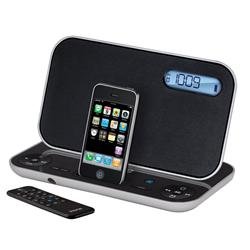
Image: Front view of the iHome iP49 Portable NXT Alarm Clock Radio, showcasing its compact design and docking station.
Setup
1. Unpacking
Carefully remove all components from the packaging. Ensure you have the iHome iP49 unit, the iPhone charging cable, and the remote control.
2. Powering On
The iHome iP49 is battery-powered. Insert the required batteries (not included) into the battery compartment located on the underside of the unit. Alternatively, connect the provided power adapter to the DC 5V input jack on the unit and then to a standard wall outlet.
3. Setting the Clock
Refer to the controls on the unit or the remote control to set the current time. Typically, a 'Time Set' button is pressed, followed by using '+' or '-' buttons to adjust hours and minutes.
4. Connecting Your Device
The unit features a built-in docking station compatible with iPod and iPhone models. Carefully place your iPod or iPhone onto the docking connector. The device should begin charging automatically if the unit is powered on.
Operating Instructions
1. Basic Functions
- Power On/Off: Press the Power button to turn the unit on or off.
- Volume Control: Use the Volume Up (+) and Volume Down (-) buttons to adjust the audio level.
- Mode Selection: Press the Mode button to switch between iPod/iPhone, FM Radio, and AUX input modes.
2. Using the Docking Station
When an iPod or iPhone is docked, it will charge and allow you to play audio through the iHome iP49's speakers. Use your device's controls or the iHome remote control to navigate your music library.
3. Radio Operation
In FM Radio mode:
- Tuning: Use the Tune/Search buttons to manually tune to a station or automatically scan for the next available station.
- Presets: Save your favorite stations by pressing and holding a Preset button (e.g., P1, P2) until the display confirms. Recall saved stations by pressing the corresponding Preset button.
4. Alarm Clock Settings
The iHome iP49 allows you to set alarms to wake to your docked iPod/iPhone or the FM radio.
- Press the 'Alarm Set' button.
- Use the '+' or '-' buttons to set the desired wake time.
- Select your wake source (iPod/iPhone or FM Radio).
- Confirm your settings by pressing 'Alarm Set' again or waiting for the display to revert.
To use the sleep function, press the 'Sleep' button and select a duration. The unit will play audio for the set time and then automatically turn off.
5. Remote Control Usage
The included remote control provides convenient access to most functions, including power, volume, mode selection, alarm settings, and iPod/iPhone navigation. Ensure the remote has working batteries and is pointed towards the front of the unit for optimal performance.
Maintenance
1. Cleaning
Wipe the unit with a soft, dry cloth. Do not use liquid cleaners or abrasive materials, as they may damage the finish or internal components.
2. Battery Replacement
If using battery power, replace batteries when the low battery indicator appears or when the unit's performance diminishes. Ensure correct polarity when inserting new batteries.
3. Storage
If storing the unit for an extended period, remove the batteries to prevent leakage and potential damage.
Troubleshooting
Common Issues and Solutions:
- No Power:
- Check if the power adapter is securely connected to both the unit and the wall outlet.
- If using batteries, ensure they are correctly inserted and not depleted.
- No Sound:
- Increase the volume level.
- Ensure the correct mode (iPod/iPhone, FM, AUX) is selected.
- If using iPod/iPhone, ensure it is properly docked and playing audio.
- iPod/iPhone Not Charging:
- Ensure the unit is powered on.
- Verify the iPod/iPhone is correctly seated in the docking connector.
- Check for any debris in the docking connector on both the unit and your device.
- Alarm Not Sounding:
- Ensure the alarm is activated and set to the correct time.
- Verify the alarm volume is not set to zero.
- If waking to iPod/iPhone, ensure there is playable content on the device.
- Poor Radio Reception:
- Extend the FM antenna fully.
- Adjust the unit's position or location to improve signal.
Specifications
| Brand | iHome |
| Model Number | IP49SC |
| Item Weight | 4 pounds |
| Power Source | Battery Powered |
| Output Voltage | 5 Volts (DC) |
| Total USB Ports | 1 |
| Special Feature | Alarm, Radio |
| Compatible Devices | iPod, iPhone |
| Included Components | 1 iPhone charging cable, 1 Remote Control |
Warranty Information
Warranty information for the iHome iP49 is typically provided with the product packaging or can be found on the official iHome website. Please retain your proof of purchase for warranty claims.
Customer Support
For further assistance, technical support, or service inquiries, please visit the official iHome support website or contact their customer service department. Contact details are usually available in the product packaging or on the manufacturer's website.