
1. Introduction
This manual provides detailed instructions for the safe and proper installation, operation, and maintenance of your Mount-It! MI-303B Tilting TV Wall Mount Bracket. Please read all instructions carefully before beginning installation. Retain this manual for future reference.
The Mount-It! MI-303B is a heavy-duty tilting TV wall mount designed to securely hold most 32-65 inch flat-panel TVs, with a maximum weight capacity of 175 lbs. It supports VESA patterns up to 600x400mm and offers a 15-degree tilt for optimal viewing angles.
2. Safety Information
WARNING: Failure to read and follow these instructions may result in serious personal injury, property damage, or voiding of your warranty. If you do not understand these instructions or have doubts about the safety of the installation, please contact Mount-It! customer support.
- Weight Capacity: Do not exceed the maximum weight capacity of 175 lbs (79.4 kg). This mount is intended for use only with the maximum weights indicated. Use with products heavier than the maximum weights indicated may result in instability causing possible injury.
- TV Size: This mount is designed for TVs between 32 and 65 inches. While it may fit some TVs up to 75 inches, always verify VESA pattern and weight.
- Wall Structure: The wall must be capable of supporting five times the weight of the TV and the mount combined. Mount only to wood studs, solid concrete, or concrete block walls. Do not mount on drywall alone.
- Stud Spacing: Ensure your wall studs are within the compatible range (8", 16", or 24" on center).
- VESA Compatibility: Verify your TV's VESA mounting hole pattern (distance between holes on the back of your TV) is compatible with this mount (Min 100x100mm, Max 600x400mm).
- Cable Access: Before mounting, check for possible blocked cable/input ports on your TV.
- Safety Screw: Always engage the safety screws after hanging the TV to prevent accidental dislodgement.
- Professional Installation: If you are unsure about your ability to install this mount, seek assistance from a qualified professional.
3. Package Contents
Please check to ensure all components are present and undamaged. If any parts are missing or defective, contact Mount-It! customer service.
- Wall Plate Assembly
- TV Brackets (2)
- Hardware Kit (various screws, washers, spacers for TV and wall mounting)
- Integrated Bubble Level
- Instruction Manual

Image: Overview of the Mount-It! MI-303B wall mount, highlighting features like 2mm thick steel, included level, 15-degree tilt, easy-to-turn tilt knobs, large cable openings, and safety screw.
4. Specifications
| Model Number | MI-303B |
| Compatible TV Sizes | 32 - 65 inches (up to some 75 inches) |
| Weight Capacity | 175 lbs (79.4 kg) |
| VESA Compatibility | 100x100, 200x100, 200x200, 300x200, 300x300, 400x200, 400x300, 400x400, 600x200, 600x300, 600x400 mm |
| Tilt Angle | +/- 15 Degrees |
| Profile from Wall | Low-profile design (approx. 2.45 inches) |
| Material | Alloy Steel |
| Color | Black Sleek Powder Finish |
| Product Dimensions | 31.38 x 2.25 x 9.75 inches |

Image: Diagram showing universal compatibility, low profile (3" from wall), tilt range (±15°), screen size compatibility (32"-65"), and 175 lb capacity.

Image: Illustration of various VESA mounting patterns (100x100mm to 700x400mm) supported by the mount.

Image: Diagram illustrating VESA compatibility with minimum and maximum dimensions for the mounting holes.

Image: Technical drawing showing the overall dimensions of the wall plate and TV brackets: 30 inches wide and 19.75 inches high (with brackets extended), with the wall plate being 9.5 inches high.
5. Setup and Installation
Follow these steps for a secure and successful installation. It is recommended to have two people for installation.
Step 1: Prepare the Wall Plate
- Locate the desired mounting position on your wall.
- Use a stud finder to locate wood studs. Mark the center of the studs. The mount is compatible with 8", 16", or 24" stud spacing.
- Position the wall plate against the wall at the desired height and use the integrated bubble level to ensure it is perfectly horizontal. Mark the drilling locations for the lag bolts.
- Drill pilot holes at the marked locations. For wood studs, use a 7/32" (5.5mm) drill bit. For solid concrete or concrete block, use a 3/8" (10mm) masonry drill bit and insert concrete anchors (not included, but typically provided in hardware kits for concrete).
- Attach the wall plate to the wall using the provided lag bolts and washers. Tighten securely.

Image: Diagram illustrating 8"-24" stud spacing compatibility and the importance of mounting on studs, not drywall alone, for easy TV centering.
Step 2: Attach Brackets to TV
- Carefully place your TV face down on a soft, clean surface to prevent screen damage.
- Identify the VESA mounting holes on the back of your TV.
- Select the appropriate screws, washers, and spacers from the hardware kit that fit your TV's mounting holes. Use spacers if the TV back is uneven or if cables need extra clearance.
- Attach the two TV brackets to the back of your TV, ensuring they are vertically aligned and securely fastened. The hooks on the brackets should face upwards.
Step 3: Hang TV on Wall Plate
- With assistance, carefully lift the TV and hook the TV brackets onto the top edge of the wall plate.
- Gently lower the TV until the brackets are fully seated on the wall plate.
- Slide the TV horizontally to center it as desired.
- Locate the safety screws at the bottom of the TV brackets. Tighten these screws to secure the TV to the wall plate, preventing accidental removal.

Image: Step-by-step visual guide for installation: 1. Install the mount on the wall. 2. Connect the brackets to the TV. 3. Connect the TV to the wall mount and adjust viewing angles.
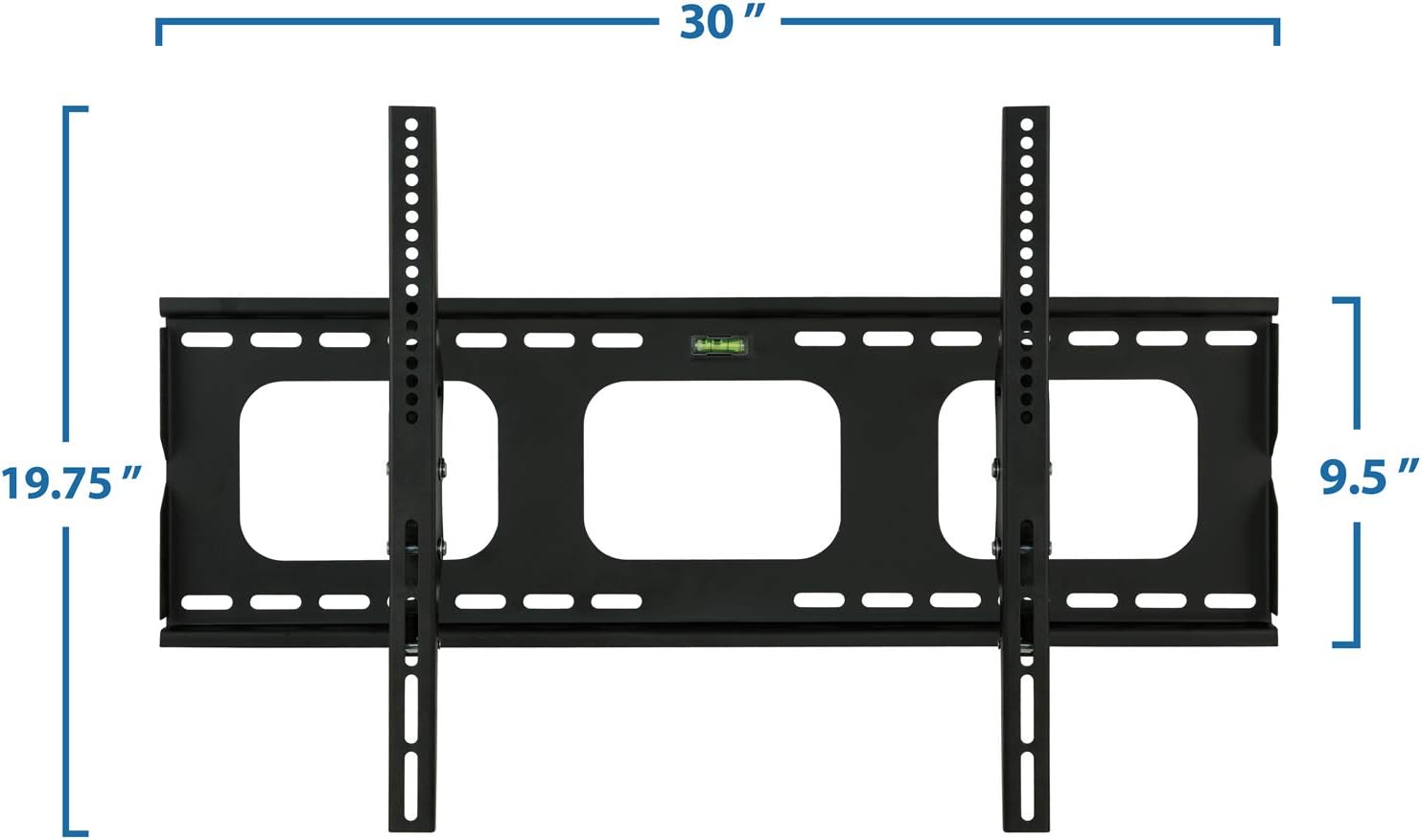
Image: Close-up view of the safety screw bracket locking system, showing how the screw secures the TV bracket to the wall plate.
Cable Management
The wall plate features large openings to facilitate cable routing. After mounting your TV, feed your cables through these openings to keep them organized and out of sight.

Image: Illustration showing large openings in the wall plate for effortless cable routing, ensuring a clean and neat setup.
6. Operating Instructions
Adjusting Tilt Angle
This mount features a continuous tilt mechanism allowing for a +/- 15-degree tilt. To adjust the tilt:
- Locate the easy-to-turn tilt knobs on the side of the TV brackets.
- Loosen the knobs slightly to allow the TV to tilt.
- Adjust the TV to your desired viewing angle.
- Tighten the tilt knobs firmly to secure the TV in place.

Image: Illustration demonstrating the tilt adjustment feature of the mount, allowing users to easily change the viewing angle.

Image: A person adjusting the tilt of a mounted TV, highlighting the tool-free tilt adjustment for an elevated viewing experience.
7. Maintenance
- Regular Inspection: Periodically check that all screws and connections are tight and secure. Over time, vibrations or movement can cause fasteners to loosen.
- Cleaning: Clean the mount with a soft, dry cloth. Avoid using abrasive cleaners or solvents that could damage the finish.
- Damage: If any part of the mount appears damaged or worn, discontinue use and contact Mount-It! customer support for replacement parts or advice.
8. Troubleshooting
- TV is not level: Ensure the wall plate was installed level using the integrated bubble level. If the wall plate is level, check if the TV brackets are evenly attached to the TV. Minor adjustments can sometimes be made by slightly loosening and re-tightening the TV bracket screws.
- Difficulty tilting the TV: Ensure the tilt knobs on the side of the TV brackets are sufficiently loosened before attempting to adjust the tilt. If they are too tight, the mechanism will be stiff.
- TV feels unstable: Immediately remove the TV from the mount. Re-check all wall mounting hardware and TV bracket screws to ensure they are securely tightened. Verify that the wall structure is appropriate and that the weight capacity has not been exceeded. Ensure safety screws are engaged.
- Cables are blocked by the mount: This mount features an open plate design for cable access. If cables are still blocked, ensure you used appropriate spacers when attaching the TV brackets to the TV.
9. Warranty and Support
Mount-It! products are designed for durability and performance. For warranty information, technical support, or to purchase replacement parts, please visit the official Mount-It! website or contact their customer service department directly. Please have your model number (MI-303B) and purchase information ready when contacting support.
Mount-It! Official Website: Visit Mount-It! Store on Amazon


