
1. Introduction
This manual provides essential information for the safe and effective use of your Frigidaire FGMO205KF Gallery Series Built-In Microwave Oven. Please read all instructions carefully before operating the appliance and retain this manual for future reference. This 2.0 cu. ft. capacity microwave oven features 1200 watts of cooking power, Sensor Cook technology, multiple Auto Cook options, User Preference settings, and One-Touch options for convenient meal preparation.
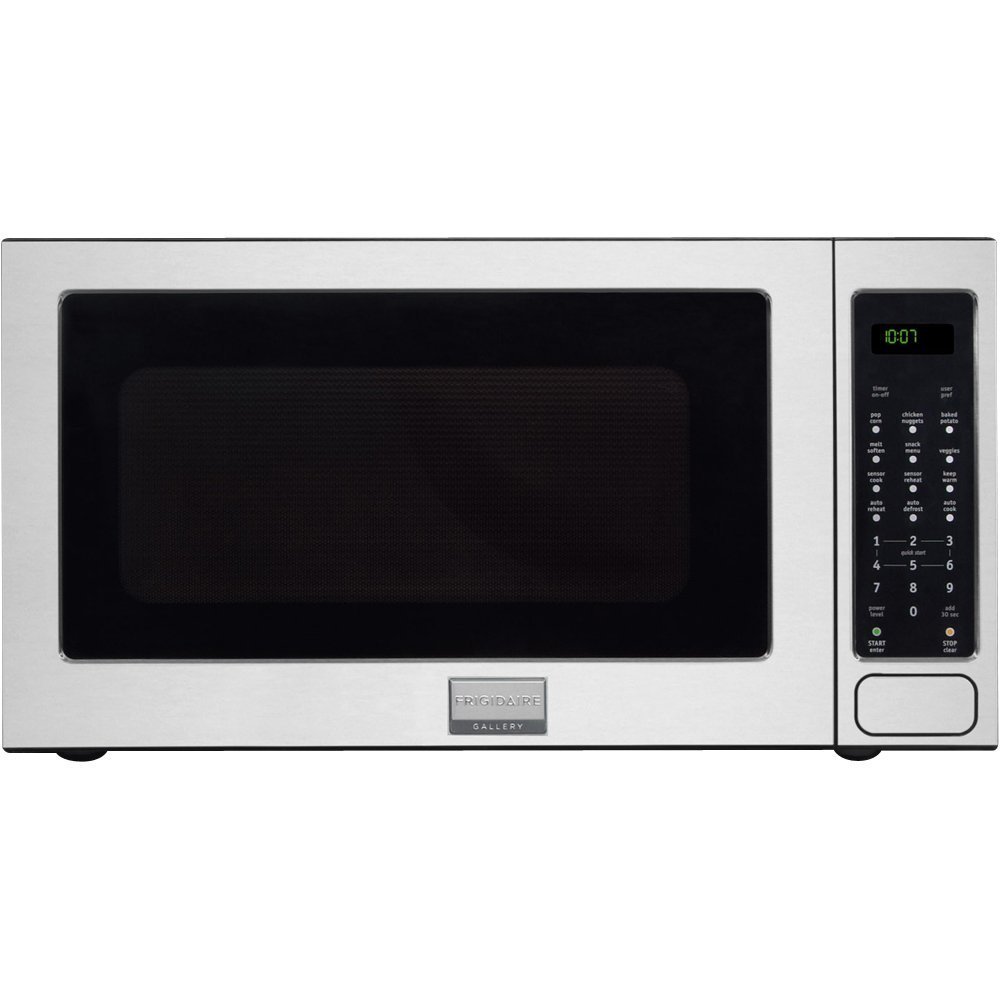
Image: Frigidaire FGMO205KF Gallery Series Microwave Oven in Stainless Steel, showcasing its sleek design and control panel.
2. Important Safety Instructions
When using electrical appliances, basic safety precautions should be followed, including the following:
- Read all instructions before using the appliance.
- Do not attempt to operate this oven with the door open as this can result in harmful exposure to microwave energy.
- Do not place any object between the oven front face and the door or allow soil or cleaner residue to accumulate on sealing surfaces.
- Do not operate the oven if it is damaged. It is particularly important that the oven door closes properly and that there is no damage to the: (1) door (bent), (2) hinges and latches (broken or loosened), (3) door seals and sealing surfaces.
- The oven should not be adjusted or repaired by anyone except properly qualified service personnel.
- Do not heat liquids or other foods in sealed containers since they are liable to explode.
- Do not use corrosive chemicals or vapors in this appliance.
- Close supervision is necessary when the appliance is used by or near children.
- Only use utensils that are suitable for use in microwave ovens.
3. Setup and Installation
The Frigidaire FGMO205KF is designed for built-in installation. Proper installation is crucial for optimal performance and safety. It is recommended that installation be performed by a qualified technician.
3.1 Unpacking
Remove all packaging materials from inside the microwave oven cavity and from the door. Check the oven for any damage, such as a misaligned or bent door, damaged door seals and sealing surface, broken or loose door hinges and latches, or dents inside the cavity or on the door. If any damage is present, do not operate the oven and contact customer support.
3.2 Electrical Requirements
Ensure the microwave oven is connected to a properly grounded electrical outlet with the correct voltage and amperage as specified in the electrical rating label on the oven. Do not use extension cords.
3.3 Built-In Installation
This microwave requires a compatible trim kit for built-in installation into cabinetry. Follow the specific instructions provided with your trim kit for precise cabinet cutout dimensions and mounting procedures. Ensure adequate ventilation space is maintained around the appliance as per the installation guide.
4. Operating Instructions
Your Frigidaire FGMO205KF microwave oven offers a variety of cooking functions to simplify your kitchen tasks.
4.1 Basic Operation
- Setting Cook Time: Enter the desired cooking time using the number pad.
- Start/Enter: Press this button to begin cooking or confirm a selection.
- Stop/Clear: Press this button to stop cooking or clear an entry.
- Add 30 Sec: Press to add 30 seconds of cooking time at full power.
- Power Level: Adjust the microwave power level for different cooking needs.
4.2 Sensor Cook Functions
Sensor Cook automatically adjusts cooking time and power levels based on the humidity detected from the food, ensuring optimal results. Press the 'Sensor Cook' button and select the corresponding number for your food item:
- 1: Frozen Entrees
- 2: Ground Meat
- 3: Rice
- 4: Chicken Breast
- 5: Fish/Seafood
4.3 Auto Cook Options
These pre-programmed settings simplify cooking common items. Press the 'Auto Cook' button and select the corresponding number:
- 1: Pizza
- 2: Hot Dogs
- 3: Beverage
4.4 Auto Reheat Options
Reheat various foods with optimized settings. Press the 'Auto Reheat' button and select the corresponding number:
- 1: Fresh Rolls/Muffins
- 2: Frozen Rolls/Muffins
- 3: Pasta
4.5 Auto Defrost Options
Defrost food efficiently by weight or type. Press the 'Auto Defrost' button and select the corresponding number:
- 1: Ground Meat
- 2: Steaks/Chops/Fish
- 3: Chicken Pieces
- 4: Roast
- 5: Casserole
- 6: Soup
4.6 Snack Menu
Convenient settings for popular snacks. Press the 'Snack Menu' button and select the corresponding number:
- 1: Hand-held Snacks (3-4 oz)
- 2: Hand-held Snacks (5-6 oz)
- 3: Frozen Kid's Meal
4.7 Melt/Soften Functions
Achieve perfect melting or softening results. Press the 'Melt/Soften' button and select the corresponding number:
- 1: Butter
- 2: Chocolate
- 3: Ice Cream
- 4: Cream Cheese
4.8 User Preference Options
The microwave offers 7 user preference options to customize settings such as clock display, sound levels, and more. Refer to the full manual for detailed instructions on setting these preferences.
4.9 One-Touch Options
Quick access buttons for common tasks like Popcorn, Chicken Nuggets, Baked Potato, and Veggies. Simply press the desired button to start cooking.
5. Maintenance and Cleaning
Regular cleaning and maintenance will ensure the longevity and efficient operation of your microwave oven.
5.1 Cleaning the Interior
Wipe the oven cavity after each use with a damp cloth to prevent food splatters from drying and sticking. For stubborn stains, use a mild soap solution or a microwave-safe cleaner. Do not use abrasive cleaners or scouring pads.
5.2 Cleaning the Exterior
Clean the exterior surfaces, including the door and control panel, with a soft, damp cloth and mild soap. For stainless steel surfaces, use a stainless steel cleaner and polish, wiping in the direction of the grain. Avoid spraying cleaners directly onto the control panel.
5.3 Turntable Care
The glass turntable and roller ring can be removed for cleaning. Wash them in warm, soapy water or in the dishwasher. Ensure they are completely dry before placing them back in the oven. Do not operate the microwave without the turntable and roller ring properly in place.
6. Troubleshooting
Before contacting customer service, refer to the following common issues and solutions:
| Problem | Possible Cause | Solution |
|---|---|---|
| Oven does not start | Door not closed properly; Power cord unplugged; Blown fuse/tripped circuit breaker. | Ensure door is securely latched; Check power cord connection; Check household fuse/circuit breaker. |
| No heat during operation | Incorrect power level selected; Technical malfunction. | Verify power level setting; Contact service if issue persists. |
| Display not working | Power interruption; Control panel issue. | Reset power by unplugging for 30 seconds; Contact service. |
| Food is unevenly cooked | Food not stirred/rotated; Turntable not rotating. | Stir or rotate food during cooking; Ensure turntable is correctly placed and rotates freely. |
| Loud beeping sound | End of cooking cycle alert. | Some models allow adjustment or disabling of alert sounds in User Preferences. |
7. Specifications
| Feature | Detail |
|---|---|
| Brand | Frigidaire |
| Model Number | FGMO205KF |
| Capacity | 2.0 Cubic Feet |
| Wattage | 1200 Watts |
| Exterior Dimensions (D x W x H) | 19.13"D x 24"W x 13.38"H |
| Interior Dimensions (W x D x H) | 17-3/8"W x 18-5/8"D x 10-1/2"H |
| Color | Stainless Steel |
| Material | Steel (Inner Material: Stainless Steel) |
| Installation Type | Built-In |
| Controller Type | Touch |
| Number of Programs | 10 |
| Item Weight | 41 Pounds |
8. Warranty Information
Your Frigidaire FGMO205KF microwave oven is covered by a limited manufacturer's warranty. Please refer to the warranty card included with your purchase for specific terms, conditions, and duration of coverage. Keep your proof of purchase for warranty claims.
9. Customer Support
For technical assistance, service, or to order replacement parts, please contact Frigidaire Customer Service. Have your model number (FGMO205KF) and serial number ready when you call.
Frigidaire Customer Service:
Website: www.frigidaire.com
Phone: Refer to your product registration or local Frigidaire website for contact numbers specific to your region.


