
Fissler PROX61
Fissler CookStar Induction Pro Portable Cooktop User Manual
Model: PROX61
1. Introduction
Thank you for choosing the Fissler CookStar Induction Pro Portable Cooktop. This manual provides essential information for the safe and efficient operation, maintenance, and troubleshooting of your new appliance. Please read these instructions thoroughly before first use and keep them for future reference.
2. Product Features
- Powerful Performance: Equipped with a 1500-watt motor for rapid heating.
- Elegant Design: Stylish black profile with a frameless Schott Ceran glass ceramic surface.
- Booster Function: Temporarily increases power to 1500 watts for 20 seconds for quick boiling or searing.
- Keep Warm Function: Maintains food at a steady 140°F (60°C), ideal for serving, with an automatic 2-hour timer.
- Integrated Timer: Allows for precise cooking control.
- Quiet Operation: Features a whisper-quiet cooling fan.
- Compact and Portable: Slim design for easy storage and use in various locations.
- Easy to Clean: Frameless surface simplifies cleaning.
- Quality Construction: Made in Germany, ensuring high standards of craftsmanship.
3. Safety Instructions
Always follow basic safety precautions when using electrical appliances to reduce the risk of fire, electric shock, and injury.
- Electrical Safety: Ensure the cooktop is plugged into a grounded 110V outlet. Do not use with damaged cords or plugs.
- Ventilation: The cooktop requires adequate airflow. Do not block the air intake vents on the bottom or the exhaust vents on the back of the unit. Placing the unit on a towel or against a wall can impede airflow and cause overheating.
- Cookware: Use only induction-compatible cookware with a flat, magnetic bottom. Non-induction cookware will not heat.
- Avoid Glazed Pots: Do not use pots with glaze, especially cast iron with glaze, even if labeled induction-ready. The glaze may shatter due to rapid expansion differences between the glaze and the metal.
- Placement: Place the cooktop on a stable, heat-resistant, and flat surface. Keep it away from heat sources, water, and flammable materials.
- Hot Surfaces: The cooktop surface will become hot during and after use. Do not touch hot surfaces.
- Initial Odor: A slight electrical odor may be present during the first few uses, especially at high power. This is normal and will dissipate. Ensure good ventilation during this period.
- Hearing Aids: Some users with hearing aids may experience interference at higher power levels.
- Children and Pets: Keep the appliance out of reach of children and pets.
4. Setup
- Unpack: Carefully remove the cooktop from its packaging. Retain packaging for future transport or storage.
- Placement: Place the cooktop on a clean, dry, stable, and level surface. Ensure there is sufficient space around the unit for proper ventilation, especially at the bottom and back. Avoid placing it directly against a wall or on soft surfaces like tablecloths or towels that could block vents.
- Power Connection: Plug the power cord into a standard 110V electrical outlet.
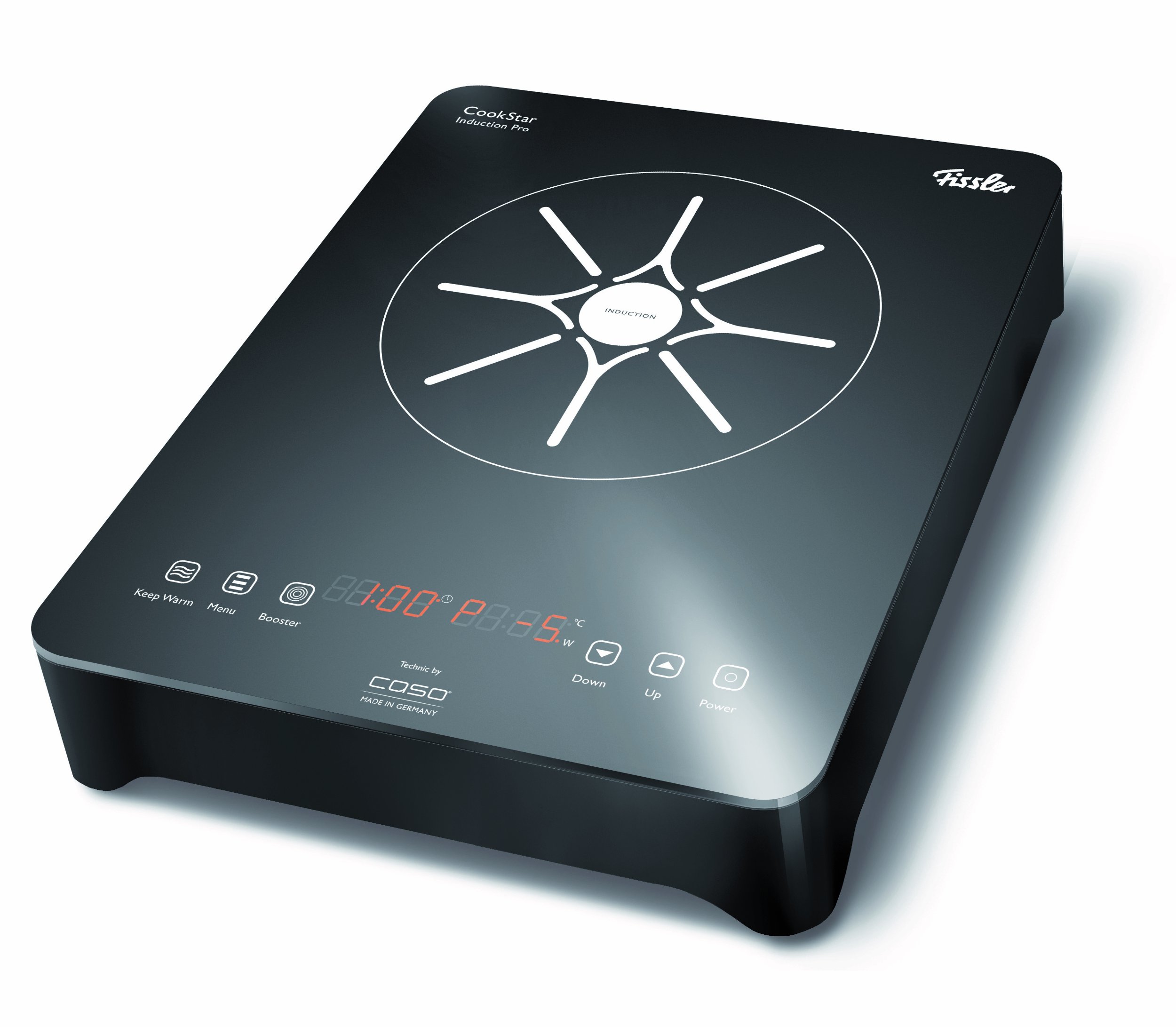
Image: The Fissler CookStar Induction Pro Portable Cooktop, showcasing its sleek black design and frameless glass ceramic surface, positioned on a countertop. This image illustrates the compact size and aesthetic of the unit when set up for use.
5. Operating Instructions
The Fissler CookStar Induction Pro offers intuitive touch controls for various cooking functions.
5.1 Power On/Off
- Press the Power button to turn the unit on. The display will illuminate.
- To turn off, press the Power button again.
5.2 Power Level Selection
After turning on, place an induction-compatible pot on the cooktop. The unit will typically start at a default power level (e.g., 0) or prompt for selection.
- Use the Up (+) and Down (-) buttons to adjust the power level from 1 to 9.
- For quick adjustment, pressing the Menu button may jump to a common power level (e.g., 5), from which you can fine-tune with the Up/Down buttons.
- Power level 9 is the maximum setting for rapid heating.
5.3 Temperature Mode
The cooktop also features preset temperature settings for precise cooking.
- Switch to temperature mode (refer to the control panel for the specific button, often labeled 'Temp' or integrated with 'Menu').
- Select desired temperature, such as 180°F (82°C) or 150°F (66°C) for simmering.
5.4 Booster Function
- Activate the Booster function (usually a dedicated button) for a temporary surge of power up to 1500 watts.
- This function operates for approximately 20 seconds, after which the power returns to the previously set level.
5.5 Keep Warm Function
- Press the Keep Warm button to activate this function.
- The cooktop will maintain a temperature of 140°F (60°C).
- The timer automatically starts for 2 hours, but you can manually turn off the function or restart the timer as needed.
5.6 Integrated Timer
- Use the Timer button to set a cooking duration.
- Adjust the time using the Up/Down buttons. The cooktop will automatically turn off once the set time expires.
5.7 Display Readability
Note that the red LED display for power and timer may be challenging to read in very bright lighting conditions.
6. Compatible Cookware
Induction cooktops require specific types of cookware. For optimal performance, use pots and pans that are compatible with induction heating.
- Magnetic Test: To check if your cookware is induction-compatible, hold a magnet to the bottom of the pot or pan. If the magnet sticks firmly, the cookware is suitable for induction.
- Recommended Materials: Cast iron, magnetic stainless steel, and enamel-on-steel cookware are generally compatible. Many All-Clad pots and pans are suitable due to their induction-ready stainless steel outer layer.
- Avoid: Aluminum, copper, glass, and non-magnetic stainless steel cookware will not work on an induction cooktop. As noted in safety instructions, avoid glazed pots, even if they claim to be induction-ready, as the glaze can crack or shatter.
7. Maintenance and Cleaning
Regular cleaning and proper maintenance will ensure the longevity and optimal performance of your Fissler CookStar Induction Pro.
- Before Cleaning: Always unplug the cooktop from the power outlet and allow it to cool completely before cleaning.
- Surface Cleaning: The frameless glass ceramic surface is easy to clean. Wipe it with a soft, damp cloth and mild detergent. For stubborn stains, use a non-abrasive ceramic cooktop cleaner.
- Avoid Abrasives: Do not use abrasive cleaners, scouring pads, or harsh chemicals, as these can scratch or damage the surface.
- Control Panel: Wipe the control panel gently with a damp cloth. Ensure no liquid enters the control area.
- Vents: Periodically check the air intake and exhaust vents for dust or debris. Gently wipe them clean to ensure unobstructed airflow. Do not use liquids directly on the vents.
- Storage: When not in use, store the cooktop in a clean, dry place. Its slim design allows for compact storage.
8. Troubleshooting
If you encounter issues with your cooktop, refer to the following common problems and solutions before contacting customer service.
| Problem | Possible Cause | Solution |
|---|---|---|
| Cooktop does not turn on. | No power supply; unit not plugged in; power outlet malfunction. | Ensure the power cord is securely plugged into a working 110V outlet. Check household circuit breaker. |
| Cookware is not heating. | Cookware is not induction-compatible; pot not centered; pot too small/large. | Use only induction-compatible cookware. Ensure the pot is centered on the cooking zone. Use cookware within recommended size limits. |
| Unit overheats and shuts down. | Blocked ventilation vents; prolonged use at high power. | Ensure air intake (bottom) and exhaust (back) vents are clear. Do not place on soft surfaces. Allow unit to cool before restarting. |
| Chirping or buzzing sound. | Normal operation for some induction units; cookware type. | A slight sound can be normal. If excessively loud, ensure cookware is flat-bottomed and suitable for induction. The Fissler unit features a whisper-quiet fan, so loud noises may indicate an issue. |
| Initial odor during first use. | New components burning off manufacturing residues. | This is normal. Ensure good ventilation (open windows, use exhaust fan) until the odor dissipates. |
| LED display is hard to read. | Bright ambient lighting. | Adjust ambient lighting if possible. This is a characteristic of the display type. |
9. Specifications
- Model Number: PROX61
- Brand: Fissler
- Color: Black
- Material: Glass Ceramic (Schott Ceran)
- Heating Elements: 1
- Wattage: 1500 watts
- Controls Type: Touch
- Power Source: Corded Electric (110V)
- Dimensions: 14.4" x 11.1" x 2.9" (approximate)
- Manufacturer: Fissler USA
10. Warranty and Support
The Fissler CookStar Induction Pro Portable Cooktop comes with a 3-year warranty, covering defects in materials and workmanship under normal household use.
For warranty claims, technical support, or any questions not addressed in this manual, please contact Fissler customer service. Keep your proof of purchase for warranty validation.
You can find contact information for Fissler USA on their official website or through your retailer.
Ask a question about this manual
Ask about setup, troubleshooting, compatibility, parts, safety, or missing instructions. Manuals+ will review the question and use this page’s manual context to help answer it.