
1. Introduction
The Ohaus Scout Pro Digital Balance is a precision weighing instrument designed for accurate measurements in various laboratory and industrial settings. This manual provides essential information for the proper setup, operation, and maintenance of your balance, ensuring optimal performance and longevity.
Key features include a large stainless steel weighing surface, multiple weighing units (grams, kilograms, pounds, ounces, troy ounces, pennyweights), and connectivity options via USB or RS-232 interface.
2. Safety Information
- Always operate the balance on a stable, level surface free from vibrations.
- Avoid exposing the balance to extreme temperatures, humidity, or direct sunlight.
- Do not overload the balance beyond its maximum capacity of 600g.
- Keep the balance clean and free from dust and corrosive substances.
- Use only the power adapter supplied with the balance.
- Do not attempt to disassemble or repair the balance yourself. Refer to qualified service personnel.
3. Package Contents
Carefully unpack the box and ensure all items are present and undamaged. The package should contain:
- Ohaus Scout Pro Digital Balance
- Stainless Steel Weighing Pan
- AC Power Adapter
- User Manual (this document)
- Carrying Case
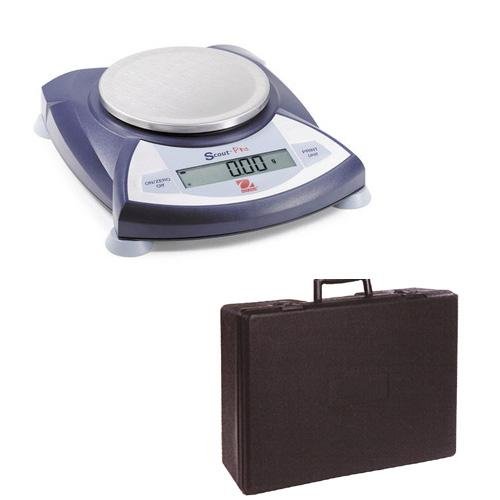
Image 3.1: The Ohaus Scout Pro Digital Balance shown with its included protective carrying case.
4. Setup
4.1. Placement
Place the balance on a firm, level, and stable surface. Ensure the location is free from drafts, vibrations, and rapid temperature changes. Avoid placing it near heat sources or direct sunlight.
4.2. Leveling
The balance must be level for accurate measurements. Adjust the leveling feet located at the bottom of the balance until the air bubble in the spirit level (usually located near the display) is centered within the circle.
4.3. Power Connection
- Connect the AC power adapter to the power input port on the back of the balance.
- Plug the adapter into a suitable electrical outlet.
4.4. Initial Power On and Zeroing
Press the ON/ZERO/OFF button to turn on the balance. Allow a brief warm-up period (typically 1-2 minutes) for the balance to stabilize. The display should show '0.00g' or '0.000g'. If not, press the ON/ZERO/OFF button again to zero the display.
5. Operating Instructions
5.1. Basic Weighing
- Ensure the balance is level and displaying '0.00g'.
- Carefully place the item to be weighed onto the center of the stainless steel weighing pan.
- Wait for the display to stabilize. The stable weight will be shown on the display.
- Remove the item from the pan. The display should return to '0.00g'.
5.2. Changing Weighing Units
The Scout Pro balance supports multiple weighing units. To change the unit:
- Press the UNIT button (or similar button labeled with unit symbols).
- Each press will cycle through the available units: grams (g), kilograms (kg), pounds (lb), ounces (oz), combined pound:ounce (lb:oz), troy ounces (ozt), and pennyweights (dwt).
- Stop at the desired unit. The display will show the current weight in the selected unit.
5.3. Tare Function
To weigh an item in a container, use the tare function:
- Place the empty container on the weighing pan.
- Press the ON/ZERO/OFF button (or a dedicated TARE button if available). The display will reset to '0.00g'.
- Add the item to be weighed into the container. The display will show the net weight of the item.
5.4. Connectivity (USB/RS-232)
The balance is equipped with a USB or RS-232 interface for data communication with a computer or printer. For detailed instructions on connecting and configuring these interfaces, refer to the specific communication protocol documentation or the Ohaus website for driver and software information.
6. Maintenance
6.1. Cleaning
- Always disconnect the balance from the power supply before cleaning.
- Wipe the exterior of the balance with a soft, damp cloth. A mild detergent can be used if necessary.
- Do not use abrasive cleaners, solvents, or harsh chemicals, as these can damage the finish or internal components.
- Ensure no liquids enter the balance housing or display.
- The stainless steel weighing pan can be removed and washed separately.
6.2. Storage
When not in use for extended periods, store the balance in its protective carrying case in a dry, dust-free environment. Ensure the balance is clean and disconnected from power.
7. Troubleshooting
If you encounter issues with your Ohaus Scout Pro Digital Balance, refer to the following common problems and solutions:
| Problem | Possible Cause | Solution |
|---|---|---|
| Display shows 'Err' or 'Overload' | Balance overloaded or damaged. | Remove excess weight. If persistent, contact support. |
| Inaccurate or unstable readings | Not level, vibrations, drafts, temperature changes, dirty pan. | Check leveling, move to a stable location, clean pan. |
| Balance does not turn on | No power, faulty adapter. | Check power connection, try a different outlet, ensure adapter is functional. |
| Display shows '0.00' but weight is not zero | Balance needs zeroing. | Press the ON/ZERO/OFF button to re-zero. |
If the problem persists after attempting these solutions, please contact Ohaus customer support.
8. Specifications
| Feature | Specification |
|---|---|
| Model | Scout Pro 600 X 0.01g |
| Capacity | 600 g |
| Readability | 0.01 g |
| Weighing Units | grams (g), kilograms (kg), pounds (lb), ounces (oz), pound:ounce (lb:oz), troy ounces (ozt), pennyweights (dwt) |
| Weighing Surface Material | Stainless Steel |
| Interface | USB, RS-232 |
| Item Weight | 6.94 Pounds (approx. 3.15 kg) |
| Manufacturer | Ohaus |
| ASIN | B0027I6WPU |
9. Warranty and Support
For information regarding the product warranty, please refer to the warranty card included with your purchase or visit the official Ohaus website. For technical support, service, or replacement parts, please contact Ohaus customer service directly. Contact details can typically be found on the Ohaus website or in your product packaging.
When contacting support, please have your product model number (Scout Pro 600 X 0.01g) and serial number (if applicable) ready.


