1. Introduction
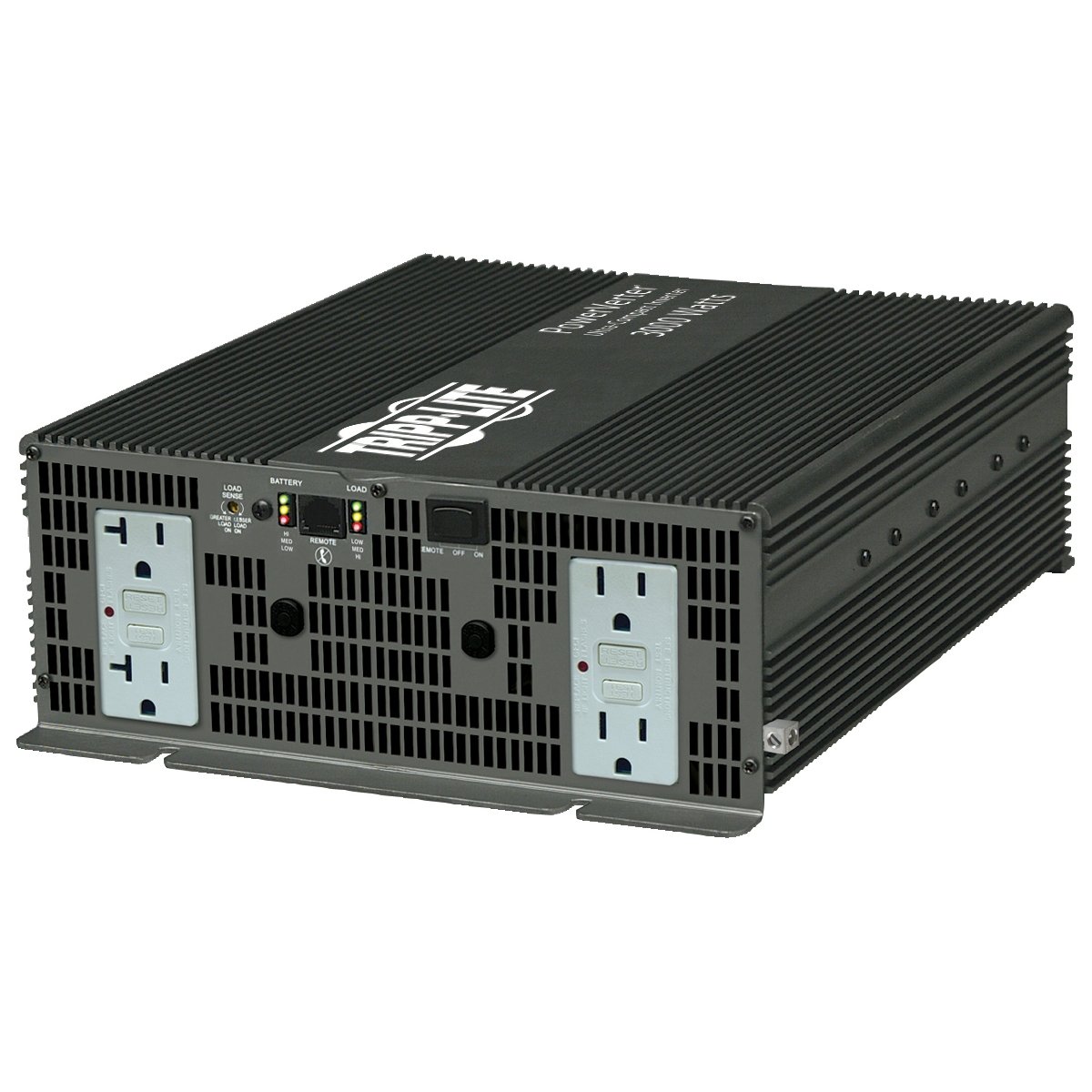
This manual provides essential information for the safe and efficient operation of your Tripp Lite 3000W PowerVerter Plus Inverter (Model PV3000GCFI). This industrial-strength power inverter is designed to convert 12V DC power from a battery or automotive source into 120V AC power, suitable for various heavy-duty applications, including powering office equipment on the road or tools at a work site.
2. Safety Information
WARNING: This product can expose you to chemicals including Lead and Lead Compounds, which are known to the State of California to cause cancer and birth defects or other reproductive harm. For more information, go to www.P65Warnings.ca.gov.
- Read all instructions before operating the inverter.
- Ensure proper ventilation around the inverter to prevent overheating.
- Connect the inverter only to a 12V DC power source.
- Do not expose the inverter to moisture or extreme temperatures.
- Always disconnect the inverter from the power source before performing any maintenance or cleaning.
- Avoid overloading the inverter beyond its rated capacity.
3. Package Contents
Verify that your package contains the following items:
- PV3000GCFI Inverter
- Remote control LED/switch module (APSRM4)
- 25-ft. remote cable
- Warranty information
- Instruction manual (this document)
4. Key Features
- Power Output: 3000 watts continuous output power; up to 6000 watts instantaneous peak power.
- Outlets: 4 shock-protected GFCI AC outlets for enhanced safety.
- Design: Rugged all-metal housing with an ultra-compact, lightweight design.
- Protection: Automatic shutdown feature to prevent battery drain.
- Remote Control: Includes a remote control LED/switch module with a 25-ft. cable for convenient operation.
5. Setup Instructions
Follow these steps to properly set up your PowerVerter Plus Inverter:
- Unboxing and Inspection: Carefully remove all components from the packaging. Inspect the inverter and accessories for any signs of damage.
- Placement: Choose a well-ventilated, dry location for the inverter, away from direct sunlight, heat sources, and flammable materials. Ensure sufficient space around the unit for airflow.
- Battery Connection: Connect the inverter directly to a 12V DC battery or automotive DC source using appropriate cables. Ensure correct polarity: connect the red cable to the positive (+) terminal and the black cable to the negative (-) terminal. Secure all connections tightly.
- Remote Control Connection (Optional): If using the remote control, connect the 25-ft. remote cable to the designated remote port on the inverter and the remote control module.
Setup Demonstration Video
Video 1: This video demonstrates the setup process for a similar 5000W power inverter, including connecting to a battery and plugging in devices. While the model differs, the general connection principles are applicable.
Video 2: A seller's overview of a 5500W power inverter, showcasing its front and back panels, including AC outlets, USB ports, and battery terminals. Provides a visual reference for inverter components.
6. Operating Instructions
- Powering On: Once the inverter is securely connected to the 12V DC power source, press the power button on the inverter or the remote control module to turn the unit on. The power indicator light should illuminate.
- Connecting Devices: Plug your 120V AC devices into the GFCI outlets on the inverter. Ensure that the total wattage of all connected devices does not exceed the inverter's continuous power rating of 3000W.
- Monitoring: Observe the inverter's display (if available) or indicator lights for information on battery voltage, output wattage, and any fault conditions.
- Automatic Shutdown: The inverter features an automatic shutdown mechanism to protect your battery from excessive discharge. If the battery voltage drops too low, the inverter will shut off to prevent damage.
- Powering Off: To turn off the inverter, press the power button on the unit or the remote control. Disconnect all AC devices before disconnecting the inverter from the DC power source.
Remote Control Reset Demonstration Video
Video 3: This video demonstrates how to reset the remote controller for an inverter. This process can be useful if the remote is not responding or needs to be re-synchronized.
7. Maintenance
- Cleaning: Keep the inverter clean and free from dust and debris. Use a dry cloth to wipe down the exterior. Do not use liquid cleaners.
- Ventilation: Regularly check that the ventilation openings are not blocked to ensure proper cooling.
- Battery Care: Ensure your 12V battery is well-maintained and charged. A healthy battery is crucial for optimal inverter performance.
- Connections: Periodically inspect all electrical connections for tightness and corrosion. Loose connections can lead to poor performance or safety hazards.
8. Troubleshooting
| Problem | Possible Cause | Solution |
|---|---|---|
| Inverter does not turn on | No DC input power; loose battery connections; low battery voltage. | Check battery connections and ensure they are tight. Verify battery voltage is sufficient (above 10.5V). Charge or replace battery if necessary. |
| No AC output | Overload; thermal shutdown; fault condition. | Reduce connected load. Allow inverter to cool down. Check for fault indicators and consult the manual for specific fault codes. Reset the inverter if needed. |
| Inverter shuts down frequently | Overheating; low battery voltage; excessive load. | Ensure adequate ventilation. Check battery charge. Reduce the total wattage of connected devices. |
9. Specifications
| Feature | Specification |
|---|---|
| Model Name | PV3000GCFI |
| Wattage (Continuous) | 3000 watts |
| Peak Power Output | 6000 watts |
| Power Source | Battery Powered (12V DC) |
| Output Voltage | 120V AC |
| Outlets | 4 GFCI AC outlets |
| Product Dimensions | 14.8 x 12.5 x 4.3 inches |
| Item Weight | 12.2 pounds |
| Manufacturer | TRIPP LITE |
10. Warranty and Support
The Tripp Lite 3000W PowerVerter Plus Inverter (PV3000GCFI) comes with a 1-year warranty. For technical support, warranty claims, or additional product information, please contact TRIPP LITE customer service or visit their official website.


