
1. Product Overview
The Gira 291600 System 55 Emergency Call Module is a critical component designed for integration into an emergency call system. This module incorporates essential electronics, an indicator light, and an acoustic buzzer to provide clear and immediate alerts during an emergency. It features a potential-free contact, which is maintained for the duration of an emergency call, allowing for flexible system integration. The optical and acoustic signals are configurable via internal jumpers, offering options such as steady light, flashing light, or a distinct emergency signal. This module is intended to expand or enhance existing emergency call kits, ensuring reliable communication in critical situations.
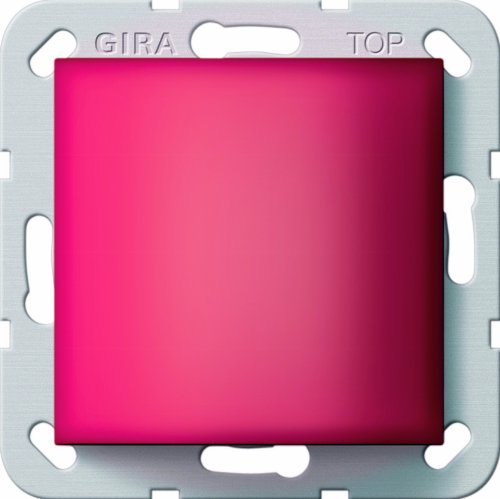
Image 1.1: The Gira 291600 System 55 Emergency Call Module, featuring a square, red indicator surface set within a light grey mounting frame. The frame is marked with "GIRA" and "TOP" for orientation.
2. Safety Information
- Electrical Safety: Installation and maintenance of this device must only be performed by qualified and authorized electrical personnel in accordance with all local and national electrical codes and regulations.
- Power Disconnection: Always ensure that the main power supply to the installation area is disconnected before commencing any installation, wiring, or maintenance work on the module.
- Intended Use: This module is designed for use as part of an emergency call system. Do not use it for purposes other than its intended function.
- Environmental Conditions: Do not expose the module to moisture, extreme temperatures, or corrosive environments. Ensure the installation location is dry and within specified operating temperature ranges.
- Damage Inspection: Before installation, inspect the module for any signs of physical damage. Do not install a damaged unit.
3. Package Contents
The Gira 291600 System 55 Emergency Call Module package typically contains:
- 1 x Gira 291600 System 55 Emergency Call Module
Note: This module is designed to be integrated into a larger emergency call kit. Additional components required for a complete system (e.g., power supply, external signaling devices, call buttons) are sold separately and are not included with this module.
4. Setup and Installation
Installation of the Gira 291600 module should only be carried out by a qualified electrician. Adhere to all relevant electrical safety standards and local building codes.
- Power Disconnection: Before beginning installation, ensure that the main power supply to the circuit where the module will be installed is completely disconnected and secured against accidental re-connection.
- Mounting: Mount the Gira 291600 module into a compatible System 55 frame or housing. Ensure the module is securely seated and oriented correctly (refer to "TOP" marking on the frame).
- Wiring: Connect the module to the emergency call system's wiring according to the provided wiring diagram (typically found in the complete emergency call kit's manual). The module provides a potential-free contact for system integration. Ensure all connections are secure and properly insulated.
- Signal Configuration (Jumpers): The optical (indicator light) and acoustic (buzzer) signals can be configured using internal jumpers.
- Steady Light: For a continuous illumination of the indicator light.
- Flashing Light: For a pulsating illumination of the indicator light.
- Emergency Signal: For a specific, distinct optical and/or acoustic pattern indicating an emergency.
- Testing: After installation and configuration, restore power and perform a thorough test of the emergency call system to ensure the module functions correctly, including the indicator light, buzzer, and potential-free contact.
5. Operating Instructions
The Gira 291600 module operates as an integral part of a larger emergency call system. Its primary function is to provide visual and audible indication when an emergency call is active.
- Emergency Call Activation: When an emergency call is triggered by a connected call button or sensor within the system, the Gira 291600 module will activate its indicator light and buzzer.
- Visual Indication: The indicator light on the module will illuminate according to the pre-set jumper configuration (steady, flashing, or emergency signal).
- Audible Indication: The integrated buzzer will emit an audible signal, also configured via jumpers, to draw attention to the emergency.
- Potential-Free Contact: Simultaneously, the potential-free contact will close (or open, depending on system design) for the duration of the emergency call, signaling the event to connected control units or external devices.
- Call Acknowledgment/Reset: The indicator light and buzzer will typically remain active until the emergency call is acknowledged or reset by the main control unit of the emergency call system. Refer to the main system's manual for specific acknowledgment and reset procedures.
6. Maintenance
The Gira 291600 Emergency Call Module requires minimal maintenance to ensure its continued reliable operation.
- Cleaning: Periodically clean the surface of the module with a soft, dry, lint-free cloth. Do not use abrasive cleaners, solvents, or excessive moisture, as these can damage the module's surface or internal components.
- Functional Checks: Regularly test the emergency call system, including the Gira 291600 module, to ensure all components are functioning correctly. Follow the testing procedures outlined in your complete emergency call system's manual.
- Professional Inspection: It is recommended to have the entire emergency call system, including this module, inspected by a qualified professional at regular intervals as per local regulations or manufacturer recommendations.
7. Troubleshooting
If you experience issues with your Gira 291600 Emergency Call Module, consider the following troubleshooting steps. For complex issues, always consult a qualified electrician or the system installer.
| Problem | Possible Cause | Solution |
|---|---|---|
| Module indicator light or buzzer does not activate during an emergency call. |
|
|
| Indicator light or buzzer signal is incorrect (e.g., steady instead of flashing). |
|
|
If the problem persists after attempting these solutions, contact Gira customer support or a certified service technician.
8. Specifications
| Attribute | Value |
|---|---|
| Manufacturer | Gira |
| Model Number | 291600 |
| Product Dimensions (L x W x H) | 5 x 5 x 5 cm |
| Item Weight | 99.79 grams |
| Batteries Included | No |
| Batteries Required | No |
| Components Included | None (refers to additional items; the module itself is the primary component) |
| Spare Parts Availability | Information unavailable |
9. Warranty and Support
Specific warranty information for the Gira 291600 System 55 Emergency Call Module is typically provided at the point of purchase or within the documentation of the complete emergency call system it is part of. Gira products are known for their quality, and warranty terms usually cover manufacturing defects for a specified period.
For detailed warranty terms, technical support, or service inquiries, please:
- Contact the authorized Gira dealer or installer from whom you purchased the product.
- Visit the official Gira website for contact information and support resources.
- Refer to the documentation provided with your complete emergency call system for integrated support information.
Please have your model number (291600) and purchase details ready when contacting support.