
Introduction
This manual provides essential information for the safe and efficient operation of your Cal TR-60 Electronic Transformer. This device is designed to convert standard 120V AC household current to 12V AC, specifically for use with halogen lamps up to a maximum of 80 watts. Please read these instructions thoroughly before installation and use.
Safety Information
- Electrical Hazard: Installation should be performed by a qualified electrician or a knowledgeable individual familiar with electrical wiring. Ensure power is disconnected at the circuit breaker before installation.
- Compatibility: This transformer is designed for halogen lamps only. Do not use with LED, incandescent, or other lamp types unless explicitly stated as compatible by the lamp manufacturer.
- Wattage Limit: Do not exceed the maximum output of 80 watts. Overloading the transformer can cause damage and create a fire hazard.
- Protection Features: The unit is equipped with short circuit and overload protection for enhanced safety. However, proper installation and adherence to wattage limits are crucial.
- Indoor Use Only: This transformer is intended for indoor, dry location use. Do not expose to moisture or extreme temperatures.
- Ventilation: Ensure adequate ventilation around the transformer to prevent overheating. Do not enclose in airtight spaces.
- UL Listed: This product is UL listed, indicating compliance with safety standards.
Product Overview
The Cal TR-60 is a compact electronic transformer designed for low-voltage halogen lighting systems. It features a durable black casing and pre-attached wiring for both input and output connections.
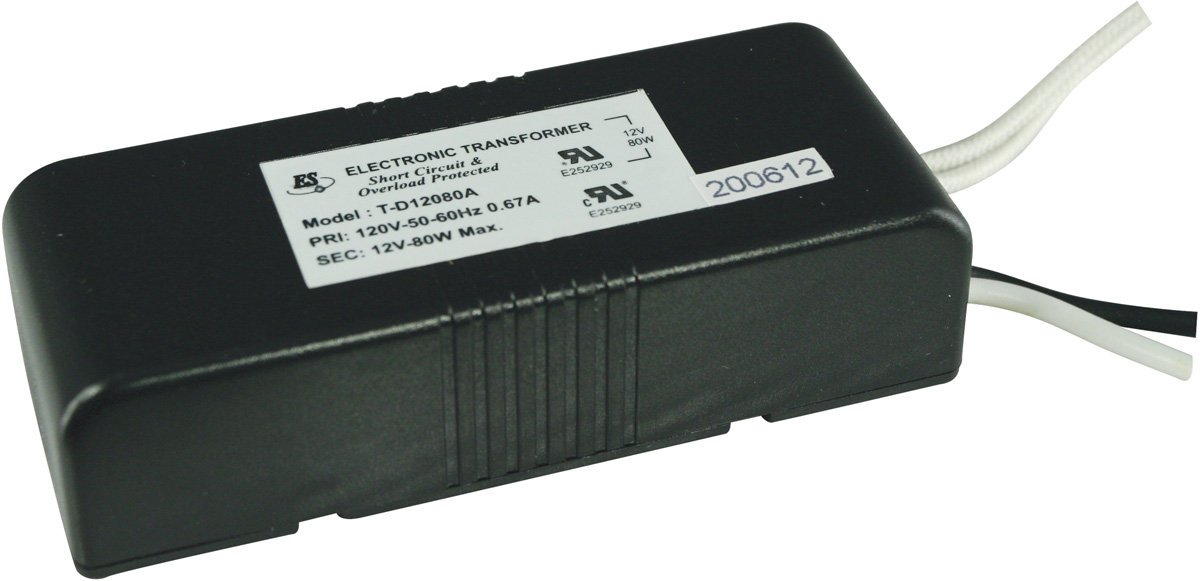
Image 1: Cal TR-60 Electronic Transformer. This image displays the black rectangular transformer unit with its white label clearly visible. The label details the model number T-D12080A, input (PRI: 120V-50-60Hz 0.67A), and output (SEC: 12V-80W Max.) specifications, along with UL certification marks and short circuit/overload protection information. White and black wires extend from one end of the unit for electrical connections.
Key Features:
- 120V AC Input, 12V AC Output
- Maximum 80W output for halogen lamps
- Short Circuit & Overload Protected
- Class 2 rated
- Compact design (approximately 4 x 2 x 1.5 inches)
Setup and Installation
Before beginning installation, ensure all power to the circuit is turned off at the main breaker. Incorrect wiring can lead to electrical shock or fire.
- Disconnect Power: Locate the circuit breaker controlling the lighting fixture and switch it to the OFF position. Verify power is off using a voltage tester.
- Identify Wiring: The transformer has two sets of wires:
- Primary (Input) Wires: These connect to your 120V AC power supply. Typically, these are black (hot) and white (neutral).
- Secondary (Output) Wires: These connect to your 12V halogen lamp(s).
- Connect Primary Wires: Connect the 120V AC input wires from your power source to the transformer's primary wires. Use appropriate wire connectors (e.g., wire nuts) and ensure secure connections.
- Connect the Hot (Live) wire from the power source to the transformer's Hot (Live) input wire.
- Connect the Neutral wire from the power source to the transformer's Neutral input wire.
- Connect Secondary Wires: Connect the transformer's 12V output wires to your halogen lamp fixture. Ensure the total wattage of all connected lamps does not exceed 80W.
- Secure Transformer: Mount the transformer in a suitable, well-ventilated location, away from direct heat sources or moisture. Ensure it is securely fastened to prevent movement.
- Restore Power: Once all connections are secure and the transformer is mounted, restore power at the circuit breaker.
Operating Instructions
The Cal TR-60 Electronic Transformer operates automatically once properly installed and powered. It requires no user interaction for its primary function.
- Power On: After installation, turn on the power at the circuit breaker and then activate the light switch connected to the fixture.
- Lamp Operation: The transformer will supply the necessary 12V AC power to the connected halogen lamps, allowing them to illuminate.
- Dimming: If using with a dimmer switch, ensure the dimmer is compatible with electronic low-voltage transformers and halogen loads. Incompatible dimmers can cause flickering or damage to the transformer/lamps.
Maintenance
The Cal TR-60 Electronic Transformer is designed for maintenance-free operation. However, periodic checks can help ensure longevity and safety.
- Cleaning: Ensure the transformer remains free of dust and debris. If cleaning is necessary, disconnect power and wipe with a dry, soft cloth. Do not use liquid cleaners.
- Ventilation: Periodically check that the area around the transformer remains clear and well-ventilated.
- Wiring Inspection: Annually, or if issues arise, inspect wiring connections for any signs of loosening, corrosion, or damage. Disconnect power before inspection.
- Lamp Replacement: When replacing halogen lamps, ensure the new lamps do not exceed the transformer's 80W maximum output.
Troubleshooting
| Problem | Possible Cause | Solution |
|---|---|---|
| Lamps do not light up. |
|
|
| Lamps flicker or dim inconsistently. |
|
|
| Transformer makes humming noise. |
|
|
Specifications
| Model Number | TR-60 (Also T-D12080A on label) |
| Input Voltage | 120V AC, 50/60Hz, 0.67A |
| Output Voltage | 12V AC |
| Maximum Output Wattage | 80W (for Halogen Lamps Only) |
| Protection | Short Circuit & Overload Protected |
| Class Rating | Class 2 |
| Dimensions (L x W x H) | Approximately 4 x 2 x 1.5 inches |
| Weight | Approximately 3.84 ounces |
| Certifications | UL Listed (E252929) |
| Material | Metal casing |
Warranty Information
This Cal TR-60 Electronic Transformer is covered by a one-year warranty from the date of purchase. This warranty covers defects in materials and workmanship under normal use. It does not cover damage resulting from improper installation, misuse, abuse, or unauthorized modifications. Please retain your proof of purchase for warranty claims.
Support
For technical assistance, troubleshooting beyond this manual, or warranty inquiries, please contact Cal Lighting customer support. Refer to your product packaging or the Cal Lighting official website for current contact information.
Manufacturer: Cal Lighting
UPC: 020193600177


