
1. Introduction
Thank you for purchasing the jWIN JX-M17 Portable Multi-Band Radio. This device offers a wide range of listening options, including AM, FM, LW, and SW bands, along with a built-in alarm clock. This manual provides detailed instructions for setup, operation, maintenance, and troubleshooting to ensure optimal performance and longevity of your radio.
2. Safety Information
- Do not expose the unit to rain or moisture to prevent fire or electric shock.
- Avoid placing the unit near heat sources such as radiators, heat registers, stoves, or other apparatus (including amplifiers) that produce heat.
- Use only attachments/accessories specified by the manufacturer.
- Unplug this unit during lightning storms or when unused for long periods of time.
- Refer all servicing to qualified service personnel. Servicing is required when the apparatus has been damaged in any way.
- Dispose of batteries properly, following local regulations. Do not expose batteries to excessive heat.
3. Package Contents
Please check that all items are present:
- jWIN JX-M17 Portable Multi-Band Radio
- Power Adapter (if included)
- Instruction Manual (this document)
4. Product Overview
Familiarize yourself with the main components and controls of your radio.
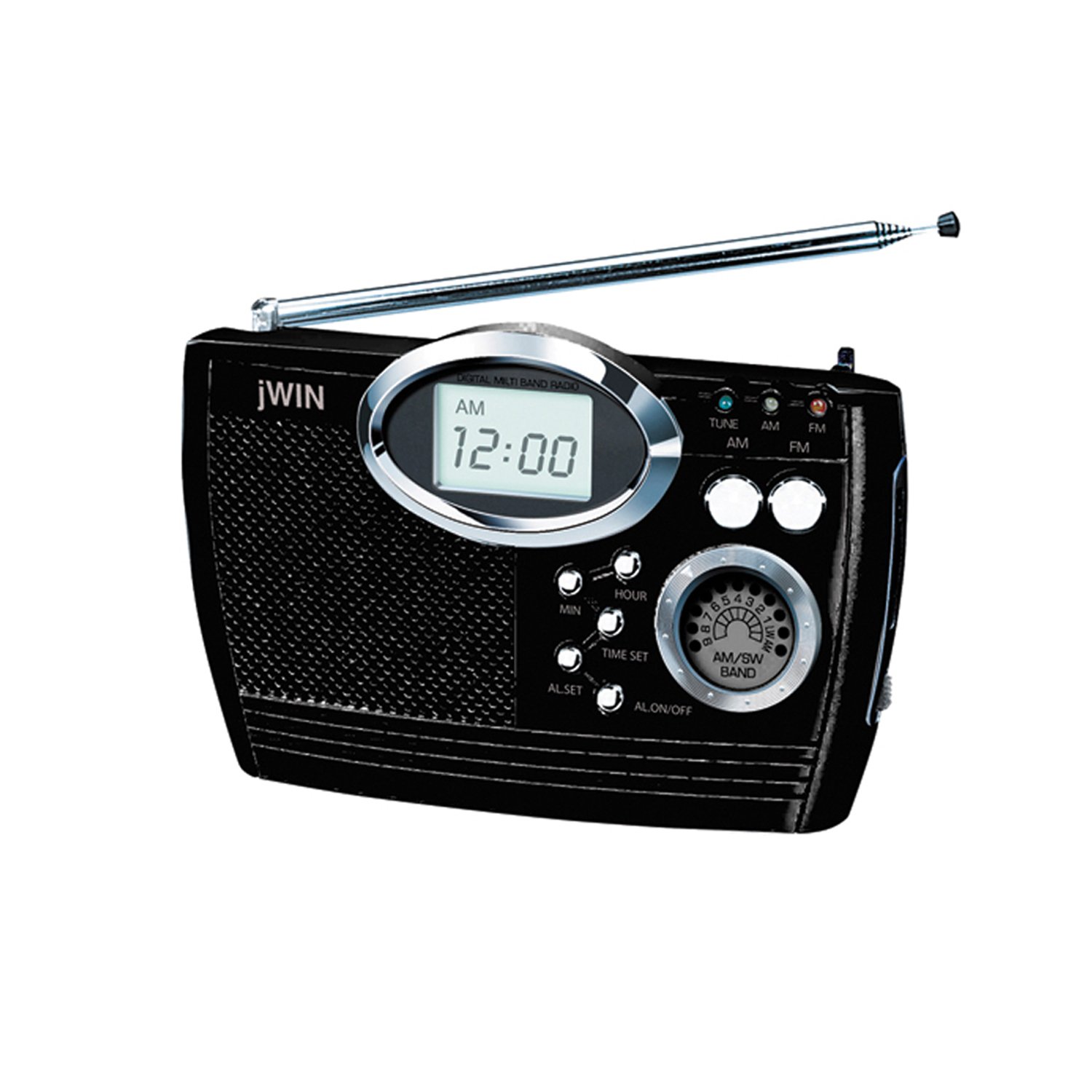
Figure 1: Front view of the jWIN JX-M17 Portable Multi-Band Radio, showing the digital display, tuning knobs, volume control, and function buttons. The telescopic antenna is visible on the top.
- Digital Display: Shows frequency, time, and alarm status.
- Tuning Knob: Used to select radio frequencies.
- Volume Control: Adjusts the audio output level.
- Band Selector: Switches between AM, FM, LW, and SW bands.
- Power Button: Turns the radio on or off.
- Telescopic Antenna: Extends for improved reception, especially for FM and SW bands.
- Integrated Hand Strap: For easy portability.
5. Setup
5.1 Powering the Radio
The JX-M17 radio can be powered by batteries or an AC power adapter.
Battery Installation:
- Locate the battery compartment cover on the back of the radio.
- Slide or unclip the cover to open it.
- Insert the required number of AAA batteries (not included) according to the polarity indicators (+ and -) inside the compartment.
- Replace the battery compartment cover securely.
AC Power Connection:
- If an AC power adapter is provided, plug the small end into the DC IN jack on the radio.
- Plug the other end of the adapter into a standard wall outlet.
- Note: Using the AC adapter will typically bypass battery power.
6. Operating Instructions
6.1 Power On/Off
Press the POWER button to turn the radio on or off. The digital display will illuminate when the radio is on.
6.2 Tuning to a Station
- Select Band: Use the BAND selector switch to choose your desired band (AM, FM, LW, SW1-9).
- Extend Antenna: For FM and Shortwave (SW) reception, fully extend the telescopic antenna. For AM and Longwave (LW), the internal ferrite bar antenna is used, and the telescopic antenna may not be necessary.
- Tune Frequency: Rotate the TUNING knob to scan for stations. The frequency will be displayed on the digital screen. Stop when you find a clear signal.
- Adjust Volume: Rotate the VOLUME knob to your preferred listening level.
6.3 Setting the Clock
- Ensure the radio is powered off.
- Press and hold the TIME SET button (or similar button, refer to specific button labels on your unit). The hour digits will start flashing.
- Use the TUNING knob or HOUR/MINUTE buttons to adjust the hour.
- Press TIME SET again to confirm the hour and move to minute adjustment.
- Adjust the minutes using the TUNING knob or HOUR/MINUTE buttons.
- Press TIME SET one last time to save the time.
6.4 Setting the Alarm
- Ensure the radio is powered off.
- Press and hold the ALARM SET button (or similar). The alarm hour digits will flash.
- Adjust the alarm hour using the TUNING knob or HOUR/MINUTE buttons.
- Press ALARM SET again to confirm the hour and move to minute adjustment.
- Adjust the alarm minutes.
- Press ALARM SET one last time to save the alarm time.
- To activate the alarm, press the ALARM ON/OFF button. An alarm icon should appear on the display.
- To stop a sounding alarm, press the POWER button. The alarm will reset for the next day.
7. Maintenance
- Cleaning: Wipe the radio's exterior with a soft, dry cloth. Do not use abrasive cleaners or solvents.
- Battery Care: If the radio will not be used for an extended period, remove the batteries to prevent leakage.
- Storage: Store the radio in a cool, dry place away from direct sunlight and extreme temperatures.
8. Troubleshooting
| Problem | Possible Cause | Solution |
|---|---|---|
| No power | Batteries are dead or incorrectly inserted; AC adapter not connected or faulty. | Replace batteries, check polarity; ensure AC adapter is securely plugged in. |
| Poor reception | Antenna not extended; weak signal area; interference from other electronics. | Fully extend telescopic antenna; reposition radio; move away from interfering devices. |
| Alarm does not sound | Alarm not activated; alarm volume too low; incorrect alarm time set. | Ensure alarm icon is visible on display; increase volume; re-set alarm time. |
| Digital display is blank | No power; unit is off. | Check power source; press the POWER button to turn on the radio. |
9. Specifications
- Model: JX-M17
- Brand: jWIN
- Tuner Technology: AM, FM
- Radio Bands Supported: 12-Band (LW, AM, FM, SW 1-9)
- Power Source: Corded Electric (AC Adapter) / Battery Operated (e.g., AAA batteries)
- Display Type: Digital
- Special Feature: Portable, Alarm Clock
- UPC: 079532080507, 639247050013, 777779149932, 601000800944
10. Warranty and Support
For warranty information and customer support, please refer to the documentation included with your product packaging or visit the official jWIN website. Keep your purchase receipt as proof of purchase.