
1. Introduction
The Visonic Next K9-85 MCW is a wireless, pet-immune passive infrared (PIR) motion detector designed for security systems. It utilizes advanced PowerCode technology for reliable communication and features pet tolerance for animals up to 38 kg (85 lb), minimizing false alarms in environments with pets. This manual provides instructions for the proper installation, operation, and maintenance of your detector.
2. Product Overview
The Visonic Next K9-85 MCW detector is a key component of a comprehensive security system, offering reliable motion detection while distinguishing between human intruders and household pets. Its wireless design allows for flexible placement without the need for extensive wiring.
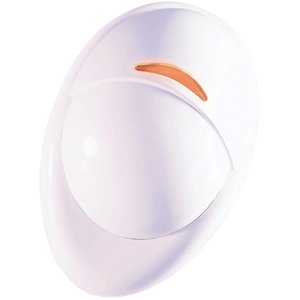
Figure 1: Front view of the Visonic Next K9-85 MCW Wireless Pet Immune Motion PIR Detector. This image shows the compact design of the detector, typically mounted on a wall or placed on a tabletop, with its infrared lens visible.
3. Setup and Installation
3.1 Battery Installation
The detector operates on a 3 Volt long-life Lithium battery. Ensure correct polarity when inserting the battery.
- Open the detector casing by gently prying the front cover from the base.
- Locate the battery compartment.
- Insert the 3 Volt Lithium battery, observing the positive (+) and negative (-) markings.
- Close the detector casing, ensuring it snaps securely into place.
3.2 Mounting
The detector can be mounted on a wall or placed on a tabletop. For optimal pet immunity, mount the detector at the recommended height (typically 1.8 to 2.4 meters or 6 to 8 feet) and avoid aiming it directly at stairs or furniture that pets can climb onto.
- Wall Mounting: Use the provided screws and anchors to secure the detector's base to a wall. Ensure the detector has a clear line of sight to the area it is monitoring.
- Tabletop Placement: If using tabletop placement, ensure the detector is stable and positioned to cover the desired area without obstruction.
3.3 Enrollment with Security Panel
The K9-85 MCW detector must be enrolled with a compatible Visonic PowerMax or PowerCode wireless control panel. Refer to your security panel's manual for specific enrollment procedures.
- Put your security panel into enrollment mode.
- Activate the detector by triggering its tamper switch or by performing a walk test (refer to detector's specific activation method).
- The panel should confirm the enrollment of the new detector. Assign it to the appropriate zone.
- Perform a walk test to verify proper communication and detection coverage.
4. Operating Instructions
Once installed and enrolled, the Visonic Next K9-85 MCW detector operates automatically as part of your security system. It detects motion using passive infrared technology and transmits signals to the control panel.
- Arming the System: When your security system is armed, the detector becomes active. Any detected motion within its coverage area will trigger an alarm, unless the system is configured for a specific delay.
- Pet Immunity: The detector is designed to ignore pets weighing up to 38 kg (85 lb) when properly installed. This feature helps prevent false alarms caused by pets moving within the protected area.
- Supervision: The detector is fully supervised, meaning it periodically communicates with the control panel to confirm its operational status. If communication is lost or the battery is low, the panel will indicate a fault.
5. Maintenance
5.1 Battery Replacement
When the control panel indicates a low battery for the K9-85 MCW detector, replace the battery promptly to ensure continuous protection. Use only a 3 Volt Lithium battery of the specified type.
- Disarm your security system before replacing the battery to avoid triggering an alarm.
- Open the detector casing as described in Section 3.1.
- Remove the old battery and dispose of it according to local regulations.
- Insert the new 3 Volt Lithium battery, observing polarity.
- Close the detector casing.
- Test the detector by performing a walk test to confirm it is functioning correctly and communicating with the panel.
5.2 Cleaning
Periodically clean the detector's lens and casing to ensure optimal performance. Dust or dirt on the lens can impair detection capabilities.
- Use a soft, dry, lint-free cloth to wipe the exterior of the detector.
- Do not use abrasive cleaners, solvents, or spray directly onto the detector.
6. Troubleshooting
| Problem | Possible Cause | Solution |
|---|---|---|
| False Alarms |
|
|
| No Detection |
|
|
| Low Battery Indication |
|
|
7. Specifications
- Brand: LASERSHIELD PRO INSTANT SECURITY
- Model: K9-85 MCW
- Color: White
- Power Source: Battery Powered
- Battery Type: 3 Volt Lithium
- Pet Immunity: Up to 38 kg (85 lb)
- Item Weight: 3.52 ounces (0.22 Pounds)
- Mounting Type: Tabletop / Wall Mount
- Compatible Devices: PowerMax, Visonic PowerCode wireless panels and receivers
- Recommended Uses: Residential Security, Commercial Security
- UPC: 780245998675
- Package Dimensions: 4.53 x 2.6 x 2.05 inches
- Date First Available: March 14, 2009
8. Warranty Information
This product is covered by a limited warranty provided by LASERSHIELD PRO INSTANT SECURITY. For specific warranty terms and conditions, please refer to the documentation included with your purchase or contact customer support. The warranty typically covers defects in materials and workmanship under normal use.
9. Customer Support
For technical assistance, troubleshooting, or further information regarding your Visonic Next K9-85 MCW detector, please contact LASERSHIELD PRO INSTANT SECURITY customer support. Contact details can usually be found on the manufacturer's website or on your product packaging.
Please retain this manual for future reference.