1. Product Overview
The LEGO Mindstorms NXT 2.0 kit combines the versatility of the LEGO building system with an intelligent microcomputer brick and intuitive programming software. This kit enables users to construct and program robots that can see, speak, feel, and move. Designed for ages 10 and up, it provides all necessary components to build and program a basic robot within approximately one hour, serving as an excellent introduction to robotics and programming.

Image: The complete LEGO Mindstorms NXT 2.0 kit packaging, highlighting its features and the main robot design.
2. What's in the Box
The LEGO Mindstorms NXT 2.0 kit includes the following components:
- NXT programmable LEGO Brick (the intelligent microcomputer brain)
- Ultrasonic Sensor (for detecting distance and movement)
- Color Sensor (for distinguishing colors and light settings, also functions as a lamp)
- Two Touch Sensors (for detecting physical contact)
- Three Interactive Servo Motors (for precise control and movement)
- USB cable (for connecting the NXT brick to a computer)
- 7x6-wire cables (for connecting sensors and motors to the NXT brick)
- Building instructions for four different robots
- User guide
- Software CD (for programming)
- Test pad
- 619 LEGO pieces (various bricks, gears, axles, etc.)
Note: 6 'AA'/LR6 batteries are required for the NXT brick and are not included in the kit. Cables to connect sensors are also not included.
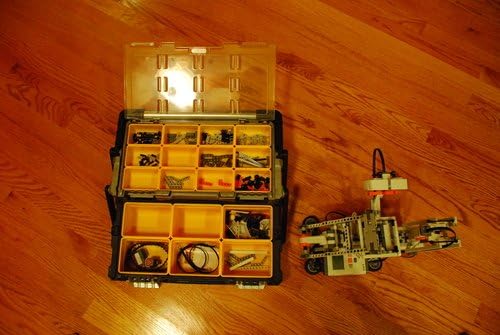
Image: An open storage case displaying the organized LEGO Mindstorms NXT 2.0 components, including various bricks, gears, and electronic parts.
3. Setup and Assembly
To begin using your LEGO Mindstorms NXT 2.0 kit, follow these general steps:
- Install Batteries: Insert 6 'AA' batteries into the NXT programmable brick. Ensure correct polarity.
- Software Installation: Install the LEGO Mindstorms NXT 2.0 software on your computer using the provided CD. Follow the on-screen instructions for your operating system.
- First Build: Refer to the included building instructions booklet for the 'Quick Start' robot. This basic model is designed for an easy introduction to the system.
- Connect Components: As you build, connect the sensors and motors to the NXT brick using the provided cables according to the building instructions.
- Initial Programming: Use the software to create a simple program for your 'Quick Start' robot. The software features an icon-based drag-and-drop interface, making it user-friendly.
- Download Program: Connect the NXT brick to your computer via the USB cable or a compatible Bluetooth adapter. Download your program to the NXT brick.
- Test and Play: Disconnect the NXT brick from your computer and observe your robot come to life.
For more advanced creations, the software provides instructions for additional robot models. You can also find a vast community and resources on the official LEGO Mindstorms website for further building and programming ideas.

Image: A fully assembled humanoid robot built using the LEGO Mindstorms NXT 2.0 kit, showcasing its articulated design.
4. Operating Your Robot
Operating your LEGO Mindstorms NXT 2.0 robot involves building, programming, and executing commands. The core principle is to construct your robot using the LEGO elements, program its behavior using the intuitive software, and then download the program to the NXT brick.
4.1. The NXT Brick: The Brain of Your Robot
The NXT brick is the central processing unit of your robot. It features a 32-bit microprocessor, a large matrix display, input and output ports for connecting sensors and motors, and a built-in speaker. All programs are stored and executed by the NXT brick.
4.2. Interactive Servo Motors
The kit includes three Interactive Servo Motors. These motors provide precise control over your robot's movements. Each motor has a built-in rotation sensor capable of measuring one-degree steps, allowing for highly accurate motion and positioning.
4.3. Robotic Sensors
Your robot interacts with its environment through various sensors:
- Ultrasonic Sensor: This sensor provides your robot with 'vision'. It can be used to detect and measure distances to obstacles, avoid collisions, and sense movement in its vicinity.
- Touch Sensors (x2): These sensors give your robot a sense of 'touch'. They detect when they are pressed or released, allowing your robot to react to physical contact, pick up objects, or trigger actions based on touch.
- Color Sensor: This versatile sensor has three primary functions: it distinguishes between various colors (including black, white, and a range of bright and pastel colors), it can detect different light settings, and it can also function as a color lamp.
4.4. Programming with the Software
The included software is compatible with both Mac and PC and features an intuitive icon-based drag-and-drop interface. It guides you through 16 building and programming challenges, ranging from beginner to expert levels. To program your robot:
- Launch the LEGO Mindstorms NXT 2.0 software.
- Create your program by dragging and dropping programming blocks onto the canvas.
- Connect the NXT brick to your computer using the USB cable or a Bluetooth connection.
- Download the created program to the NXT brick.
- Once downloaded, the NXT brick can execute the program independently.

Image: An assembled animal-like robot, possibly a snake or dragon, demonstrating the versatile building capabilities of the LEGO Mindstorms NXT 2.0 kit.
5. System Requirements
To ensure proper functionality of the LEGO Mindstorms NXT 2.0 software, your computer must meet the following minimum system requirements:
5.1. Microsoft Windows Requirements
- Operating System: Windows XP Professional or Home Edition with Service Pack 2 or newer, or Windows Vista Service Pack 1 or newer.
- Processor: Intel Pentium processor or compatible, 800 MHz minimum (1.5 GHz or better recommended) for Windows XP; 1 GHz minimum (1.5 GHz or better recommended) for Windows Vista.
- Optical Drive: CD-ROM drive.
5.2. Apple Macintosh Requirements
- Operating System: Apple MacOS X v10.4 or v10.5.
- Processor: PowerPC G3, G4, G5 processor, 600 MHz minimum; Intel processor (1.3 GHz or better recommended).
- Optical Drive: DVD drive.
5.3. General System Requirements (for both Windows and Mac)
- RAM: 512MB of RAM minimum.
- Hard Disk Space: 700MB of available hard-disk space.
- Display: XGA display (1024x768 resolution).
- USB Port: 1 available USB port.
- Bluetooth: Compatible Bluetooth adapter (optional, for wireless connection).
6. Maintenance
To ensure the longevity and optimal performance of your LEGO Mindstorms NXT 2.0 kit, follow these maintenance guidelines:
- Cleaning: Keep all LEGO bricks, sensors, and motors clean and free from dust and debris. Use a soft, dry cloth for cleaning. Avoid using harsh chemicals or abrasive materials.
- Storage: Store all components in a dry, cool place, away from direct sunlight and extreme temperatures. The original packaging or a dedicated storage container (like the one shown in Section 2) is recommended to keep parts organized and prevent loss.
- Battery Care: Remove batteries from the NXT brick if the kit will not be used for an extended period to prevent leakage and damage.
- Cable Management: Handle cables carefully to avoid kinks or damage to the connectors.
7. Troubleshooting
If you encounter issues with your LEGO Mindstorms NXT 2.0 kit, consider the following common troubleshooting steps:
- NXT Brick Not Powering On: Ensure that fresh 'AA' batteries are correctly installed in the NXT brick with the correct polarity.
- Robot Not Responding: Verify that all sensors and motors are securely connected to the correct ports on the NXT brick. Check that the program has been successfully downloaded to the NXT brick.
- Software Connection Issues: If the software cannot connect to the NXT brick, ensure the USB cable is properly connected to both the brick and the computer, or that your Bluetooth adapter is enabled and paired correctly. Restarting both the software and the NXT brick may resolve connection problems.
- Program Errors: Review your program in the software for any logical errors or incorrect block configurations. The software often provides visual cues for potential issues.
- Sensor Malfunction: Ensure sensors are clean and unobstructed. Test individual sensors using the NXT brick's built-in sensor view or simple test programs.
For more detailed troubleshooting guides and community support, please visit the official LEGO Mindstorms website.
8. Specifications
| Feature | Detail |
|---|---|
| Product Dimensions | 18.9 x 3.7 x 14.88 inches |
| Item Weight | 4.41 pounds |
| Item Model Number | 4544091 |
| Manufacturer Recommended Age | 10 - 18 years |
| Batteries Required | 6 AA batteries (not included) |
| Manufacturer | LEGO Technic |
| Number of Pieces | 619 |
9. Warranty and Support
This product was originally used for home projects and is sold as-is. Please note that cables to connect sensors are not included with the product as sold. For any support inquiries, technical assistance, or to find additional resources, please refer to the official LEGO Mindstorms website or contact LEGO customer service directly. The official website often provides FAQs, forums, and updated software downloads.