
1. Introduction
This manual provides essential information for the proper installation, operation, and maintenance of your Grote 53422 7" LED Stop Tail Turn Light with Reflex. Please read these instructions thoroughly before installation and retain this manual for future reference.
2. Product Overview
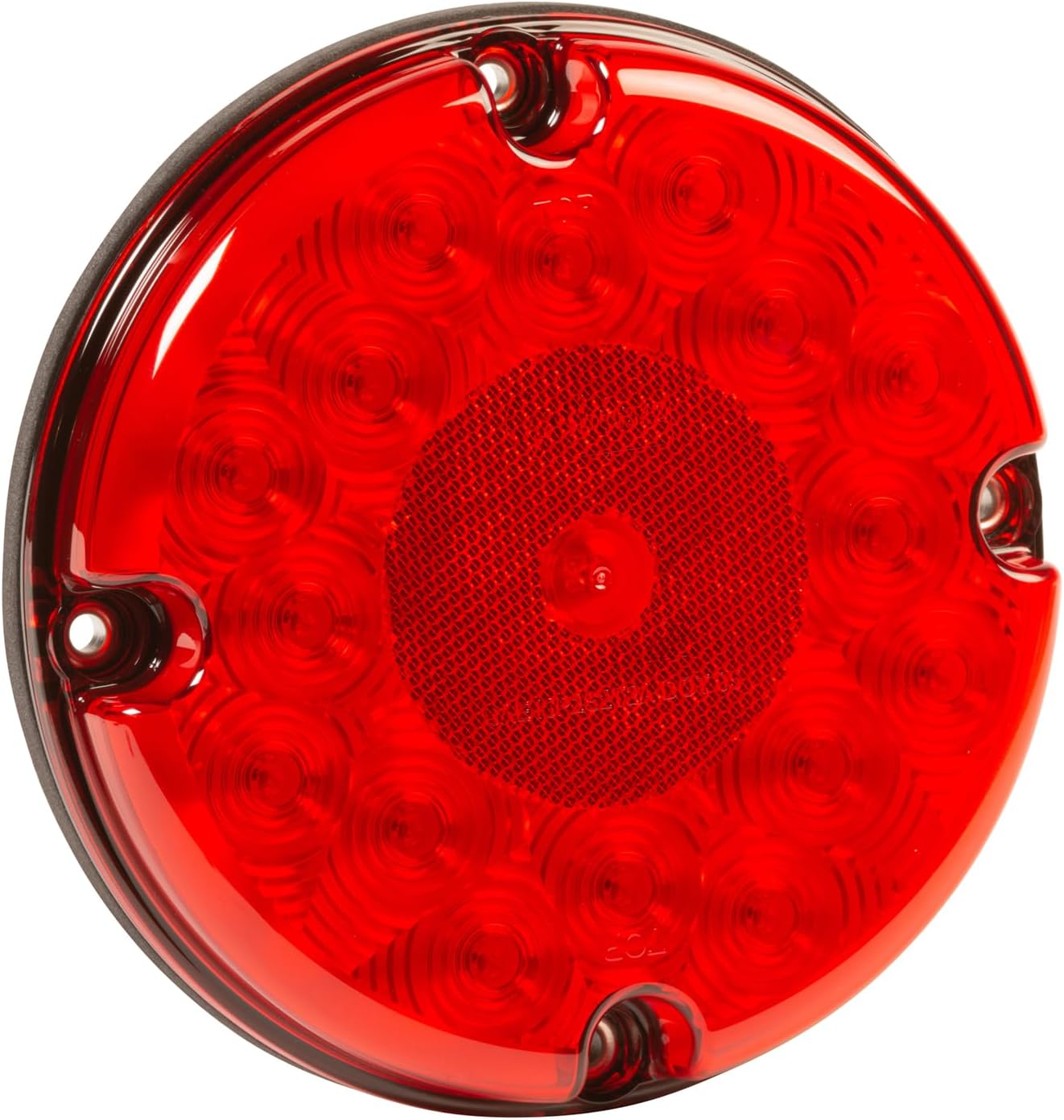
The Grote 53422 is a 7-inch round LED light designed for stop, tail, and turn signal functions on various vehicles. It features an integrated reflex reflector for enhanced visibility and safety. The unit is constructed with a durable polycarbonate lens and is designed to be waterproof.
Key Features:
- Functionality: Provides Stop, Tail, and Turn signal lighting.
- Integrated Reflex: Enhances visibility without additional reflectors.
- Durable Construction: Features a red polycarbonate lens.
- Waterproof Design: Suitable for various environmental conditions.
- Power Consumption: 4.68 watts.
- Dimensions: Approximately 1.95 x 7.3 x 7.3 inches.
- Weight: Approximately 7.2 ounces.
Components:

3. Setup and Installation
Installation should be performed by a qualified individual to ensure proper function and safety. Disconnect the vehicle's power supply before beginning installation.
Tools and Materials (Not Included):
- Wire strippers/crimpers
- Electrical connectors (e.g., butt connectors, spade terminals)
- Mounting hardware (screws, bolts, or grommet if applicable)
- Multimeter (for testing connections)
Wiring Connections:
The Grote 53422 light typically uses a standard three-wire connection system. Refer to Figure 2 for visual reference of the wiring pigtail.
- White Wire: Connect to vehicle's Ground.
- Black Wire: Connect to vehicle's Tail/Running Light circuit.
- Red Wire: Connect to vehicle's Stop/Turn Signal circuit.
Note: Wire colors may vary depending on the specific vehicle's wiring harness. Always verify functions with a multimeter before making final connections.
Mounting:
The Grote 53422 is designed for surface mounting. Secure the light using appropriate hardware through the mounting holes visible on the front bezel (Figure 1). Ensure the light is mounted securely and oriented correctly (e.g., "TOP" marking facing upwards if present).
4. Operating Instructions
Once properly installed and wired, the Grote 53422 LED light operates automatically in conjunction with your vehicle's electrical system.
- Tail Light Function: Activates when the vehicle's running lights are turned on.
- Stop Light Function: Activates when the vehicle's brake pedal is pressed.
- Turn Signal Function: Activates when the vehicle's turn signal lever is engaged.
The integrated reflex reflector provides passive visibility even when the light is not illuminated.
5. Maintenance
The Grote 53422 LED light is designed for minimal maintenance. Regular inspection and cleaning will ensure optimal performance and longevity.
- Cleaning: Periodically clean the lens with a soft cloth and mild soap and water to remove dirt, dust, and road grime. Avoid abrasive cleaners or solvents that could damage the polycarbonate lens.
- Inspection: Regularly check the light for any physical damage, loose connections, or signs of moisture ingress. Although waterproof, extreme conditions or damage can compromise seals.
- Wiring: Ensure all wiring connections remain secure and free from corrosion.
6. Troubleshooting
If you experience issues with your Grote 53422 LED light, refer to the following troubleshooting guide:
| Problem | Possible Cause | Solution |
|---|---|---|
| Light does not illuminate. |
|
|
| Light is dim or flickers. |
|
|
| Only one function works (e.g., only tail light, no stop/turn). |
|
|
7. Specifications
| Attribute | Detail |
|---|---|
| Model Number | 53422 |
| Brand | Grote |
| Color | Red |
| Vehicle Service Type | Car (Vehicle Specific Fit) |
| Special Feature | Waterproof |
| Wattage | 4.68 watts |
| Auto Part Position | Rear |
| Lens Color | Red |
| Lens Material | Polycarbonate |
| Item Dimensions (L x W x H) | 1.95 x 7.3 x 7.3 inches |
| Item Weight | 7.2 ounces |
| UPC | 089373106502 |
| Manufacturer | GROTE |
8. Warranty Information
Specific warranty details for the Grote 53422 LED Stop Tail Turn Light are not provided within this document. For information regarding product warranty, please refer to the official Grote website or contact Grote customer service directly. Retain your proof of purchase for any warranty claims.
9. Customer Support
If you require further assistance or have questions not covered in this manual, please contact Grote customer support or the retailer from whom you purchased the product. You can typically find contact information on the official Grote website or on the product packaging.
For more information about Grote products, visit: Grote Store on Amazon

