Introduction
This manual provides detailed instructions for the installation, operation, and maintenance of the SILENT KNIGHT PS-SA Single Action Pull Station. This device is designed for use in fire alarm systems to manually initiate an alarm. It features screw terminal connections, a key lock reset, and integrated operating instructions with Braille text for accessibility.
Please read this manual thoroughly before installation and operation to ensure proper functionality and safety.
Product Overview
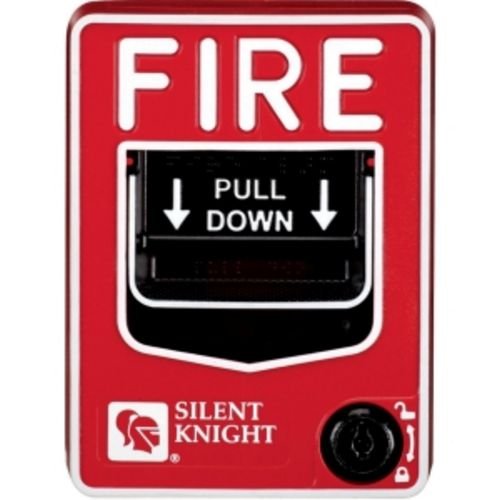
Figure 1: Front view of the SILENT KNIGHT PS-SA Single Action Pull Station. The device is red with "FIRE" prominently displayed at the top. Below it is a black pull-down handle with "PULL DOWN" and directional arrows. The bottom left features the "SILENT KNIGHT" logo, and the bottom right has a keyhole for resetting the station.
The PS-SA pull station is a critical component in fire safety systems, allowing occupants to manually trigger an alarm in case of a fire emergency. Its robust design ensures reliable operation and easy reset capabilities.
Setup and Installation
1. Safety Precautions
- Always disconnect power to the fire alarm control panel before beginning installation.
- Ensure all wiring complies with local and national electrical codes.
- Installation should only be performed by qualified personnel.
2. Mounting
- Select a visible and accessible location, typically near exits, in accordance with local fire codes.
- Mount the pull station to a standard single-gang or double-gang electrical box using appropriate screws.
- Ensure the device is securely fastened to prevent movement.
3. Wiring
- The PS-SA features screw terminal connections. Refer to the fire alarm control panel's manual for specific wiring diagrams.
- Connect the initiating device circuit (IDC) wires to the designated terminals.
- Ensure all connections are tight and secure to prevent intermittent operation.
- Verify correct polarity before applying power.
Operating Instructions
1. Activating the Alarm
In the event of a fire, firmly grasp the handle marked "PULL DOWN" and pull it downwards until it latches in the activated position. This action will send an alarm signal to the fire alarm control panel, initiating the building's alarm sequence.
Warning: Only activate the pull station in a genuine emergency or during authorized testing.
2. Resetting the Pull Station
After activation, the PS-SA pull station must be reset using the provided key. Insert the key into the keyhole located at the bottom right of the device and turn it to reset the pull handle to its original, non-alarm position. Remove the key once reset is complete.
The fire alarm control panel will also need to be reset according to its specific instructions to clear the alarm condition.
Maintenance
Regular maintenance ensures the reliable operation of your SILENT KNIGHT PS-SA pull station.
1. Routine Inspection
- Visually inspect the pull station monthly for any signs of damage, tampering, or obstruction.
- Ensure the "PULL DOWN" handle moves freely and latches correctly when activated (during authorized testing).
- Check that the keyhole mechanism operates smoothly for resetting.
2. Testing
The pull station should be tested annually, or more frequently as required by local codes and regulations, by a qualified fire alarm technician. Testing typically involves:
- Notifying building occupants and the monitoring station of the test.
- Activating the pull station to verify it sends an alarm signal to the control panel.
- Resetting the pull station with the key.
- Verifying the alarm clears from the control panel.
3. Cleaning
Clean the exterior of the pull station with a soft, damp cloth. Do not use abrasive cleaners or solvents, as these can damage the finish or internal components.
Troubleshooting
| Problem | Possible Cause | Solution |
|---|---|---|
| Pull station does not activate alarm. | Loose wiring, faulty pull station, control panel issue. | Check wiring connections. Test with a multimeter if possible. Consult fire alarm technician. |
| Pull station does not reset with key. | Key not fully inserted, internal mechanism jammed, incorrect key. | Ensure key is fully inserted and turned correctly. Do not force. Contact technician if issue persists. |
| False alarms. | Accidental activation, wiring short, environmental factors. | Ensure proper mounting and protection from accidental contact. Inspect wiring for damage. Consult technician. |
For issues not listed here, or if troubleshooting steps do not resolve the problem, contact a certified fire alarm technician.
Specifications
- Model: PSSA
- Type: Single Action Pull Station
- Reset Method: Key Reset
- Connections: Screw Terminals
- Accessibility: Molded operating instructions with Braille text
- Dimensions (Package): 9 x 6 x 2.5 inches (approximate)
- Weight (Item): 9.6 ounces (approximate)
- Manufacturer: Silent Knight
- UPC: 783008104511
Warranty and Support
For warranty information and technical support, please contact SILENT KNIGHT directly or refer to the documentation provided with your fire alarm control panel system. It is recommended to have all fire alarm system components installed and serviced by certified professionals.
For further assistance, please visit the official SILENT KNIGHT website or contact their customer service department.


