
Rogers Mini Sorter (ASIN: B001UG2AQA)
Rogers Mini Sorter User Manual
Model: Mini Sorter (ASIN: B001UG2AQA)
Introduction
This user manual provides comprehensive instructions for the setup, operation, maintenance, and troubleshooting of your Rogers Mini Sorter. Please read this manual carefully before using the product to ensure proper function and longevity.
Safety Information
While the Rogers Mini Sorter is a simple and safe product, please observe the following precautions:
- Keep out of reach of small children to prevent accidental ingestion of small parts or injury.
- Do not expose the sorter to extreme temperatures or direct sunlight for prolonged periods, as this may cause material degradation.
- Avoid using harsh chemicals for cleaning; refer to the Maintenance section for proper cleaning instructions.
- Use the sorter only for its intended purpose of organizing documents or small items.
Package Contents
Upon opening the package, please verify that all components are present and undamaged:
- 1 x Rogers Mini Sorter unit
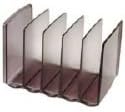
Image: The Rogers Mini Sorter, showing its compact design and five distinct compartments for organizing documents or small items. The material appears to be a durable, translucent gray plastic.
Setup
The Rogers Mini Sorter requires minimal setup. It is designed for immediate use.
- Unpack the Mini Sorter from its packaging.
- Place the sorter on a flat, stable surface such as a desk, shelf, or countertop.
- Ensure the surface is clean and free of debris to prevent scratching the sorter's base.
Operating Instructions
The Mini Sorter is designed for simple and efficient organization.
- Identify the items you wish to sort. This can include letters, envelopes, small notebooks, index cards, or other similar-sized documents.
- Utilize the five available slots to categorize and separate your items. For example, you might designate slots for "To Do," "To File," "Urgent," "Reference," and "Completed."
- Insert items vertically into the desired slots. The design allows for easy insertion and retrieval.
- Regularly review and clear out slots to maintain an organized workspace.
Maintenance
To keep your Rogers Mini Sorter in optimal condition, follow these simple maintenance guidelines:
- Cleaning: Wipe the sorter with a soft, damp cloth. For stubborn marks, a mild soap solution can be used, followed by wiping with a clean, damp cloth to remove any residue.
- Avoid: Do not use abrasive cleaners, solvents, or harsh chemicals, as these can damage the plastic material.
- Dusting: Regularly dust the sorter to prevent accumulation, especially within the slots.
Troubleshooting
The Rogers Mini Sorter is a passive device and rarely encounters issues. However, if you experience any problems, consider the following:
- Slipping on Surface: If the sorter slides on your desk, place a non-slip mat or rubber feet underneath its base.
- Items Falling Out: Ensure items are inserted fully and are not too wide or heavy for the slots. The sorter is designed for standard document sizes.
- Damage: If the sorter is physically damaged (e.g., cracked), it may need to be replaced.
Specifications
| Model Name | Mini Sorter |
| Brand | Rogers |
| ASIN | B001UG2AQA |
| Date First Available | July 19, 2021 |
| Material | Plastic (translucent gray) |
| Number of Slots | 5 |
Warranty and Support
Rogers stands behind the quality of its products. While specific warranty details are not provided in this manual, please retain your proof of purchase for any warranty claims.
For support, inquiries, or to report any issues with your Mini Sorter, please contact Rogers customer service through their official website or the retailer from whom you purchased the product. Refer to your purchase documentation for specific contact information.
Ask a question about this manual
Ask about setup, troubleshooting, compatibility, parts, safety, or missing instructions. Manuals+ will review the question and use this page’s manual context to help answer it.