
1. Introduction
The MagLite XL100 LED Flashlight is a revolutionary lighting instrument designed for optimum light output and user-friendly performance. It incorporates advanced MAG-LED technology and an innovative Advanced Flashlight User Interface, offering five selectable modes, variable strobe rates, intensity level memory recall, and a lockout feature to prevent accidental operation.
This manual provides detailed instructions for the proper setup, operation, and maintenance of your MagLite XL100 LED Flashlight to ensure long-lasting performance and user satisfaction.
2. Safety Information
- Do not look directly into the flashlight beam. The intense light can cause temporary vision impairment or permanent eye damage.
- Keep the flashlight and batteries out of reach of children.
- Dispose of used batteries properly according to local regulations. Do not incinerate or expose batteries to extreme heat.
- Avoid exposing the flashlight to extreme temperatures or direct sunlight for prolonged periods.
- Do not attempt to disassemble or modify the flashlight. This will void the warranty and may cause damage.
3. Package Contents
Please verify that all items are present in your package:
- MagLite XL100 LED Flashlight
- 3 x AAA Alkaline Batteries
4. Setup: Battery Installation
The MagLite XL100 flashlight requires three AAA alkaline batteries for operation. Follow these steps to install the batteries:
- Unscrew the tail cap of the flashlight by turning it counter-clockwise.
- Insert the three AAA batteries into the battery compartment, ensuring that the positive (+) and negative (-) ends align with the polarity indicators inside the flashlight body.
- Screw the tail cap back onto the flashlight by turning it clockwise until it is securely tightened. Do not overtighten.

The MagLite XL100 flashlight requires three AAA alkaline batteries for operation. To install, unscrew the tail cap and insert the batteries according to the polarity indicators inside the battery compartment.
5. Operating Instructions: Advanced Flashlight User Interface
The MagLite XL100 features an innovative motion-controlled user interface accessed via the rear push-button tail cap switch. The flashlight offers five distinct modes:
- Normal Mode: Adjustable brightness with memory.
- Strobe Mode: Adjustable strobe rate.
- Nite Lite Mode: Low-level illumination for extended periods.
- Signal Mode: On/Off with a twist of the wrist.
- SOS Mode: Signals the International Morse Code Distress Signal.
Mode Selection and Operation:
To select a mode, hold the flashlight horizontally and rotate your wrist to cycle through the available modes indicated around the tail cap. Once the desired mode is aligned, press the tail cap button to activate it.
For modes with variable settings (e.g., brightness in Normal Mode, strobe rate in Strobe Mode), rotate the flashlight while the mode is active to adjust the intensity or rate. The flashlight will remember your last setting for each mode.
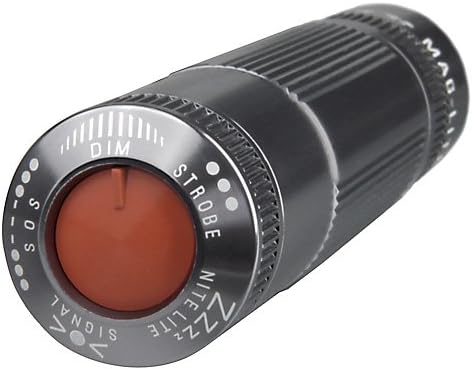
The tail cap switch is the primary control for the MagLite XL100. Rotate the flashlight to select different modes, indicated by the labels around the switch. Press the button to activate the selected mode.

The advanced LED emitter provides bright, efficient illumination. The beam is fixed and does not require adjustment.
6. Maintenance
- Cleaning: Wipe the exterior of the flashlight with a soft, damp cloth. Do not use abrasive cleaners or solvents.
- Battery Replacement: Always replace all three AAA batteries at the same time. Do not mix old and new batteries or different battery types. Remove batteries if the flashlight will not be used for an extended period to prevent leakage.
- O-Ring Lubrication: Periodically apply a thin coat of silicone grease to the O-rings to maintain water resistance and ensure smooth operation of threaded parts.
7. Troubleshooting
| Problem | Possible Cause | Solution |
|---|---|---|
| Flashlight does not turn on. | Dead or improperly installed batteries. Tail cap not fully tightened. | Replace batteries, ensuring correct polarity. Tighten tail cap securely. |
| Light is dim or flickers. | Low battery power. Dirty battery contacts. | Replace batteries. Clean battery contacts with a pencil eraser or cotton swab. |
| Modes are not changing correctly. | Incorrect motion for mode selection. | Ensure you are holding the flashlight horizontally and rotating your wrist to cycle through modes. Refer to Operating Instructions. |
8. Specifications
| Feature | Detail |
|---|---|
| Model Number | XL100-S3096 |
| Color | Gray |
| Power Source | 3 x AAA Alkaline Batteries |
| Material | Anodized Aluminum Alloy |
| White Brightness | 100 Lumens |
| Item Weight | 3.68 Ounces |
| Product Dimensions | 8.86 x 4.8 x 1.3 inches |
| Special Features | Adjustable modes, Memory recall, Lockout |
| Included Components | Battery |
FL1 Standard Performance Metrics:

Performance metrics for the MagLite XL100, including beam intensity (4484cd), throw distance (134m), runtime (5h 15min high, 201h low), light output (83 lumens), water resistance, and 1 meter impact resistance, as per FL1 Standard.
9. Warranty and Support
Warranty: The MagLite XL100 LED Flashlight is backed by a limited lifetime warranty. Please refer to the official MagLite website or contact customer support for full warranty details and terms.
Support: For additional support, product information, or to purchase accessories, please visit the official MagLite Store on Amazon or their official website.