1. Introduction
This instruction manual provides essential information for the proper use and care of your Walimex Pro 500mm 1:6.3 DSLR Mirror Telephoto Lens. Please read this manual thoroughly before using the product to ensure optimal performance and longevity.
The Walimex Pro 500mm 1:6.3 DX mirror telephoto lens is designed for use with DSLR cameras, offering a fixed focal length of 500mm. Its robust metal housing and high-quality glass elements ensure good image quality. This lens is particularly suitable for nature and wildlife photography due to its telephoto capabilities and manual focus.
Compatibility: This lens is compatible with Pentax K-mount cameras (e.g., K10D, K20D, K100D, K110D, K200D, istDL, Samsung GX series) and analog AF/MF cameras compatible with Pentax.
2. Product Overview
2.1 Key Features
- Suitable for Pentax K10D, K20D, K100D, K110D, K200D, istDL, Samsung GX series, and analog AF/MF cameras compatible with Pentax.
- High-quality, coated glass lenses ensure excellent image quality.
- Robust metal housing for durability.
- Ideal for travel, nature, and wildlife photography.
- Manual focusing capability.
- Can be used with aperture priority and manual exposure settings.
- Includes a high-quality storage bag and lens cap.
- Comes with a 500/6.3 DX mirror lens and a T2-adapter.
2.2 Components
The Walimex Pro 500mm 1:6.3 DSLR Mirror Telephoto Lens package includes the following items:
- Walimex Pro 500mm 1:6.3 Mirror Telephoto Lens
- T2-Adapter for Pentax K-mount
- Front and Rear Lens Caps
- Storage Bag

Figure 1: Walimex Pro 500mm 1:6.3 DSLR Mirror Telephoto Lens. This image shows the overall design of the lens, highlighting its compact form factor for a telephoto lens.

Figure 2: Side view of the Walimex Pro 500mm lens, showing the manual focus ring and distance markings.

Figure 3: Included black storage bag for protecting the lens during transport and storage.

Figure 4: The T2-adapter (T-PK) for connecting the lens to Pentax K-mount camera bodies.
3. Setup
3.1 Attaching the T2-Adapter
- Remove the rear lens cap from the Walimex Pro 500mm lens.
- Carefully screw the T2-adapter onto the rear thread of the lens until it is securely fastened. Do not overtighten.
3.2 Mounting the Lens to the Camera
- Ensure your camera is turned off.
- Remove the body cap from your Pentax K-mount camera.
- Align the red dot or indicator on the T2-adapter with the corresponding mark on your camera's lens mount.
- Gently insert the lens (with adapter) into the camera mount and rotate it clockwise until it clicks into place.
- To remove, press the lens release button on your camera and rotate the lens counter-clockwise.

Figure 5: Illustration of attaching the lens with the T2-adapter to a DSLR camera body.
3.3 Initial Camera Settings
Since this is a manual lens, certain camera settings need to be adjusted:
- Shooting Mode: Set your camera to Manual (M) mode or Aperture Priority (Av/A) mode. In Aperture Priority, the camera will automatically select the shutter speed.
- Lens Aperture: The lens has a fixed aperture of f/6.3. You cannot change this on the lens itself.
- ISO Sensitivity: Adjust ISO as needed based on lighting conditions. Higher ISO values may be required in low light due to the fixed aperture.
- Focusing Screen: For some older DSLR models, a split-prism focusing screen can aid manual focusing.
4. Operating the Lens
4.1 Manual Focusing
The Walimex Pro 500mm lens features manual focus only. To achieve sharp images:
- Look through your camera's viewfinder or use Live View on your LCD screen.
- Rotate the large focusing ring on the lens barrel until your subject appears sharp.
- For critical focus, especially with Live View, use the camera's magnification feature to zoom in on your subject.
- The minimum focusing distance is 2 meters, allowing for good magnification of distant subjects.
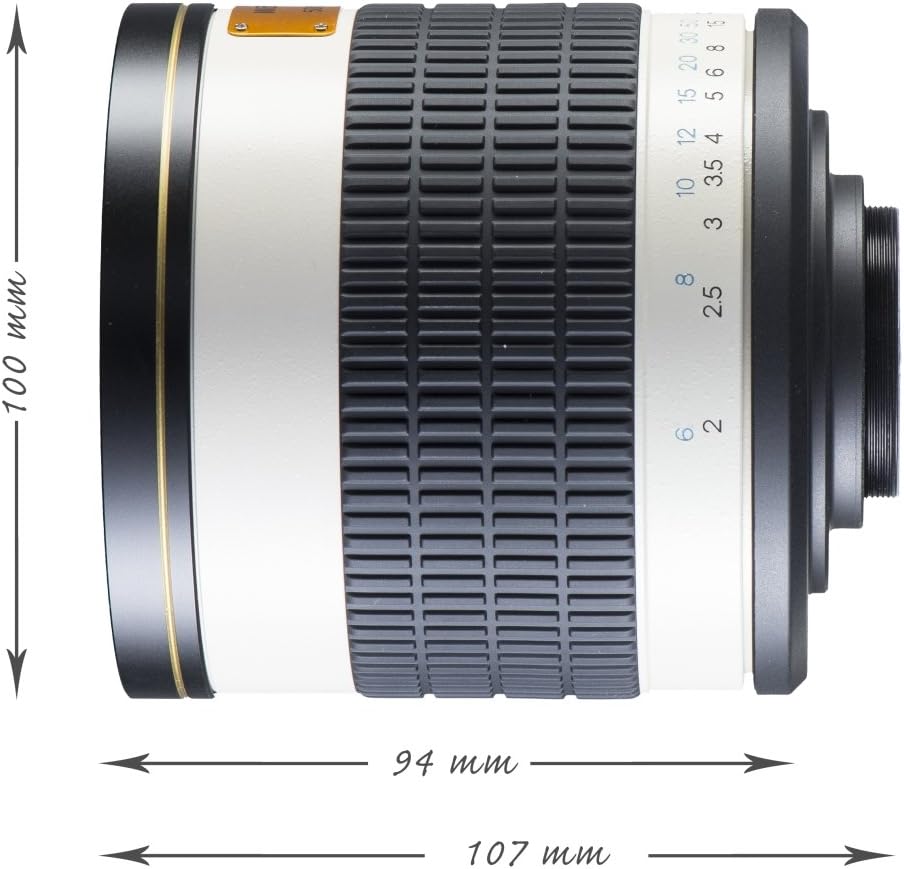
Figure 6: The lens showing the focus distance scale in meters and feet.
4.2 Exposure Control
As a mirror lens, this product has a fixed aperture of f/6.3. Exposure is controlled by adjusting the shutter speed and ISO sensitivity on your camera.
- In Manual (M) mode, you set both shutter speed and ISO.
- In Aperture Priority (Av/A) mode, the camera will automatically set the shutter speed based on the light meter reading and your chosen ISO.
- Consider using a tripod for stable shots, especially with longer shutter speeds, to prevent camera shake.
4.3 Using with Crop Sensor Cameras
When used on digital SLR cameras with an APS-C (crop) sensor, the effective focal length is multiplied by the camera's crop factor (typically 1.5x for Pentax). This results in an equivalent focal length of approximately 750mm (500mm x 1.5).
5. Maintenance
- Cleaning the Lens: Use a soft, lint-free cloth and a specialized lens cleaning solution to clean the optical surfaces. Avoid touching the glass directly with your fingers. Use a blower brush to remove dust particles before wiping.
- Storage: Store the lens in a cool, dry place, away from direct sunlight and extreme temperatures. Use the provided storage bag to protect it from dust and scratches. Ensure both front and rear lens caps are securely attached.
- Handling: Always handle the lens carefully. Avoid dropping it or subjecting it to strong impacts, as this can damage the internal optical elements.
6. Troubleshooting
| Problem | Possible Cause | Solution |
|---|---|---|
| Images are blurry/out of focus. | Incorrect manual focus, camera shake, subject movement. | Ensure precise manual focusing. Use a tripod. Increase shutter speed or ISO to freeze motion. |
| Images are too dark (underexposed). | Insufficient light, incorrect exposure settings. | Increase ISO sensitivity. Use a slower shutter speed (with a tripod). Ensure camera is in M or Av/A mode. |
| Images are too bright (overexposed). | Excessive light, incorrect exposure settings. | Decrease ISO sensitivity. Use a faster shutter speed. Consider using an ND filter. |
| Lens not attaching to camera. | T2-adapter not correctly attached to lens, incorrect alignment, wrong camera mount. | Verify T2-adapter is securely attached to the lens. Ensure correct alignment marks are matched. Confirm camera has a Pentax K-mount. |
7. Specifications
| Feature | Detail |
|---|---|
| Brand | Walimex Pro |
| Model Number | 15544 |
| Focal Length | 500mm (fixed) |
| Aperture | f/6.3 (fixed) |
| Lens Type | Mirror Telephoto |
| Focus Type | Manual Focus |
| Compatible Mounts | Pentax K (via T2-adapter) |
| Minimum Focal Length | 500mm |
| Maximum Focal Length (on APS-C) | 750mm (equivalent) |
| Filter Diameter (front) | 95mm (based on review) |
| Filter Diameter (rear) | 34mm (based on review) |
| Product Dimensions | 0.99 x 0.99 x 0.99 cm; 850 g (Note: These dimensions seem incorrect based on images, likely placeholder data from source. Actual lens is larger.) |
Note: Some specifications, such as filter diameter, are derived from user reviews and may not be official manufacturer data. The listed product dimensions appear to be placeholder values.
8. Warranty and Support
For warranty information and technical support, please refer to the documentation provided with your purchase or visit the official Walimex Pro website. Keep your proof of purchase for any warranty claims.
9. Related Videos
No official product videos from Walimex Pro were found that are directly relevant to this specific lens model. The available videos are for a different brand and lens type.


