
Introduction
This manual provides essential instructions for the safe and efficient operation, maintenance, and troubleshooting of your METROVAC VM6SB500 Professional Hand Vacuum. Please read this manual thoroughly before using the appliance and retain it for future reference.
The METROVAC VM6SB500 is a powerful, compact, and durable hand vacuum designed for various cleaning tasks. Its all-steel construction and 500-watt motor provide strong suction for effective cleaning of upholstery, carpets, hard floors, and more.
Important Safety Instructions
When using an electrical appliance, basic precautions should always be followed, including the following:
- Read all instructions before using this hand vacuum.
- WARNING: To reduce the risk of fire, electric shock, or injury, do not leave the appliance unattended when plugged in. Unplug from outlet when not in use and before servicing.
- Do not use outdoors or on wet surfaces.
- Do not allow to be used as a toy. Close attention is necessary when used by or near children.
- Use only as described in this manual. Use only manufacturer's recommended attachments.
- Do not use with damaged cord or plug. If appliance is not working as it should, has been dropped, damaged, left outdoors, or dropped into water, return it to a service center.
- Do not pull or carry by cord, use cord as a handle, close a door on cord, or pull cord around sharp edges or corners. Do not run appliance over cord. Keep cord away from heated surfaces.
- Do not unplug by pulling on cord. To unplug, grasp the plug, not the cord.
- Do not handle plug or appliance with wet hands.
- Do not put any object into openings. Do not use with any opening blocked; keep free of dust, lint, hair, and anything that may reduce airflow.
- Keep hair, loose clothing, fingers, and all parts of body away from openings and moving parts.
- Do not pick up anything that is burning or smoking, such as cigarettes, matches, or hot ashes.
- Do not use to pick up flammable or combustible liquids, such as gasoline, or use in areas where they may be present.
- Do not use without dust bag and/or filters in place.
- Turn off all controls before unplugging.
- Use extra care when cleaning on stairs.
Package Contents
Carefully unpack your METROVAC VM6SB500 and ensure all items are present. If any items are missing or damaged, contact customer support immediately.
- METROVAC VM6SB500 Hand Vacuum Unit
- Pik-all Nozzle
- Dust Brush
- Crevice Tool
- 2 Disposable Bags
- 20" Flexible Hose
- Shoulder Strap
- Upholstery Tool
Setup
Before first use, assemble the necessary components for your cleaning task.
1. Attaching Accessories
- Nozzles and Brushes: Select the appropriate nozzle (Pik-all, Crevice Tool) or brush (Dust Brush, Upholstery Tool) for your cleaning needs. These attachments can be directly inserted into the vacuum's intake opening. Ensure a snug fit.
- Flexible Hose: For extended reach or use with smaller attachments, connect the 20" flexible hose to the vacuum's intake. Then, attach your desired nozzle or brush to the other end of the hose.
- Shoulder Strap: For hands-free operation or easier portability during longer cleaning sessions, attach the shoulder strap to the designated loops on the vacuum unit.

Image: The METROVAC VM6SB500 Hand Vacuum with a brush attachment connected, ready for use.

Image: The METROVAC VM6SB500 Hand Vacuum shown with an extended nozzle, suitable for reaching into tight spaces or for floor cleaning.
Operating Instructions
1. Power Connection
Plug the 12-foot power cord into a standard 120V electrical outlet. Ensure the outlet is easily accessible.
2. Turning On/Off
Locate the power switch on the vacuum unit. Press the switch to the "ON" position to start the vacuum. Press it again to the "OFF" position to stop the vacuum.
3. Cleaning Surfaces
- General Cleaning: Use the Pik-all nozzle for general debris on various surfaces.
- Tight Spaces: The Crevice Tool is ideal for reaching into narrow gaps, corners, and edges.
- Upholstery and Delicate Surfaces: Attach the Upholstery Tool or Dust Brush for cleaning furniture, curtains, and other delicate items.
- Stairs and Floors: For stairs, use the Pik-all nozzle or an extended attachment. For hard floors, the Pik-all nozzle can effectively pick up dry debris.

Image: The METROVAC VM6SB500 Hand Vacuum effectively cleaning spilled cereal on a kitchen countertop using a nozzle attachment.

Image: The METROVAC VM6SB500 Hand Vacuum being used to clean spilled cereal from a tiled floor, demonstrating its versatility.
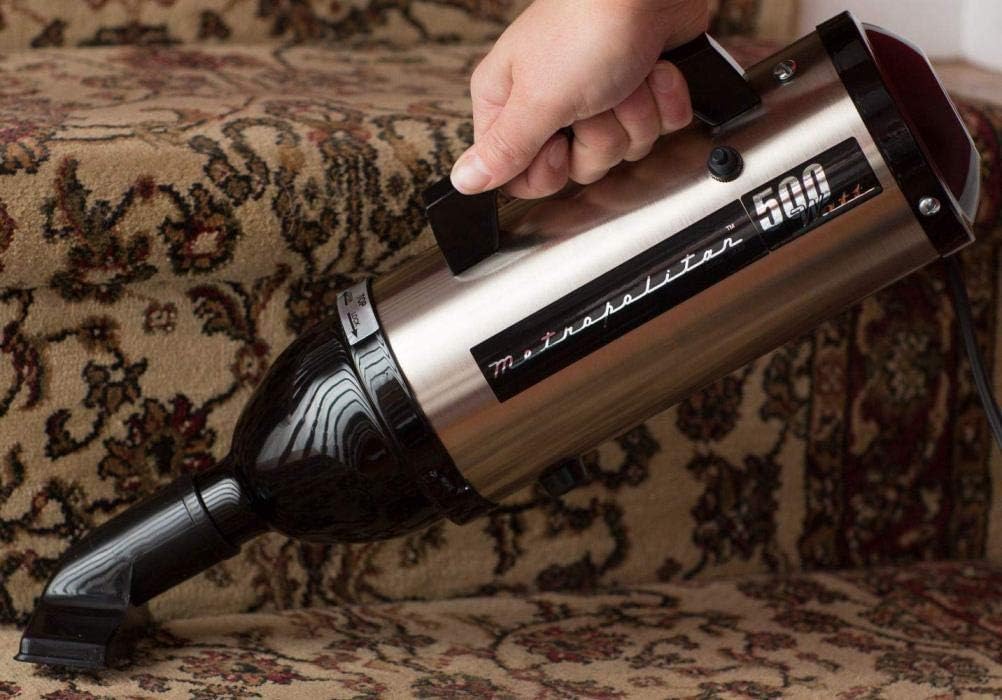
Image: The METROVAC VM6SB500 Hand Vacuum cleaning carpeted stairs, highlighting its portability and ease of use in challenging areas.
Maintenance
Regular maintenance ensures optimal performance and extends the life of your vacuum.
1. Emptying and Replacing Disposable Bags
The VM6SB500 uses disposable bags to collect debris. It is recommended to check the bag regularly and replace it when it is full or suction power decreases significantly.
- Ensure the vacuum is unplugged from the power outlet.
- Locate the latch or release mechanism for the dust collection chamber. Open the chamber.
- Carefully remove the full disposable bag. Dispose of it properly.
- Insert a new disposable bag, ensuring it is correctly seated within the chamber.
- Close the dust collection chamber securely until it latches.
2. Filter Cleaning
While the primary collection is via disposable bags, the vacuum also contains a filter that should be inspected periodically.
- With the vacuum unplugged and the dust collection chamber open, locate the filter.
- Gently remove the filter. Tap it over a waste bin to dislodge accumulated dust and debris.
- If the filter is heavily soiled, it may be rinsed with water. Ensure the filter is completely dry before reinserting it into the vacuum.
- Reinstall the clean, dry filter and close the dust collection chamber.
3. Exterior Cleaning
Wipe the exterior of the vacuum with a soft, damp cloth. Do not use harsh chemicals or abrasive cleaners. Ensure no moisture enters the motor housing.
Troubleshooting
If you encounter issues with your METROVAC VM6SB500, refer to the following common problems and solutions:
| Problem | Possible Cause | Solution |
|---|---|---|
| Vacuum does not turn on. |
|
|
| Loss of suction. |
|
|
| Unusual noise or odor. |
|
|
Specifications
| Model Name | VM6SB500 (also referred to as VM6BS500) |
| Brand | METROVAC |
| Construction | All Steel |
| Motor | 0.75 HP / 120V |
| Amperage | 4.5 Amps |
| Wattage | 500 Watts |
| Airflow | 70 CFM (Cubic Feet per Minute) |
| Water Lift (Maximum Suction) | 60 Inches |
| Cord Length | 12 Feet |
| Hose Length | 20 Inches (Flexible Hose) |
| Dimensions (L x W x H) | 12.5" x 4" x 5.25" |
| Weight | 2.7 lbs |
| Filter Type | Cyclonic (with disposable bags) |
| Noise Level | 70 Decibels |
| Made In | USA |
Warranty and Support
Your METROVAC VM6SB500 Professional Hand Vacuum comes with a Five-Year Motor Warranty, covering defects in materials and workmanship for the motor component from the date of purchase.
For warranty claims, technical assistance, or to purchase replacement parts and accessories, please contact METROVAC customer support. Keep your proof of purchase for warranty validation.
For the most current support information, please visit the official METROVAC website or refer to the contact details provided with your product packaging.


