
Product Overview
This manual provides instructions for the RemotesReplaced Compatible Remote Control, designed as a direct replacement for the original Sony RM684 remote. It offers identical functionality without the need for complex setup, allowing for immediate use with your compatible device.

Image: Front view of the RemotesReplaced compatible remote control, showcasing its full button layout including power, mute, channel, volume, navigation, and numeric keys. The design is sleek and black.
Setup Guide
Installing Batteries
The RemotesReplaced compatible remote control requires two AAA batteries (not included).
- Locate the battery compartment on the back of the remote control.
- Slide the battery compartment cover downwards to open.
- Insert two AAA batteries, ensuring correct polarity (+ and -) as indicated inside the compartment.
- Slide the battery compartment cover back into place until it clicks securely.

Image: Bottom view of the remote control, highlighting the battery compartment cover. This is where two AAA batteries are inserted for power.
Initial Use
This remote control is pre-programmed and requires no setup codes. Once batteries are installed, it is ready for immediate use with your compatible Sony RM684 device.
Operating Your Remote Control
The RemotesReplaced compatible remote control provides full functionality equivalent to the original Sony RM684 remote. Familiarize yourself with the button layout for optimal use.
Basic Functions
- Power Button: Press to turn your device on or off.
- Mute Button: Press to mute or unmute the audio.
- Volume Up/Down: Use the "Vol +" and "Vol -" buttons to adjust the volume level.
- Channel Up/Down: Use the "CH +" and "CH -" buttons to change channels.
- Numeric Keypad (0-9): Use to directly enter channel numbers or other numerical inputs.
- Navigation Buttons (Up, Down, Left, Right, OK): Use for menu navigation and selection.
Advanced Functions
- Menu Button: Access the main menu of your device.
- Exit Button: Exit current menus or screens.
- Source/Input Button: Switch between different input sources (e.g., TV, HDMI, AV).
- Playback Controls: Buttons for Play, Pause, Stop, Fast Forward, Rewind (if applicable to your device).
- EPG (Electronic Program Guide): Access the electronic program guide.
- Info Button: Display information about the current program or content.

Image: A close-up view of the remote control's buttons, illustrating the clear labeling and layout of various functions such as power, volume, channel, and navigation keys.
Care and Maintenance
To ensure the longevity and optimal performance of your remote control, follow these guidelines:
- Cleaning: Wipe the remote control with a soft, dry cloth. Do not use liquid cleaners or abrasive materials.
- Battery Replacement: Replace batteries when the remote's response becomes sluggish or stops working. Always replace both batteries at the same time with new ones of the same type.
- Storage: Store the remote in a cool, dry place away from direct sunlight and extreme temperatures.
- Avoid Drops: Protect the remote from physical impact, as drops can damage internal components.

Image: Side profile of the remote control, showing its ergonomic design and slim form factor. This view emphasizes the importance of careful handling to prevent damage.
Troubleshooting
If you experience issues with your remote control, please refer to the following common solutions:
| Problem | Possible Cause | Solution |
|---|---|---|
| Remote not responding. | Dead or incorrectly inserted batteries. | Replace batteries with new AAA batteries, ensuring correct polarity. |
| Remote only works intermittently. | Low battery power or obstruction between remote and device. | Replace batteries. Ensure a clear line of sight to the device's IR receiver. |
| Certain buttons do not work. | Button stuck or internal fault. | Gently press the button multiple times. If the issue persists, contact customer support. |
Important Safety Information
This product is intended for use with adult supervision. Keep out of reach of small children.

Image: A safety warning notice in multiple languages, including English, French, German, Italian, and Spanish, stating 'To be used with adult supervision.' This emphasizes the importance of responsible use.
Product Specifications
- Model: RM684
- Brand: RemotesReplaced
- Compatible Devices: Television (specifically Sony devices compatible with RM684)
- Connectivity Technology: Infrared
- Batteries Required: 2 x AAA (not included)
- Product Dimensions: 21 x 5 x 2 cm (approximately)
- Item Weight: 120 g (approximately)
- Manufacturer: Linkwebb
- Country of Origin: China

Image: Top-down view of the remote control, clearly showing the infrared (IR) emitter at the front. This component transmits signals to the television.
Warranty and Customer Support
Warranty Information
This RemotesReplaced compatible remote control is guaranteed for 1 year from the date of purchase against manufacturing defects. This warranty covers functionality under normal use. Please retain your proof of purchase.
Customer Support
For any questions, troubleshooting assistance, or warranty claims, please contact RemotesReplaced customer support. Refer to the retailer's website or your purchase documentation for contact details.
Recycling Information
Please dispose of this product and its batteries responsibly according to local regulations.
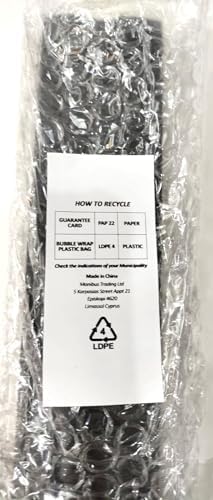
Image: A label showing recycling information for the product packaging, including symbols for bubble wrap (LDPE 4) and paper (PAP 22). This encourages environmentally responsible disposal.