Introduction
This manual provides essential instructions for setting up, operating, and maintaining your Sony DVP-FX930 9-Inch Portable DVD Player. Please read thoroughly to ensure optimal performance and longevity of your device.
Important Safety Information
- Do not expose the device to rain or moisture.
- Avoid direct sunlight or extreme temperatures.
- Use only specified power adapters.
- Keep out of reach of small children.
What's Included
- Sony DVP-FX930 9-Inch Portable DVD Player
- Remote Control (RMT-D191)
- Rechargeable Battery Pack
- AC Adaptor (AC-FX160)
- Car Battery Charger (DCC-FX160)
- A/V Cable
- Owner's Manual
Product Overview
The Sony DVP-FX930 is a versatile portable DVD player designed for on-the-go entertainment. It features a high-resolution 9-inch widescreen display and a long-lasting rechargeable battery.
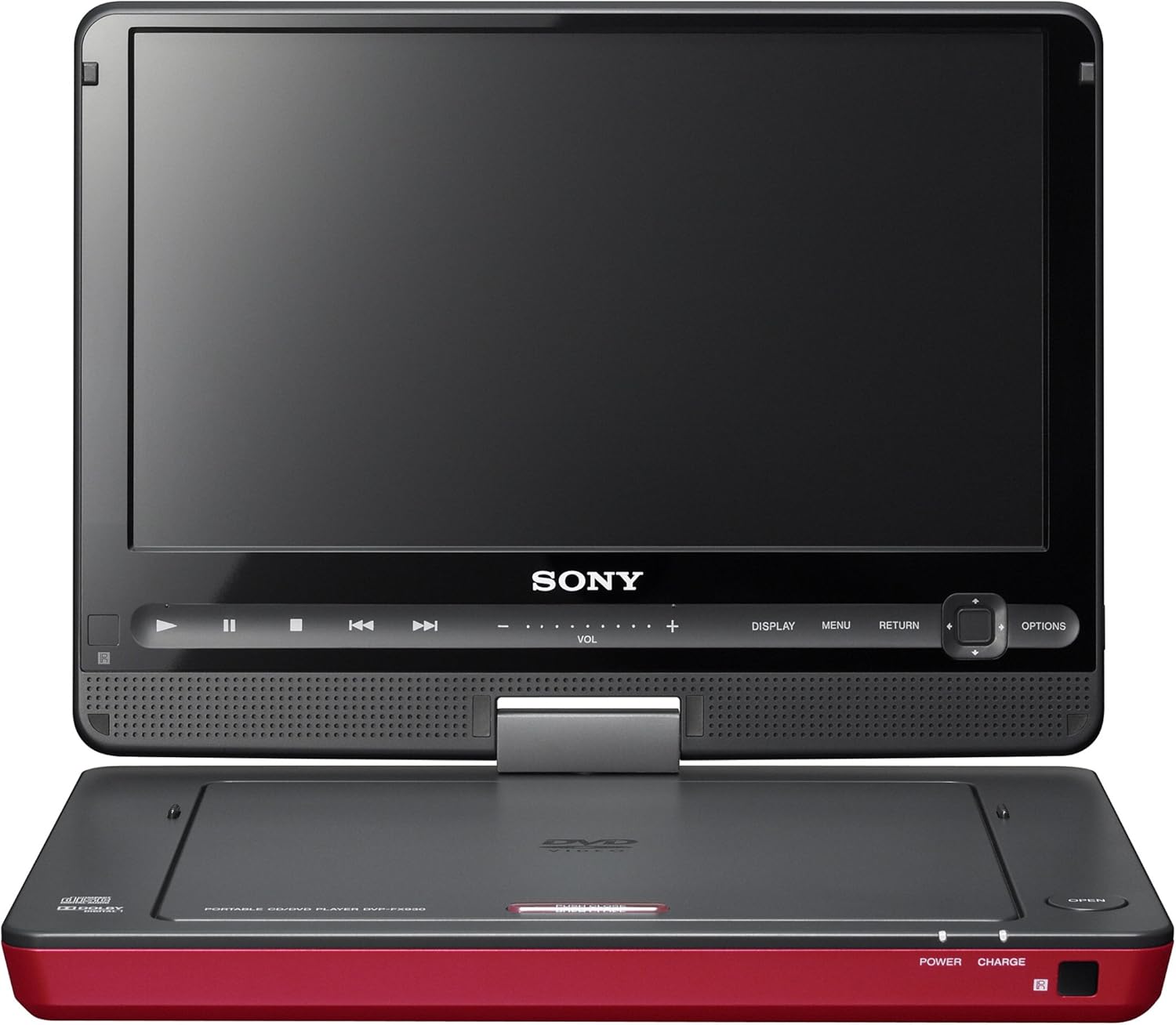
Figure 1: Front view of the Sony DVP-FX930 Portable DVD Player with the screen open, showing controls and disc tray.

Figure 2: Top view of the Sony DVP-FX930 Portable DVD Player in its closed state, highlighting the red casing.

Figure 3: Side view of the Sony DVP-FX930 Portable DVD Player with the screen swiveled, demonstrating its flexible viewing angles.
Setup
1. Charging the Battery
Before first use, fully charge the rechargeable battery pack. Connect the AC Adaptor (AC-FX160) to the DC IN port on the player and then to a wall outlet. For in-car charging, use the Car Battery Charger (DCC-FX160) with your vehicle's 12V accessory socket.
2. Inserting a Disc
- Open the disc compartment by gently lifting the screen.
- Place the DVD or CD disc onto the spindle with the label side facing up.
- Gently press the disc until it clicks into place.
- Close the disc compartment.
3. Connecting to a TV (Optional)
Use the supplied A/V cable to connect the DVP-FX930 to your television's A/V input ports. This allows the portable player to function as a standard DVD player for home viewing.
Operating Instructions
1. Power On/Off
Slide the ON/OFF switch located on the side of the player to power it on or off. The screen will illuminate upon powering on.
2. Basic Playback
After inserting a disc and powering on, the player will typically begin playback automatically. Use the touch keys on the bezel or the remote control (RMT-D191) for Play, Pause, Stop, Fast Forward, and Rewind functions.
3. Screen Adjustment
The 9-inch screen features a 180-degree swivel and flip mechanism. Gently adjust the screen to your desired viewing angle. This allows for versatile placement, including folding it flat for tablet-style viewing.
4. Multiple Format Playback
The DVP-FX930 supports multiple disc formats. Additionally, it features an SD card slot and a USB port, allowing you to view photos or play music/videos from compatible memory devices.
5. Disc Resume Function
The player features a disc resume function. If the device is turned off during playback, it will resume from where you left off when powered back on.
Key Features
- 9-Inch High-Resolution Widescreen Display: Enjoy clear and vibrant visuals with an 800 x 480 resolution screen.
- 6-Hour Rechargeable Battery: Provides extended viewing time, ideal for long journeys.
- 180-Degree Swivel and Flip Screen: Offers flexible viewing angles and compact storage.
- Touch Keys on Bezel: Conveniently located controls for easy operation.
- Multiple Format Disc Playback: Supports various disc types, along with USB and SD card media.
- Dual Sensors for Enhanced Remote Control Use: Allows for reliable remote operation from different positions.
- Dual Built-in Headphone Jacks: Enables two users to listen simultaneously.
- A/V Input and Output: Connect to a TV or external video source.
- 12-bit/108MHz Video DAC: Ensures a pristine picture quality by minimizing digital artifacts.
Maintenance
1. Screen Cleaning
To clean the screen, gently wipe it with a soft, lint-free cloth. Avoid using abrasive cleaners or solvents that could damage the display.
2. Disc Care
Handle discs by their edges to prevent fingerprints and scratches. Store discs in their cases when not in use.
3. Battery Longevity
For optimal battery life, avoid fully discharging the battery frequently. Store the device in a cool, dry place when not in use for extended periods.
Troubleshooting
- No Power: Ensure the battery is charged or the AC adaptor/car charger is securely connected. Check the ON/OFF switch.
- Disc Not Playing: Verify the disc is clean and free of scratches. Ensure it is inserted correctly with the label side up. Check if the disc format is supported.
- No Picture/Sound on TV: Confirm the A/V cables are correctly connected to both the player and the TV, and the TV input is set to the correct A/V source.
- Remote Control Not Working: Check the remote's batteries. Ensure there are no obstructions between the remote and the player's sensors.
- Region Code Issues: This player is designed for Region 1 DVDs (U.S. and Canada). Discs from other regions may not play.
Specifications
| Feature | Detail |
|---|---|
| Brand | Sony |
| Model Number | DVP-FX930 |
| Screen Size | 9-inch (diagonal) |
| Screen Resolution | 800 x 480 |
| Battery Life | Up to 6 hours |
| Weight | 1.98 pounds |
| Product Dimensions | 6.5 x 8.9 x 1.8 inches |
| Video DAC | 12-bit/108MHz |
| Supported Media | DVD, CD, USB, SD Card |
Warranty and Support
For warranty information and technical support, please refer to the official Sony website or contact Sony customer service directly. Details can typically be found in the included Owner's Manual or on the product packaging.


