1. Introduction
Thank you for purchasing the BOSS Audio Systems ONYX N2000.4 4-Channel MOSFET Power Amplifier. This manual provides detailed instructions for proper installation, operation, and maintenance of your amplifier. Please read this manual thoroughly before attempting installation or operation to ensure optimal performance and safety.
2. Safety Information
Improper installation or use can result in serious injury or damage to the amplifier or vehicle. Observe the following safety guidelines:
- Professional Installation Recommended: For best results and to avoid damage, installation by a qualified professional is highly recommended.
- Power Disconnection: Always disconnect the vehicle's negative battery terminal before starting any installation.
- Wiring: Ensure all wiring is correctly connected and securely fastened. Use appropriate gauge wiring for power and speaker connections.
- Ventilation: Mount the amplifier in a location that allows for adequate air circulation to prevent overheating. Do not cover the amplifier's heat sinks.
- Moisture: Avoid mounting the amplifier in areas exposed to moisture or direct sunlight.
- Fuses: Always replace fuses with the same type and rating.
3. Package Contents
Verify that your package contains the following items:
- BOSS Audio Systems ONYX N2000.4 4-Channel Amplifier
- Remote Subwoofer Level Control
- Mounting Hardware (screws, washers)
- User Manual (this document)
4. Key Features
The ONYX N2000.4 amplifier is designed to deliver powerful and clear audio performance. Key features include:
- 2000 Watts Max Power Output
- 4-Channel Configuration
- MOSFET Power Supply
- Remote Subwoofer Level Control
- Variable Low Pass and High Pass Crossovers
- Variable Input Gain Control
- Bridgeable Outputs for 2-Channel Operation
5. Setup and Installation
Before beginning installation, ensure the vehicle's battery is disconnected. Plan your wiring carefully to avoid interference and ensure proper power delivery.
5.1 Mounting the Amplifier
Choose a mounting location that is dry, well-ventilated, and secure. Avoid mounting on carpet or in enclosed spaces that restrict airflow. Use the provided mounting hardware to secure the amplifier firmly to a solid surface.
5.2 Wiring Connections
Refer to the diagram below for proper wiring connections. Ensure all connections are tight and insulated to prevent short circuits.
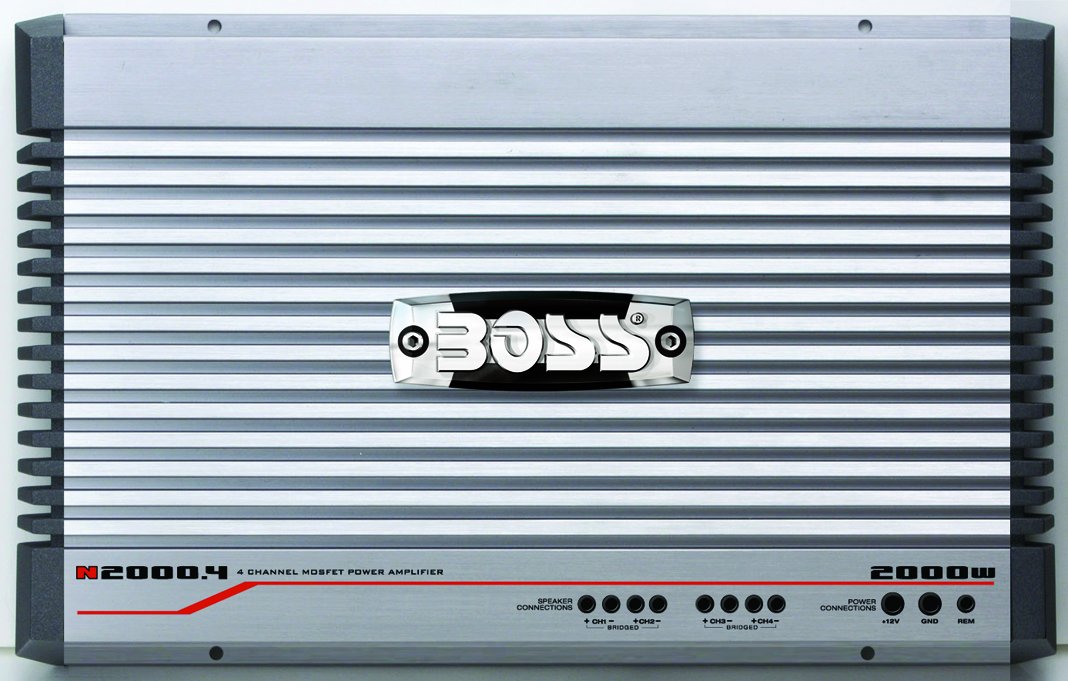
Front view of the BOSS Audio Systems ONYX N2000.4 amplifier, showing the BOSS logo, model number, power rating, and connection labels for speaker outputs and power input.
5.2.1 Power Connections
- +12V (Power): Connect to the positive terminal of the vehicle's battery using a heavy-gauge power cable (e.g., 4 AWG or larger). An inline fuse (not supplied) should be installed within 18 inches of the battery.
- GND (Ground): Connect to a clean, unpainted metal surface of the vehicle chassis. Ensure a good electrical connection. Use a heavy-gauge cable of the same size as the +12V wire.
- REM (Remote Turn-On): Connect to the remote turn-on output of your head unit. This wire turns the amplifier on and off with your car stereo.
5.2.2 Speaker Connections
The N2000.4 supports both 4-channel stereo and 2-channel bridged configurations.
- 4-Channel Stereo: Connect each speaker to its corresponding positive (+) and negative (-) terminals (CH1+, CH1-, CH2+, CH2-, CH3+, CH3-, CH4+, CH4-). Ensure correct polarity.
- 2-Channel Bridged: For higher power output to two speakers or subwoofers, bridge channels. Connect the positive (+) terminal of the speaker/subwoofer to CH1+ and the negative (-) terminal to CH2-. Similarly, for the second bridged output, connect to CH3+ and CH4-. Refer to the amplifier's labeling for specific bridged connection points. Minimum impedance for bridged operation is typically 4 ohms.
5.2.3 Audio Input Connections
Connect the RCA output cables from your head unit to the amplifier's RCA input jacks (FRONT L/R, REAR L/R).
5.2.4 Remote Subwoofer Level Control
Connect the remote level control cable to the designated port on the amplifier. Mount the control knob in an accessible location for easy adjustment of subwoofer output.
6. Operating and Adjustments
Once installed, fine-tune the amplifier settings for optimal sound quality.
6.1 Gain Control
The gain control matches the amplifier's input sensitivity to the output of your head unit. Start with the gain set to minimum. Turn your head unit volume to about 75% of maximum. Slowly increase the amplifier gain until you hear slight distortion, then back off slightly. This ensures maximum clean signal without clipping.
6.2 Crossover Settings (HPF/LPF)
The N2000.4 features variable high-pass (HPF) and low-pass (LPF) crossovers to direct specific frequency ranges to your speakers or subwoofers.
- High Pass Filter (HPF): Used for full-range speakers to block low frequencies, preventing distortion and improving clarity. Set the HPF to a frequency appropriate for your speakers (e.g., 80Hz-120Hz).
- Low Pass Filter (LPF): Used for subwoofers to block high frequencies, ensuring only bass notes are reproduced. Set the LPF to a frequency appropriate for your subwoofer (e.g., 80Hz-120Hz).
6.3 Bass Boost
If equipped, the bass boost control allows you to enhance low-frequency output. Use sparingly to avoid distortion and speaker damage.
6.4 Remote Subwoofer Level Control
This knob provides convenient adjustment of the subwoofer output level from the driver's seat without affecting other amplifier settings.
7. Maintenance
Regular maintenance ensures the longevity and performance of your amplifier.
- Cleaning: Periodically wipe the amplifier's exterior with a soft, dry cloth. Do not use harsh chemicals or abrasive cleaners.
- Ventilation: Ensure the amplifier's cooling fins remain free of dust and debris to maintain proper heat dissipation.
- Fuse Replacement: If a fuse blows, replace it only with a fuse of the exact same type and amperage rating. Using an incorrect fuse can cause damage or fire.
8. Troubleshooting
If you experience problems with your amplifier, consult the following troubleshooting guide before contacting support.
| Problem | Possible Cause | Solution |
|---|---|---|
| No Power / Amplifier Not Turning On |
|
|
| No Sound Output |
|
|
| Distorted Sound |
|
|
| Amplifier Overheating |
|
|
9. Specifications
| Model | N2000.4 |
| Channels | 4-Channel |
| Amplifier Class | MOSFET |
| Max Power Output | 2000 Watts |
| Dimensions (L x W x H) | 16.42 x 10.19 x 2.22 inches |
| Weight | 10.1 pounds |
| Remote Subwoofer Level Control | Included |
| Manufacturer | Boss Audio |
10. Warranty and Support
10.1 Warranty Information
The BOSS Audio Systems ONYX N2000.4 amplifier comes with a 6-year warranty. This includes a 1-year over-the-counter exchange and 5 years for parts and labor. Please retain your proof of purchase for warranty claims.
10.2 Customer Support
For technical assistance, troubleshooting beyond this manual, or warranty inquiries, please contact BOSS Audio Systems customer support. Refer to the official BOSS Audio Systems website for the most current contact information.
Note: Do not attempt to repair this unit yourself. Unauthorized repairs will void the warranty.


