
Introduction
The Denon DP-200USB is a fully automatic turntable designed for playing vinyl records and converting them into digital MP3 files. This manual provides essential information for the safe and efficient use of your turntable, covering setup, operation, maintenance, and troubleshooting.
Please read this manual thoroughly before using the product and retain it for future reference.
Safety Instructions
- Power Source: Connect the turntable only to the specified power supply voltage.
- Moisture: Do not expose the unit to rain or moisture to prevent fire or electric shock.
- Ventilation: Ensure adequate ventilation. Do not block ventilation openings.
- Placement: Place the unit on a stable, level surface away from direct sunlight, heat sources, and strong magnetic fields.
- Cleaning: Disconnect the power cord before cleaning. Use a soft, dry cloth. Do not use liquid or aerosol cleaners.
- Servicing: Do not attempt to service the unit yourself. Refer all servicing to qualified service personnel.
Package Contents
Verify that all items are present in the package:
- Denon DP-200USB Turntable Unit
- Dust Cover
- Platter
- Drive Belt
- Rubber Mat
- 45 RPM Adapter
- Power Adapter
- RCA Audio Cable
- USB Cable
- Software CD (Trans Music Manager)
- User Manual (this document)
Setup
1. Unpacking and Placement
Carefully remove the turntable from its packaging. Place the unit on a flat, stable surface, ensuring there is enough space around it for ventilation and operation.
2. Installing the Platter and Drive Belt
- Place the platter onto the center spindle.
- Locate the drive belt under the platter. Gently stretch the belt and hook it around the motor pulley. Ensure the belt is not twisted.
- Place the rubber mat on top of the platter.

Image: Top-down view of the Denon DP-200USB turntable, showing the platter and rubber mat in place, ready for operation.
3. Installing the Dust Cover
Insert the hinges of the dust cover into the hinge holders at the rear of the turntable unit.
4. Connecting to an Audio System
Connect the RCA audio cables from the turntable's output to an available input on your amplifier or receiver. The DP-200USB features a built-in RIAA equalizer. Use the EQ switch on the rear panel to select the appropriate setting:
- EQ ON: Use this setting if your amplifier does not have a dedicated "PHONO" input or if you are connecting to an AUX/LINE input.
- EQ OFF: Use this setting if your amplifier has a "PHONO" input.
5. Power Connection
Connect the power adapter to the DC input on the turntable and then plug it into a wall outlet.
Operating Instructions
1. Playing a Record
- Place a record on the platter. For 45 RPM singles, use the included adapter.
- Select the appropriate speed (33 1/3 or 45 RPM) using the speed selector switch.
- Remove the stylus protector from the cartridge.
- Press the START button. The tonearm will automatically move to the beginning of the record and begin playback.
- To stop playback, press the STOP button. The tonearm will return to its rest, and the platter will stop rotating.
2. Converting Records to MP3 (USB Recording)
The DP-200USB allows you to convert your vinyl records directly to MP3 files on a USB flash drive.
- Insert a USB flash drive into the USB port on the front panel of the turntable. Ensure the drive has sufficient free space.
- Place the record you wish to convert on the platter.
- Press the REC ON/OFF button to start recording. The REC indicator light will illuminate.
- Press the START button to begin playing the record. The turntable will automatically start recording the audio to the USB drive.
- When the record finishes, or you wish to stop recording, press the REC ON/OFF button again. The REC indicator light will turn off.
- Remove the USB flash drive.
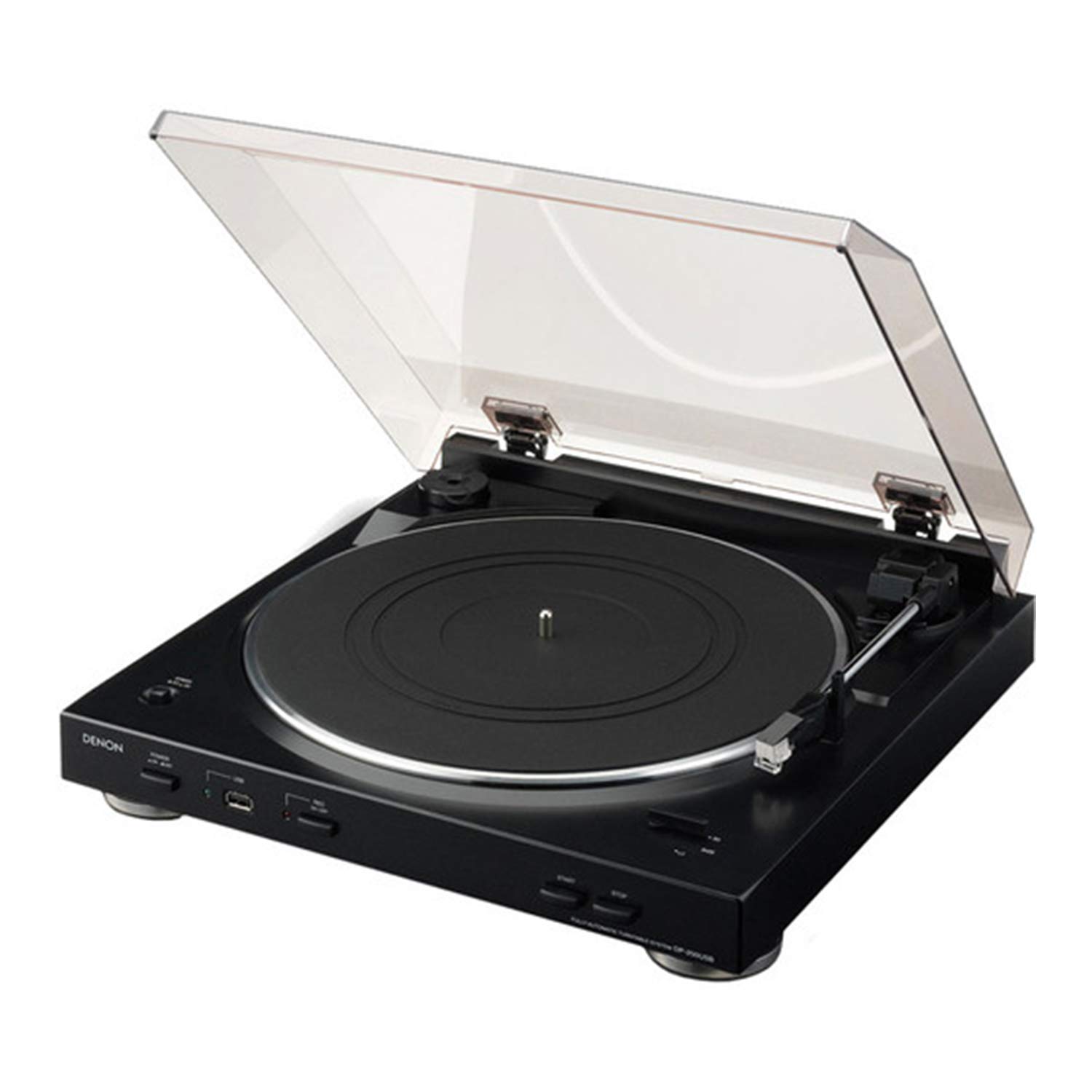
Image: The Denon DP-200USB turntable showing a USB flash drive inserted into the front USB port, ready for MP3 recording.
3. Using the Trans Music Manager Software
The included Trans Music Manager software (for PC) helps organize and enhance your recorded MP3 files:
- Audio Waveform Recognition: The software can analyze the first 15 seconds of each track to search the Gracenote internet music database for track details (artist, title, etc.).
- Auto Track Divider: It can automatically detect silent breaks between songs and insert new track tags, splitting your recording into individual tracks. Manual track division is also an option.
- Install the software from the provided CD or download the latest version from the Denon support website.
Maintenance
- Cleaning the Unit: Wipe the turntable cabinet and dust cover with a soft, dry cloth. Do not use abrasive cleaners or solvents.
- Stylus Care: Gently clean the stylus periodically using a soft brush designed for stylus cleaning, brushing from back to front. Avoid touching the stylus with your fingers.
- Record Care: Keep your records clean and free of dust to ensure optimal sound quality and prolong stylus life.
- Dust Cover: Keep the dust cover closed when not in use to protect the turntable from dust.
Troubleshooting
| Problem | Possible Cause | Solution |
|---|---|---|
| No power | Power cord not connected; outlet not active. | Check power cord connection; try a different outlet. |
| No sound or low sound | Audio cables not connected; incorrect EQ setting; amplifier input not selected. | Ensure RCA cables are securely connected; verify EQ switch setting (ON for AUX/LINE, OFF for PHONO); select correct input on amplifier. |
| Turntable not rotating | Drive belt dislodged; motor issue. | Check and re-seat the drive belt around the motor pulley. If problem persists, contact support. |
| MP3 recording not working | USB drive full or incompatible format; REC button not pressed. | Ensure USB drive has free space and is formatted to FAT32; confirm REC indicator light is on during recording. |
| Skipping or distorted sound | Dirty record; worn or damaged stylus; turntable not level. | Clean record; inspect stylus and replace if necessary; ensure turntable is on a level surface. |
Specifications
| Model Name | DP-200USB |
| Brand | Denon |
| Product Dimensions | 14.25 x 14.5 x 4 inches (36.2 x 36.8 x 10.2 cm) |
| Item Weight | 7.05 pounds (3.2 kg) |
| Color | Black |
| Material | Metal, Ceramic, Plastic, Rubber |
| Motor Type | DC Motor |
| Special Feature | Built-in Equalizer, USB MP3 Encoder |
| Compatible Devices | Personal Computer (for software) |
| Connectivity Technology | Wired (RCA, USB) |
Warranty and Support
For warranty information and technical support, please refer to the warranty card included with your product or visit the official Denon website. You can also contact Denon customer service directly for assistance with product operation, troubleshooting, or service inquiries.
Denon Official Website: www.denon.com


