
Introduction
This manual provides comprehensive instructions for the Datexx Smartech DS-638 Scientific Calculator. Designed for a wide range of mathematical, scientific, and engineering calculations, this unit features 136 functions to assist with complex problems. Please read this manual thoroughly to understand all functions and ensure optimal use of your calculator.
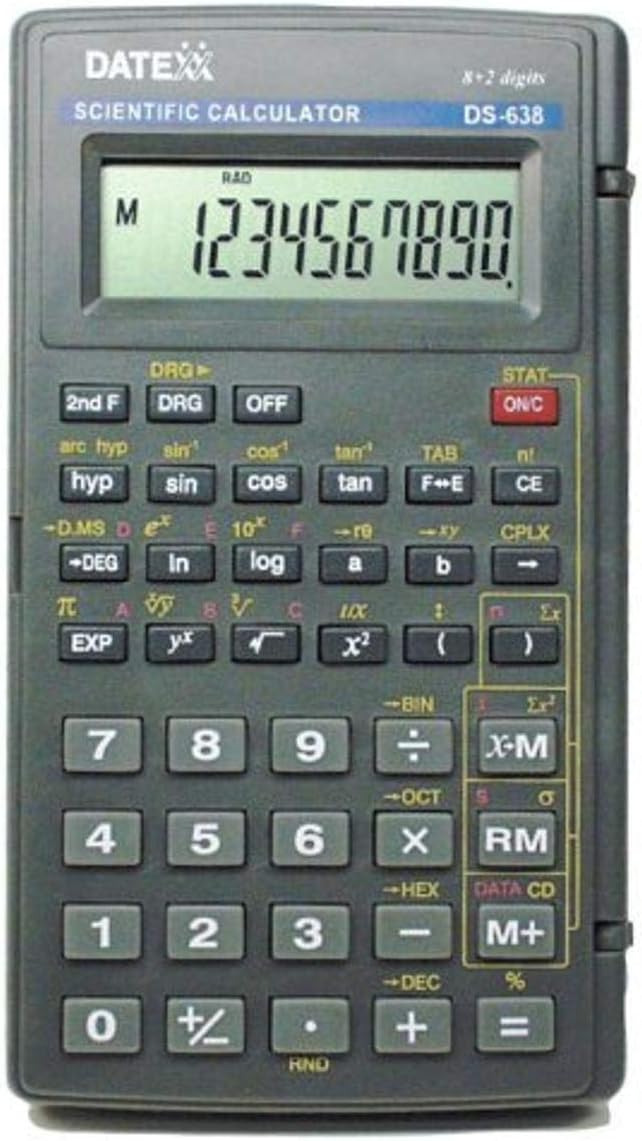
Figure 1: Front view of the Datexx Smartech DS-638 Scientific Calculator. This image displays the calculator's LCD screen, numeric keypad, and various function buttons, including trigonometric, logarithmic, and statistical operations.
Setup
1. Battery Installation
The Datexx DS-638 calculator comes with a battery pre-installed. If replacement is ever needed, ensure the calculator is turned off. Locate the battery compartment on the back of the unit. Use a small screwdriver to open the compartment, replace the old battery with a new one of the specified type (typically a button cell battery), and securely close the compartment.
2. Initial Power On
Press the ON/C button to turn on the calculator. The display should show "0" or a similar initial state. If the display is blank, check the battery installation.
3. Display Modes
The calculator may have different display modes (e.g., fixed decimal, scientific notation). Refer to the "Operating Instructions" section for details on how to adjust these settings to suit your calculation needs.
Operating Instructions
This section details the various functions and operations of the DS-638 scientific calculator.
Basic Operations
- Addition, Subtraction, Multiplication, Division: Enter numbers and use the +, -, x, ÷ keys. Press = for the result.
- Clear Entry (CE): Press CE to clear the last entered number or operation.
- All Clear (ON/C): Press ON/C to clear all calculations and reset the calculator.
- Percentage (%): Use the % key for percentage calculations.
Scientific Functions
- Trigonometric Functions (sin, cos, tan): Enter the angle value, then press sin, cos, or tan. Ensure the correct angle mode (DEG, RAD, GRAD) is selected using the DRG key.
- Inverse Trigonometric Functions (arcsin, arccos, arctan): Press 2nd F then sin, cos, or tan.
- Logarithmic Functions (log, ln): Use log for base-10 logarithm and ln for natural logarithm.
- Exponents (x², yˣ, 10ˣ, eˣ):
- Square: Enter number, then x².
- Power: Enter base, yˣ, then exponent.
- 10 to the power of x: Press 2nd F then log.
- e to the power of x: Press 2nd F then ln.
- Roots (√, ³√): Use √ for square root. For cube root or other roots, use the power function (e.g., x^(1/3)).
- Factorial (n!): Enter number, then 2nd F then n!.
Statistical Functions
The calculator supports statistical calculations including mean, standard deviation, and regression. To enter statistical mode, press STAT. Follow the on-screen prompts or manual instructions for data entry and calculation.
- Data Entry: Enter data points one by one, typically followed by a data entry key (e.g., DATA CD).
- Mean (x̄), Standard Deviation (σ, s): After data entry, use the appropriate function keys (often accessed via 2nd F or STAT menu) to calculate these values.
- Regression: The calculator can perform linear regression. Enter paired data (x, y) and then use the regression functions to find coefficients.
- CP, CPK Output: The calculator has the capacity for CP and CPK output, useful in quality control statistics. Consult specific key combinations for these advanced functions.
Base-N Calculations
The DS-638 can perform calculations in different number bases (binary, octal, decimal, hexadecimal).
- Mode Selection: Use keys like BIN, OCT, DEC, HEX to switch between bases.
- Calculations: Perform arithmetic operations within the selected base.
Polar/Rectangular Coordinate Transformation
This function allows conversion between polar coordinates (r, θ) and rectangular coordinates (x, y).
- Rectangular to Polar: Enter x, then y, and use the appropriate function key (e.g., 2nd F then P→R or similar).
- Polar to Rectangular: Enter r, then θ, and use the appropriate function key (e.g., 2nd F then R→P or similar).
Memory Functions
- Store (M+): Adds the displayed value to the memory.
- Recall (RM): Recalls the value stored in memory.
- Clear Memory (M-): Clears the memory. (Often 2nd F then M+ or similar).
Maintenance
- Cleaning: Use a soft, dry cloth to clean the calculator's exterior. Do not use liquid cleaners or abrasive materials.
- Storage: Store the calculator in a cool, dry place away from direct sunlight and extreme temperatures.
- Battery Replacement: If the display becomes dim or erratic, replace the battery as described in the "Setup" section.
Troubleshooting
- Calculator does not turn on:
- Check battery installation.
- Replace battery if necessary.
- Incorrect calculation results:
- Ensure correct mode (e.g., DEG/RAD for trigonometric functions).
- Verify data entry.
- Clear all memory and calculations using ON/C.
- Display shows "Error":
- An invalid operation was attempted (e.g., division by zero, square root of a negative number).
- Press CE or ON/C to clear the error.
Specifications

Figure 2: Datexx Smartech DS-638 Scientific Calculator showing its dimensions. The calculator measures approximately 19.81 cm in length and 10.92 cm in width.
| Feature | Detail |
|---|---|
| Model | DS-638 |
| Brand | Datexx |
| Manufacturer | Smartech |
| Number of Functions | 136 (131 without memory functions) |
| Display Type | LCD |
| Power Source | Battery |
| Batteries Included | Yes (1 Unknown type) |
| Dimensions (L x W x H) | 13.34 x 12.7 x 1.27 cm (5.25 x 5 x 0.5 inches) |
| Weight | 136.08 g (4.8 oz) |
| Color | Black |
| Special Features | Statistics & Regression (CP, CPK output), Fixed Decimal Option, Base-N Calculations, Polar/Rectangular Coordinate Transformation |
Warranty and Support
For warranty information and customer support, please refer to the documentation included with your purchase or contact Datexx customer service directly. Specific warranty terms may vary by region and retailer.
For further assistance, please visit the official Datexx website or contact their support channels.


