1. Introduction
The TRENDnet 8-Port Mini Gigabit Switch, model TEG-S80g, is designed to provide high-bandwidth network performance in a compact, durable metal enclosure. This unmanaged switch features GREENnet technology for automatic power consumption adjustment, contributing to energy savings without requiring any configuration. It is suitable for expanding network connectivity in small office or home environments, offering reliable gigabit speeds for connected devices.
Video 1: Product Overview. This video provides a brief visual introduction to the TRENDnet 8-Port Mini Gigabit Switch.
2. Features
- 8 Gigabit Ports: Provides high-speed network connections to devices.
- 16Gbps Switching Capacity: Allows smooth data traffic flow, reducing bottlenecks.
- GREENnet Technology: Automatically adjusts power consumption for energy savings.
- Fanless Design: Ensures silent operation, ideal for quiet environments.
- Durable Metal Housing: Compact and robust design for desktop or wall-mountable installations.
- Plug and Play: No configuration required for easy installation.
- NDAA + TAA Compliant: Meets U.S. integrity and supply chain standards for government contracts.
- LED Indicators: Provides visual status for link/activity and speed for each port.
3. Package Contents
Verify that your package contains the following items:
- TRENDnet 8-Port Mini Gigabit Switch (TEG-S80g)
- Power Adapter
- Quick Installation Guide
4. Setup
The TEG-S80g switch is designed for simple plug-and-play installation. Follow these steps to set up your device:
- Connect the Power Adapter: Plug the power adapter into the DC IN port on the switch and then into a standard electrical outlet. The Power LED on the front panel will illuminate.
- Connect to Your Network: Connect an Ethernet cable from your router or modem to any of the 8 Gigabit ports on the switch.
- Connect Network Devices: Connect your network devices (e.g., computers, game consoles, NAS, Smart TVs) to the remaining Gigabit ports on the switch using Ethernet cables.
- Verify Connection: The Link/ACT LED for each connected port will light up (green for Gigabit speed, orange for 10/100 Mbps speed) and blink to indicate data activity.

Image 1: The TRENDnet 8-Port Mini Gigabit Switch integrated into a home entertainment setup, connecting a Smart TV and other devices.
For wall mounting, the switch features a convenient design with mounting holes on the bottom. Ensure proper spacing for screws to securely attach the device to a wall.

Image 2: Bottom view of the switch, highlighting the integrated wall mount holes for flexible installation.
5. Operating
The TEG-S80g is an unmanaged switch, meaning it operates automatically without requiring any software configuration. Once connected, it will intelligently manage data flow between your connected devices.
LED Indicators:
- Power LED: Illuminates when the switch is powered on.
- Link/ACT LEDs (1-8):
- Green: Indicates a Gigabit (1000 Mbps) connection.
- Orange: Indicates a 10/100 Mbps connection.
- Blinking: Indicates data activity on the port.
- Off: No device is connected or the connected device is not powered on.

Image 3: Front view of the switch, showing the Power LED and individual Link/ACT LEDs for each of the 8 ports.
6. Maintenance
To ensure optimal performance and longevity of your TRENDnet 8-Port Mini Gigabit Switch, follow these maintenance guidelines:
- Placement: Place the switch in a well-ventilated area to prevent overheating. Avoid placing it near heat sources or in direct sunlight.
- Cleaning: Keep the device clean and free from dust. Use a soft, dry cloth for cleaning. Do not use liquid or aerosol cleaners.
- Cable Management: Ensure all Ethernet cables are securely connected and properly routed to avoid strain or damage.
- Power Supply: Use only the power adapter provided with the device.
7. Troubleshooting
If you encounter issues with your switch, consider the following common troubleshooting steps:
- No Power: Ensure the power adapter is securely connected to the switch and a working electrical outlet. Check if the Power LED is illuminated.
- No Link/Activity: Verify that Ethernet cables are securely connected to both the switch and the network device. Ensure the connected device is powered on and functioning correctly. Try using a different Ethernet cable or port.
- Slow Network Speed: Confirm that both the switch and your connected devices support Gigabit Ethernet for optimal speeds. Check the Link/ACT LED color (green for Gigabit). Ensure your Ethernet cables are Cat5e or higher.
- Intermittent Connection: Check for loose cable connections. Ensure the switch is placed in a stable environment away from strong electromagnetic interference.
If problems persist, refer to the Technical Support section for further assistance.
8. Specifications
| Feature | Description |
|---|---|
| Model Number | TEG-S80G |
| Number of Ports | 8 x Gigabit Ports |
| Switching Capacity | 16Gbps (full-duplex) |
| Dimensions (L x W x H) | 4.96 x 2.04 x 0.94 inches (126 x 51.8 x 24 mm) |
| Weight | 14.4 ounces (408 g) |
| Housing | Metal |
| Fanless | Yes |
| Energy Savings | GREENnet Technology |
| Mounting | Desktop, Wall-Mountable |
| Compliance | NDAA + TAA Compliant (U.S. and Canada Only) |
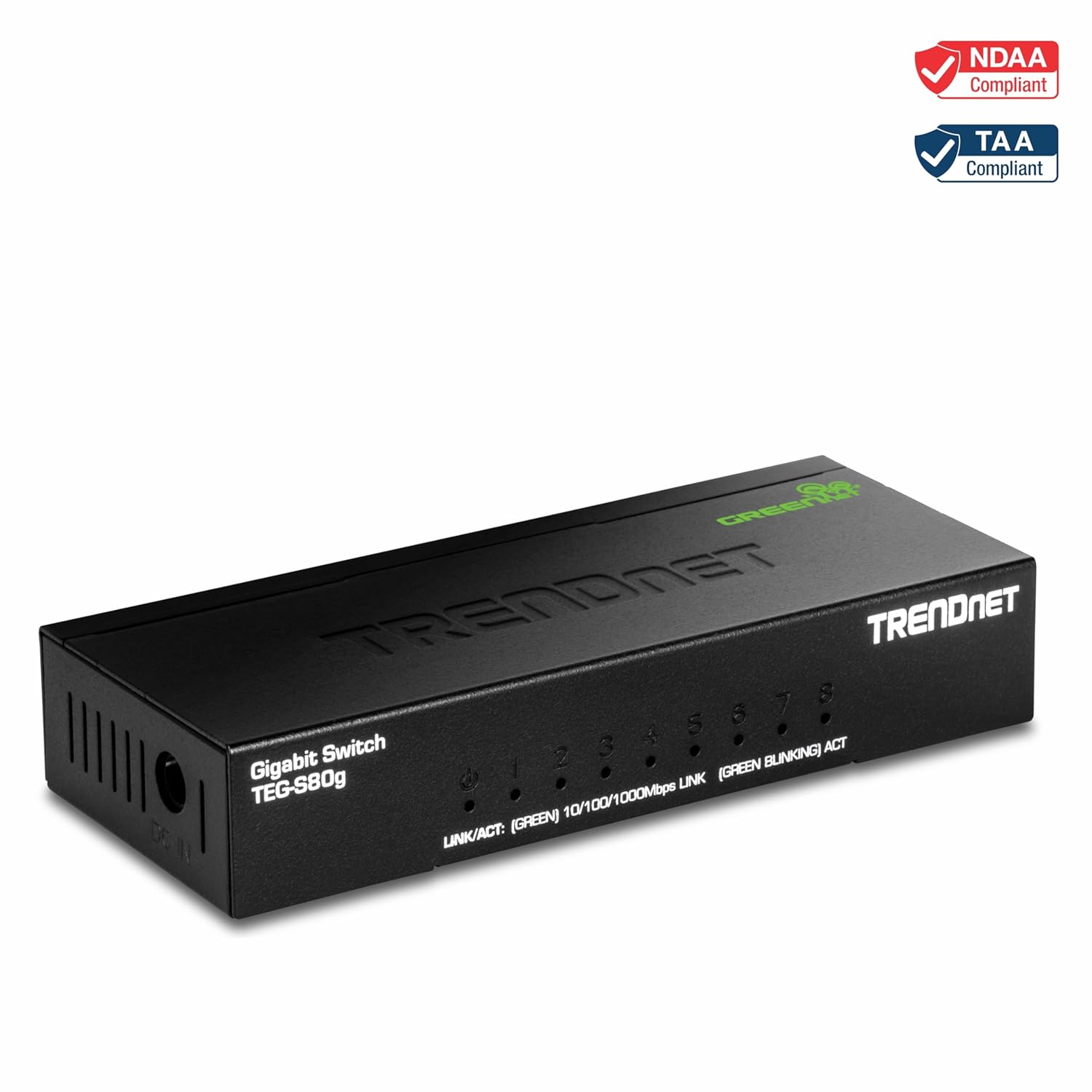
Image 4: Visual representation of the compact dimensions of the TRENDnet 8-Port Mini Gigabit Switch.
9. Warranty
The TRENDnet 8-Port Mini Gigabit Switch (TEG-S80g) is secured with Lifetime Manufacturer Protection from TRENDnet (U.S. and Canada Only). This warranty covers defects in materials and workmanship under normal use.
10. Technical Support
For any technical assistance or inquiries, TRENDnet offers reliable technical support. Our team of English-speaking advisors and experts are available during normal business hours to assist you with your needs.
Please visit the official TRENDnet website for contact information and additional resources: www.trendnet.com


