
1. Introduction
The Laser 4293 Anti Freeze Tester is a precision instrument designed to accurately measure the freeze protection level of ethylene glycol-based coolants in automotive cooling systems. This manual provides essential information for the safe and effective use of your tester, ensuring optimal performance and longevity of your vehicle's cooling system.
2. Safety Information
Always observe the following safety precautions when using the anti-freeze tester:
- Wear appropriate personal protective equipment, including eye protection, to prevent contact with coolant.
- Automotive coolant is toxic. Avoid skin contact and ingestion. Wash hands thoroughly after use.
- Ensure the engine is cool before attempting to test the coolant. Hot coolant and steam can cause severe burns.
- Dispose of used coolant responsibly according to local environmental regulations.
- Do not use this tester for coolants other than ethylene glycol.
3. Package Contents
Verify that all components are present:
- 1 x Laser 4293 Anti Freeze Tester for Ethylene Glycol
4. Setup
Before use, ensure the tester is clean and free from debris. No specific assembly is required for this device.

Image 1: The Laser 4293 Anti Freeze Tester. This image displays the full length of the tester, showing the black rubber bulb at the top, the clear plastic body with internal floating discs, and the flexible intake tube at the bottom. The markings for freeze protection levels are visible on the side of the clear body.
5. Operating Instructions
Follow these steps to accurately test your engine's coolant:
- Ensure Engine is Cool: Park the vehicle on a level surface and allow the engine to cool completely. This is crucial for safety and accurate readings.
- Locate Coolant Reservoir/Radiator: Identify the coolant reservoir or radiator cap.
- Remove Cap: Carefully remove the cap. If removing a radiator cap, turn it slowly to release any residual pressure.
- Draw Coolant: Submerge the flexible intake tube of the tester into the coolant. Squeeze the rubber bulb at the top of the tester to expel air, then release it to draw coolant into the tester's clear body. Fill the tester sufficiently so the internal discs can float freely.
- Lift and Read: Lift the tester out of the coolant. Allow a few seconds for the floating discs to settle.
- Return Coolant: Hold the tester over the coolant reservoir or radiator and squeeze the rubber bulb to return the coolant.
- Clean Tester: Rinse the tester thoroughly with clean water immediately after use to prevent residue buildup.
- Replace Cap: Securely replace the coolant reservoir or radiator cap.

Image 2: A person using the Laser 4293 Anti Freeze Tester on a motorcycle. The image shows the tester's intake tube submerged in the coolant reservoir of a motorcycle, with a hand squeezing the rubber bulb to draw in fluid. This illustrates the practical application of the device.
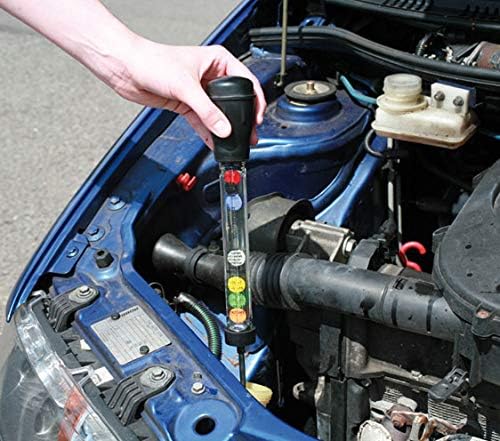
Image 3: A person using the Laser 4293 Anti Freeze Tester in a car engine bay. The tester is shown with its intake tube placed into the coolant reservoir, demonstrating the process of drawing coolant for testing in a typical automotive setting.
6. Reading Results
The tester uses a series of floating discs to indicate the freeze protection level. The number of discs that float to the top corresponds to a specific temperature range, displayed in both Celsius and Fahrenheit on the tester's scale.
- Observe the highest disc that floats. The reading next to this disc indicates the freeze protection temperature.
- The orange disc indicates an 'over protection' or 'not safe' condition. This typically means the coolant mixture contains more than 70% antifreeze, which can lead to reduced efficiency and protection. Pure ethylene glycol antifreeze freezes at approximately -6°F (-21°C).

Image 4: A close-up view of the Laser 4293 Anti Freeze Tester's clear body, highlighting the internal floating discs and the temperature scale. The scale clearly shows freeze protection levels in both Celsius and Fahrenheit, along with the orange disc indicating an 'over protection' or 'not safe' state.
7. Maintenance
Proper maintenance ensures the accuracy and longevity of your tester:
- Always rinse the tester with clean water immediately after each use to remove all traces of coolant.
- Store the tester in a clean, dry place, away from direct sunlight and extreme temperatures.
- Do not use abrasive cleaners or solvents on the tester, as this may damage the plastic or markings.
8. Troubleshooting
If you encounter issues with your tester, consider the following:
| Problem | Possible Cause | Solution |
|---|---|---|
| Inaccurate readings | Tester is dirty or has air bubbles. | Rinse tester thoroughly. Tap gently to dislodge air bubbles. |
| Discs not floating | Insufficient coolant drawn into tester; damaged discs. | Ensure enough coolant is drawn. If discs are damaged, replace tester. |
| Coolant not drawing | Intake tube blocked; bulb damaged. | Check intake tube for obstructions. Inspect bulb for cracks or leaks. |
9. Specifications
- Model: 4293
- Antifreeze Type: Ethylene Glycol
- Measurement Units: Celsius and Fahrenheit
- Product Dimensions: 5.7 x 12.1 x 39.3 cm
- Item Weight: 180 g
- Manufacturer Part Number: LAS4293
10. Warranty and Support
For warranty information and technical support, please refer to the manufacturer's official website or contact your point of purchase. Keep your proof of purchase for any warranty claims.


