
Introduction
The Vivitar ViviCam 8400YL is a compact 8.1-megapixel digital camera designed for capturing photos and videos, including use in underwater environments up to 10 meters. It features an integrated waterproof casing, a 2.4-inch LCD screen, and digital zoom capabilities. This manual provides essential information for setting up, operating, maintaining, and troubleshooting your camera.
Product Overview
The ViviCam 8400YL offers an 8.1 MP resolution with multiple settings, a 2.4-inch TFT LCD for viewing, and a movie mode for video recording. It includes 64MB of internal flash memory and supports SD cards up to 8GB for expanded storage. An 8x digital zoom allows for closer shots.
Camera Components
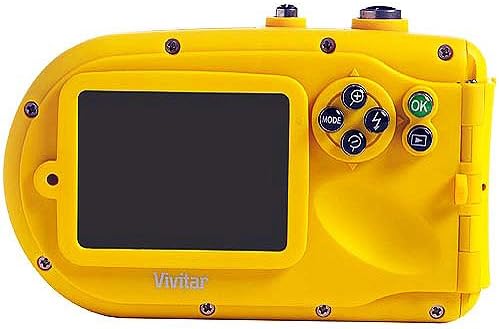
Image: Rear view of the Vivitar ViviCam 8400YL digital camera. This image displays the 2.4-inch LCD screen on the left and the control panel on the right. The control panel includes a circular directional pad with 'MODE', zoom in/out, and flash buttons, along with separate 'OK' and 'Playback' buttons. The camera body is yellow.
- LCD Screen: 2.4-inch TFT display for framing shots and reviewing media.
- Control Buttons: Includes buttons for mode selection, digital zoom, flash control, OK/confirm, and playback.
- Shutter Button: Located on the top panel for capturing photos.
- Battery Compartment: Houses two AA batteries.
- SD Card Slot: For inserting an SD memory card.
- USB Port: For connecting to a computer.
Setup
1. Installing Batteries
- Locate the battery compartment cover on the camera.
- Open the cover by sliding or unlatching it according to the indicator.
- Insert two AA batteries, ensuring correct polarity (+/-) as indicated inside the compartment.
- Close the battery compartment cover securely until it clicks into place. Ensure a tight seal for waterproof integrity.
2. Inserting an SD Memory Card
- Locate the SD card slot, typically near the battery compartment.
- Insert an SD memory card (up to 8GB supported) into the slot with the metal contacts facing the correct direction, usually downwards or towards the front of the camera.
- Push the card gently until it locks into place.
- To remove, push the card in again until it springs out slightly, then pull it out.
Operating Instructions
Powering On/Off
Press and hold the power button (usually located on the top or front of the camera) to turn the camera on or off. The LCD screen will illuminate upon power-on.
Taking Photos
- Turn on the camera.
- Ensure the camera is in photo mode (use the 'MODE' button to cycle through modes if necessary).
- Frame your shot using the 2.4-inch LCD screen.
- Press the shutter button halfway down to allow the camera to focus (if applicable).
- Press the shutter button fully down to capture the image.
Recording Videos
- Turn on the camera.
- Press the 'MODE' button until the video recording icon appears on the LCD.
- Press the shutter button to start recording. A timer or indicator will show recording is active.
- Press the shutter button again to stop recording.
- Note: Video recordings do not include sound.
Using Digital Zoom
While in photo or video mode, use the zoom buttons (often marked with '+' and '-') on the control panel to digitally zoom in or out. The ViviCam 8400YL features 8x digital zoom.
Reviewing Photos and Videos
- Press the 'Playback' button (often indicated by a play icon) to enter playback mode.
- Use the directional buttons to navigate through your captured photos and videos.
- Press the 'OK' button to view a selected item or play a video.
- Press the 'Playback' button again or the shutter button to exit playback mode.
Maintenance
Waterproof Care
- Before submerging the camera, ensure all compartment covers (battery, SD card, USB) are securely closed and sealed.
- After underwater use, rinse the camera with fresh water to remove salt or chlorine, then dry thoroughly with a soft cloth.
- Inspect rubber seals regularly for dirt, sand, or damage. Clean seals gently with a soft, damp cloth if necessary. Do not use sharp objects.
Cleaning the Camera
- Use a soft, lint-free cloth to clean the camera body and LCD screen.
- For the lens, use a specialized lens cleaning cloth or brush. Avoid touching the lens surface with fingers.
- Do not use harsh chemicals or abrasive cleaners.
Battery Care
- Remove batteries if the camera will not be used for an extended period.
- Use fresh, high-quality AA batteries for optimal performance.
Troubleshooting
- Camera does not power on: Ensure batteries are correctly inserted and fully charged. Try new batteries.
- Camera freezes or becomes unresponsive: Remove and reinsert the batteries to reset the camera.
- Images are blurry: Ensure the lens is clean. Hold the camera steady when pressing the shutter button. Allow sufficient light for the shot.
- LCD screen is difficult to see underwater or in bright light: This is a common characteristic of LCD screens in certain conditions. Try to shade the screen or adjust your viewing angle.
- Water leakage: If water enters the camera, immediately remove batteries and memory card. Allow the camera to dry completely. Contact customer support if damage occurs. Ensure all seals are clean and properly closed before each use.
- Memory card error: Ensure the SD card is inserted correctly. Try formatting the card (this will erase all data) or use a different compatible SD card.
Specifications
| Feature | Detail |
|---|---|
| Model Name | 8400YL |
| Effective Still Resolution | 8 MP |
| Maximum Webcam Image Resolution | 8 MP |
| Screen Size | 2.4 Inches |
| Digital Zoom | 8x |
| Video Resolution | 480p (VGA 640x480), 240p (QVGA 320x240) |
| Internal Memory | 64MB Flash |
| Compatible Flash Memory Type | SD (up to 8GB) |
| Water Resistance Level | Waterproof (up to 10 meters) |
| Power Source | 2 AA batteries |
| Connectivity Technology | USB |
| File Format | JPEG (Stills), AVI (Video) |
| Item Weight | 10 Grams |
Warranty Information
The Vivitar ViviCam 8400YL comes with a 1-year limited warranty from the date of purchase. This warranty covers manufacturing defects under normal use. It does not cover damage caused by misuse, accidents, unauthorized repairs, or failure to follow instructions in this manual. Please retain your proof of purchase for warranty claims.
Support
For technical assistance, warranty service, or further inquiries regarding your Vivitar ViviCam 8400YL camera, please contact Vivitar customer support. Refer to the contact information provided with your product packaging or visit the official Vivitar website for the most up-to-date support details.


