
1. Introduction
The Digi-Pas DWL80PRO is a compact, pocket-sized digital level designed for precise angle measurement. This electronic angle gauge provides digital readings in various units, making it suitable for a wide range of applications from professional engineering to DIY projects. Its features include a magnetic base for secure attachment to metal surfaces, an Alternate Zero function for relative angle measurements, and a Hold function to freeze readings.
This manual provides detailed instructions on the proper setup, operation, and maintenance of your DWL80PRO digital level to ensure accurate and reliable performance.

Figure 1: Digi-Pas DWL80PRO Pocket Size Digital Level. This image shows the front view of the black digital level with its display, ON/OFF, Alt.Zero, MODE, and CAL buttons, and a silver carabiner-style clip.
2. Safety Information
- Read all instructions before operating the device.
- Do not expose the device to extreme temperatures, moisture, or direct sunlight for prolonged periods.
- Avoid dropping the device or subjecting it to strong impacts.
- Keep the device away from strong magnetic fields, which may affect its accuracy.
- Use only the specified battery type (1 Lithium Metal battery).
- Dispose of batteries according to local regulations.
3. Product Overview
3.1 Key Features
- Dual Functions: Functions as a tilt/angle gauge and allows checking relative angles using the Alternate Zero feature.
- High Precision: Resolution of ±0.05° (at 0° & 90°), and ±0.2° (other angles).
- Multiple Display Units: Switchable display between degrees (°), slope (%), mm/M, and inch/FT.
- Strong Magnetic Base: Securely attaches to metallic surfaces for hands-free operation.
- Auto Invert Display: The display automatically rotates for easy reading when the gauge is upside down.
- Hold Function: Freezes the current reading on the LCD.
- Automatic Shut-off: Conserves battery life with a 3-minute auto shut-off feature.
- Durable Construction: Impact-resistant ABS polymer casing with a tough aluminum base.
3.2 Components
The DWL80PRO consists of the following main components:
- LCD Display
- ON/OFF Button (Red)
- Alt.Zero Button
- MODE Button
- CAL Button
- Magnetic Base
- Carabiner Clip
- Battery Compartment (on the back)

Figure 2: Rear view of the DWL80PRO, highlighting the battery compartment with "Unscrew To Open" label and product markings.
4. Setup
4.1 Battery Installation
The DWL80PRO requires one (1) Lithium Metal battery (included). To install or replace the battery:
- Locate the battery compartment on the back of the device (refer to Figure 2).
- Using a small screwdriver, unscrew the cover of the battery compartment.
- Insert the Lithium Metal battery, ensuring the correct polarity (+/-) as indicated inside the compartment.
- Replace the battery compartment cover and secure it with the screw.
4.2 Initial Power On
Press the red ON/OFF button to power on the device. The LCD display will illuminate and show the current angle reading.
5. Operation
5.1 Basic Angle Measurement
Place the magnetic base of the DWL80PRO firmly on the surface you wish to measure. The LCD will immediately display the angle relative to the horizontal plane. The display will automatically invert if the device is held upside down for easier reading.
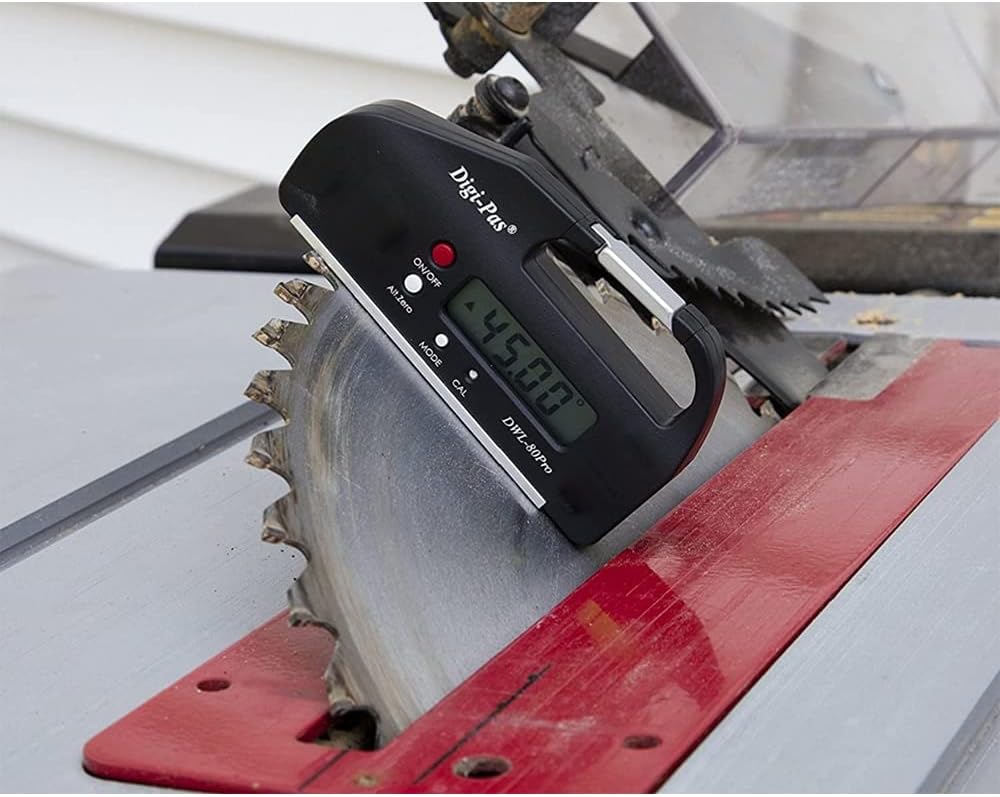
Figure 3: The DWL80PRO attached to a table saw blade, displaying an angle of 45.00 degrees.
5.2 Alternate Zero Function
The Alt.Zero function allows you to set any current surface as a new reference (0°) for relative angle measurements. This is useful for measuring the angle between two surfaces.
- Place the DWL80PRO on the first surface.
- Press the Alt.Zero button. The display will show "0.00°" and an "ALT" indicator, signifying that this position is now the reference zero.
- Move the DWL80PRO to the second surface. The display will now show the angle relative to your set "Alternate Zero".
- To exit Alternate Zero mode, press the Alt.Zero button again. The "ALT" indicator will disappear, and the device will return to absolute angle measurement.
5.3 Unit Conversion
Press the MODE button to cycle through the available measurement units: degrees (°), slope (%), mm/M, and inch/FT. The active unit will be indicated on the LCD.
5.4 Hold Function
To freeze the current reading on the display, press and hold the MODE button briefly. The display will show "HOLD" and the reading will be locked. Press the MODE button again to release the hold and resume live measurement.
5.5 Calibration
The DWL80PRO can be easily re-calibrated by the user to maintain factory accuracy. It is recommended to calibrate the device periodically or if you suspect accuracy issues.
- Place the DWL80PRO on a flat, stable surface.
- Press and hold the CAL button until "CAL 1" appears on the display.
- Rotate the device 180 degrees on the same surface, ensuring the same edge is in contact with the surface.
- Press the CAL button again. "CAL 2" will appear, followed by "CAL" and then the device will return to normal measurement mode. The calibration is complete.

Figure 4: The DWL80PRO placed on a centrifuge, indicating its use for precise leveling of equipment.
6. Maintenance
6.1 Cleaning
- Wipe the device with a soft, dry cloth.
- Do not use abrasive cleaners or solvents, as these can damage the casing or display.
- Ensure the magnetic base is clean and free of debris for accurate readings and secure attachment.
6.2 Storage
- Store the DWL80PRO in a cool, dry place, away from direct sunlight and extreme temperatures.
- If storing for an extended period, remove the battery to prevent leakage.
7. Troubleshooting
| Problem | Possible Cause | Solution |
|---|---|---|
| Device does not power on. | Dead or incorrectly installed battery. | Check battery polarity. Replace battery if necessary. |
| Inaccurate readings. | Needs calibration; dirty base; strong magnetic interference. | Perform calibration (Section 5.5). Clean the magnetic base. Move away from strong magnetic fields. |
| Display shows "HOLD". | Hold function is active. | Press the MODE button to release. |
| Display is blank or flickering. | Low battery. | Replace the battery. |
8. Specifications
- Model: DWL-80Pro
- Measurement Range: 0° ~ ±90° x 4 (360°)
- Resolution: ±0.05° (at 0° & 90°), ±0.2° (other angles)
- Display Units: Degrees (°), Slope (%), mm/M, inch/FT
- Power Source: 1 x Lithium Metal battery (3 Volts)
- Automatic Shut-off: 3 minutes
- Operating Temperature: 32°F to +122°F (0°C to +50°C)
- Material: Acrylonitrile Butadiene Styrene (ABS), Aluminum, Metal
- Color: Black
- Item Weight: 62 Grams (approx. 2.19 ounces)
- Product Dimensions: 4.21 x 0.71 x 2.17 inches (10.7 x 1.8 x 5.5 cm)

Figure 5: The DWL80PRO held in a hand, illustrating its compact size and approximate dimensions (2.3 inches / 5 cm height).
9. Warranty and Support
9.1 Warranty Information
Digi-Pas levels are warranted to the original purchaser to be free from defects in workmanship and material. Digi-Pas will repair or replace any defective part which may malfunction under normal and proper use within a period of 18 months from the date of purchase.
9.2 Customer Support
For technical assistance, troubleshooting, or warranty claims, please contact Digi-Pas customer support through their official website or the retailer where the product was purchased. Please have your product model and purchase date available when contacting support.


