
Introduction
The Laney L5T-112 Lionheart is a 5-watt, Class A, all-tube guitar amplifier combo designed to deliver classic tube tones at manageable volumes. This amplifier features a single 12-inch Celestion Heritage G12H speaker, two channels, and a built-in reverb. This manual provides essential information for the safe and effective use of your amplifier, including setup, operation, maintenance, and troubleshooting.
Important Safety Instructions
- Read Instructions: Read all safety and operating instructions before using this product.
- Retain Instructions: Keep these instructions for future reference.
- Heed Warnings: Observe all warnings on the product and in the operating instructions.
- Follow Instructions: Follow all operating and use instructions.
- Water and Moisture: Do not use this apparatus near water.
- Cleaning: Clean only with a dry cloth.
- Ventilation: Do not block any ventilation openings. Install in accordance with the manufacturer's instructions.
- Heat: Do not install near any heat sources such as radiators, heat registers, stoves, or other apparatus (including amplifiers) that produce heat.
- Power Cord Protection: Protect the power cord from being walked on or pinched, particularly at plugs, convenience receptacles, and the point where they exit from the apparatus.
- Unplug During Storms: Unplug this apparatus during lightning storms or when unused for long periods of time.
- Servicing: Refer all servicing to qualified service personnel. Servicing is required when the apparatus has been damaged in any way, such as power-supply cord or plug is damaged, liquid has been spilled or objects have fallen into the apparatus, the apparatus has been exposed to rain or moisture, does not operate normally, or has been dropped.
- Grounding: This product must be grounded.
Setup
1. Unpacking
Carefully remove the amplifier from its packaging. Inspect the unit for any signs of damage that may have occurred during transit. Retain the original packaging for future transport or servicing needs.
2. Placement
Place the amplifier on a stable, level surface. Ensure adequate ventilation around the unit, avoiding enclosed spaces or direct contact with walls that could obstruct airflow. Do not place the amplifier near heat sources or in direct sunlight.
3. Connecting Power
Ensure the amplifier's power switch is in the OFF position. Connect the supplied power cord to the IEC inlet on the rear panel of the amplifier and then to a grounded AC power outlet. Verify that the voltage rating on the amplifier matches your local mains supply.
4. Connecting Your Guitar
Connect your guitar to the 'INPUT' jack on the front panel using a high-quality instrument cable.
5. Connecting the Footswitch
The L5T-112 includes a footswitch for channel switching and reverb control. Connect the footswitch cable to the 'FOOTSWITCH' jack on the rear panel of the amplifier.
6. Speaker Connections
The amplifier features two speaker output jacks. The internal 1x12 inch Celestion speaker is pre-connected. If connecting an external speaker cabinet, ensure its impedance matches the amplifier's output impedance. Consult the amplifier's rear panel for specific impedance ratings.
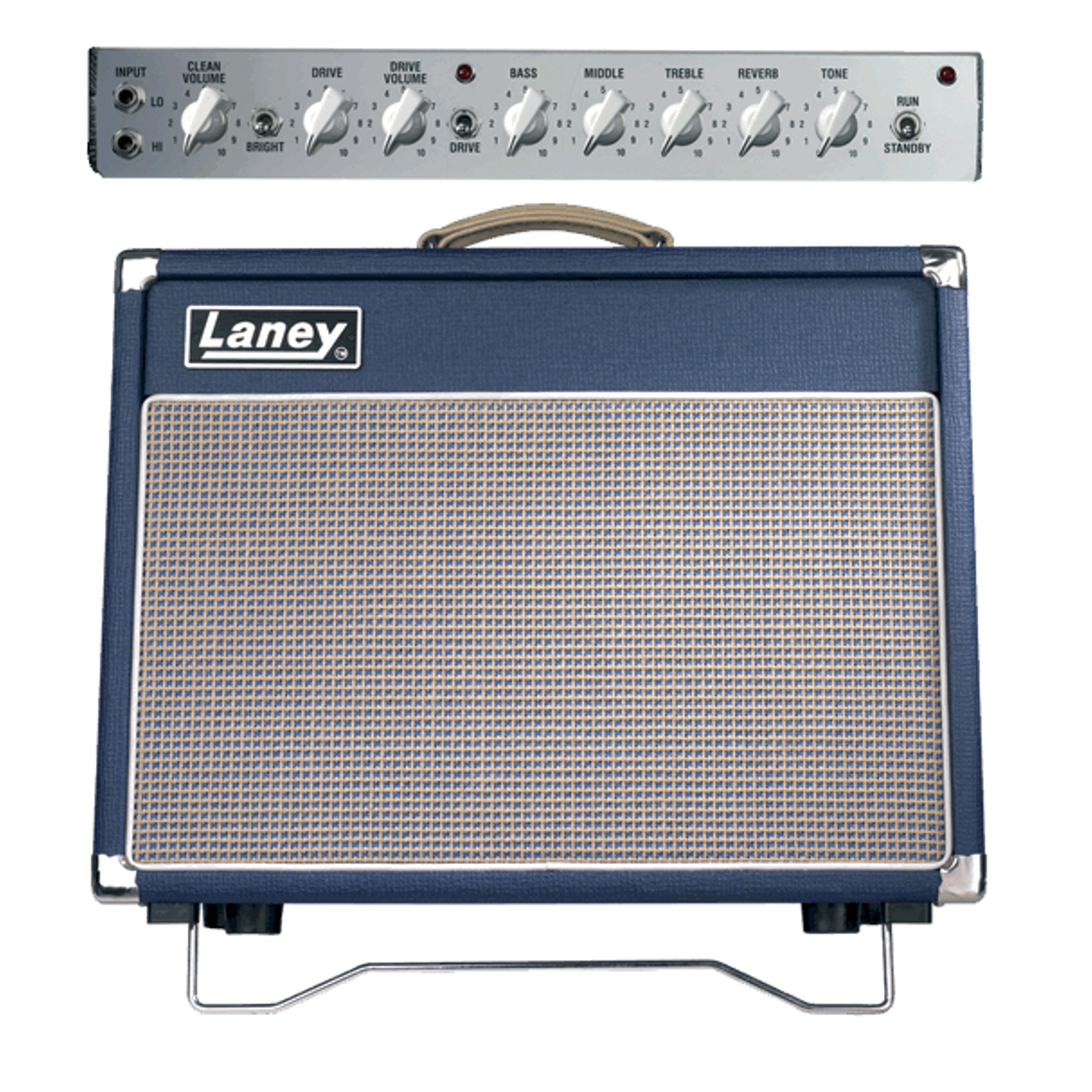
Image: Front view of the Laney L5T-112 Lionheart amplifier, showing the speaker grille and control panel.
Operating
1. Powering On
After all connections are made, switch the amplifier's power switch to the ON position. Allow a few moments for the tubes to warm up before playing. The amplifier is ready when the indicator light illuminates.
2. Control Panel Overview
The front panel features controls for two channels: Clean and Drive. Each channel has its own volume and tone shaping options.
- Input Jack: Connect your guitar here.
- Clean Channel Controls:
- Volume: Adjusts the overall output level of the Clean channel.
- Bright Switch: Engages a high-frequency boost for a brighter tone.
- Drive Channel Controls:
- Drive: Controls the amount of gain/overdrive.
- Volume: Adjusts the output level of the Drive channel.
- EQ Section (Shared):
- Bass: Adjusts low frequencies.
- Middle: Adjusts mid frequencies.
- Treble: Adjusts high frequencies.
- Reverb: Controls the level of the built-in digital reverb.
- Tone: A global tone control that affects the overall brightness of the amplifier.
- Channel Switch: Toggles between the Clean and Drive channels. This can also be controlled via the footswitch.

Image: Close-up view of the Laney L5T-112 control panel, showing knobs and switches for channels, EQ, and reverb.
3. Channel Switching
Use the 'CHANNEL' switch on the front panel or the footswitch to toggle between the Clean and Drive channels. The footswitch provides convenient hands-free operation during performance.
4. Using the Bright Switch
The 'BRIGHT' switch on the Clean channel adds clarity and sparkle to your tone. Experiment with this switch to find your preferred sound, especially with darker-sounding guitars or pickups.
5. Reverb Operation
The 'REVERB' control adjusts the intensity of the built-in digital reverb effect. Turn the knob clockwise to increase the reverb level. The reverb can also be toggled on/off using the footswitch.
6. Powering Off
Before powering off, turn down all volume controls. Switch the amplifier's power switch to the OFF position. Allow the tubes to cool down naturally.
Maintenance
1. Cleaning
Clean the amplifier's exterior with a soft, dry cloth. Do not use abrasive cleaners, solvents, or waxes, as these can damage the finish. Avoid spraying liquids directly onto the amplifier.
2. Tube Replacement
The L5T-112 uses vacuum tubes which have a finite lifespan. If you notice a decrease in performance, loss of tone, or unusual noise, the tubes may need replacement. Tube replacement should only be performed by qualified service personnel due to high internal voltages. The amplifier uses 3x 12AX7 preamp tubes and 1x EL84 power tube.
3. Storage
When not in use for extended periods, store the amplifier in a dry, temperature-controlled environment. If possible, use the included cover to protect it from dust and debris.
Troubleshooting
If you experience issues with your amplifier, consult the following basic troubleshooting steps before seeking professional service.
- No Sound:
- Check if the amplifier is powered on and the indicator light is illuminated.
- Ensure all cables (power, instrument, speaker) are securely connected.
- Verify that the guitar's volume is turned up.
- Check the amplifier's volume controls for both channels.
- Test with a different instrument cable and guitar.
- Poor Tone or Weak Output:
- Check EQ settings; ensure they are not set to extreme values.
- Inspect tubes for any visible damage or signs of failure (e.g., red plating).
- Ensure the speaker cable is properly connected.
- Excessive Hum or Noise:
- Ensure the amplifier is properly grounded.
- Try plugging the amplifier into a different power outlet.
- Move the amplifier away from other electronic devices that may cause interference.
- Test with a different instrument cable.
If these steps do not resolve the issue, contact qualified service personnel.
Specifications
| Model | L5T-112 |
| Power Output | 5 Watts RMS, Class A |
| Speaker | 1 x 12 inch Celestion Heritage G12H 70th Anniversary |
| Preamp Tubes | 3 x 12AX7 |
| Power Amp Tubes | 1 x EL84 |
| Channels | 2 (Clean and Drive) |
| Reverb | Type 4 Digital Reverb |
| Footswitch | Included (Channel/Reverb) |
| Speaker Connections | 2 x 6.35mm Jack |
| Dimensions (H x W x D) | 21 x 26 x 15 inches (approx.) |
| Weight | 56 pounds (approx.) |
Warranty and Support
Laney products are designed for reliability and performance. For information regarding warranty coverage, service, or technical support, please refer to the warranty card included with your product or visit the official Laney Amplification website. Keep your proof of purchase for any warranty claims.


