1. Introduction and Overview
The Panasonic Steam Foot Spa EH2862P-W is designed to provide a relaxing foot care experience through a combination of far-infrared heating and steam bath functions. This compact unit offers a convenient way to warm your feet and promote overall relaxation. It requires minimal water and features a user-friendly remote control for easy operation.
- Combines far-infrared and steam for effective warming.
- Compact design, approximately 30% smaller than previous models.
- Requires only about 100mL of water per session.
- Equipped with a remote control for convenient operation.
2. Safety Precautions
Always read this instruction manual thoroughly before using the product to ensure safe and correct operation.
- Electrical Safety: This unit is designed for 100 VAC, 650W power supply, typical for Japan. If using in regions with different voltage (e.g., 127 VAC in the United States), a step-down converter transformer (at least 1000W recommended) is required to prevent damage to the unit.
- Do not immerse the main unit in water.
- Keep out of reach of children and pets.
- Unplug the unit from the power outlet when not in use, during cleaning, or before moving.
- Do not use if the power cord or plug is damaged.
- Ensure hands are dry when plugging or unplugging the unit.
- Do not block the steam outlet during operation.
3. Product Components
Familiarize yourself with the main parts of your Panasonic Steam Foot Spa:
- Main Unit: The primary body of the foot spa, housing the water tank, heating elements, and steam generator.
- Remote Control: Used to power on/off, select modes, and adjust settings.
- Water Tank: Located within the main unit, where water is added for steam generation.
- Steam Outlet: Where steam is released to warm the feet.
- Far-Infrared Heater: Provides gentle, penetrating warmth.

Image: The Panasonic Steam Foot Spa main unit shown with its remote control.
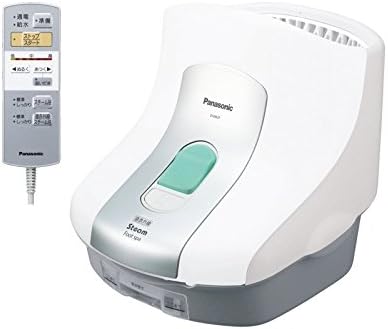
Image: A detailed view of the remote control, showing buttons for power, mode selection, and temperature adjustment.
4. Setup
- Placement: Place the Steam Foot Spa on a stable, flat, and heat-resistant surface. Ensure there is enough space around the unit for proper ventilation.
- Water Filling: Open the water tank cover. Fill the water tank with approximately 100mL of clean water. Do not overfill.
- Power Connection: Plug the power cord into a suitable electrical outlet. Ensure the voltage matches the product specifications (100 VAC).

Image: A hand demonstrating the process of adding water to the foot spa's reservoir.
5. Operating Instructions
- Power On: Press the 'Start' button on the remote control to turn on the unit.
- Select Mode: Use the remote control to select your desired mode:
- Steam Bath: Provides a warm steam experience.
- Far-Infrared Steam Bath: Combines steam with gentle far-infrared heat for enhanced warmth.
- Adjust Settings: If available, use the remote control to adjust the intensity or duration of the session.
- Place Feet: Once the unit begins to generate steam and heat, carefully place your feet into the foot spa.
- Enjoy: Relax and enjoy the soothing steam and warmth. The unit is designed to warm your feet and promote overall comfort.
- Power Off: After your session, press the 'Stop' button on the remote control to turn off the unit. Unplug the power cord from the outlet.

Image: A visual representation of feet inside the foot spa, illustrating the steam and far-infrared heating in action.
6. Maintenance and Cleaning
Regular cleaning is essential to maintain hygiene and prolong the life of your foot spa.
- Drain Water: After each use, carefully drain all remaining water from the unit.
- Clean Interior: Wipe the interior surfaces of the foot spa with a clean, damp cloth. It is crucial to clean thoroughly to prevent the growth of bacteria or mold.
- Dry Thoroughly: Ensure all parts are completely dry before storing the unit.
- Exterior Cleaning: Wipe the exterior of the unit with a soft, damp cloth. Do not use abrasive cleaners or solvents.
- Storage: Store the foot spa in a cool, dry place away from direct sunlight.
Note: Due to the need for regular cleaning and storage, this product may require consistent attention after each use.
7. Troubleshooting
If you encounter any issues with your Panasonic Steam Foot Spa, please refer to the following common solutions:
- Unit does not power on: Check if the power cord is securely plugged into both the unit and the electrical outlet. Ensure the outlet is functioning correctly.
- No steam generated: Verify that the water tank has been filled with the appropriate amount of water (approx. 100mL).
- Remote control not responding: Check the batteries in the remote control and replace them if necessary. Ensure there are no obstructions between the remote and the unit.
- Unusual noises or odors: Immediately turn off and unplug the unit. Contact customer support for assistance.
For issues not listed here, please contact Panasonic customer support.
8. Specifications
| Feature | Specification |
|---|---|
| Model Number | EH2862P-W |
| Brand | Panasonic |
| Dimensions (approx.) | 40 x 40 x 40 cm |
| Product Weight | 3980 grams |
| Color | White |
| Power Source | Corded Electric |
| Voltage | 100 VAC, 650W (for Japan) |
| Other Features | Remote Control |
9. Warranty and Support
For repairs and inquiries regarding your Panasonic Steam Foot Spa EH2862P-W, please contact Panasonic Customer Support:
- Telephone: 0120-878-554
- Operating Hours: 9:00 AM - 7:00 PM (JST)
- Special Hours: Sundays, holidays, and year-end/New Year holidays: 9:00 AM - 5:30 PM (JST)
You can also find more information by searching for "Panasonic Repair" online.


