
1. Introduction
Thank you for choosing the Bushnell Neo Golf GPS Rangefinder. This compact and user-friendly device is designed to provide accurate distances to the front, center, and back of the green, helping you improve your golf game. The Neo is ready to use right out of the box with thousands of pre-loaded courses and features auto-course recognition and auto-hole advance.
Key features include:
- Instant display of key distances (front, center, back of green)
- Storage for up to 10 GPS golf course files
- Ability to mark up to four custom points per hole
- Accurate Shot Distance feature
- Internal, rechargeable Li-ion battery
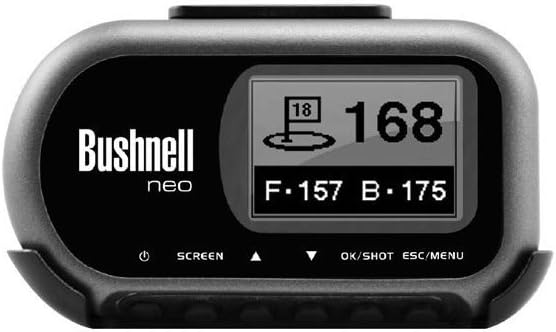
Figure 1: The Bushnell Neo Golf GPS Rangefinder, a compact black device with a clear LCD screen showing distances to the back (166), center (152), and front (143) of the green, along with the current time (10:36 AM) and hole number (12). Control buttons are located below the screen.
2. Package Contents
Please check the package for the following items:
- Bushnell Neo Golf GPS Rangefinder
- Belt Clip
- USB Charging Cable (not explicitly listed but standard for rechargeable devices)
- Quick Start Guide (not explicitly listed but standard)
3. Setup
3.1 Charging the Device
Before first use, fully charge your Bushnell Neo. Connect the device to a USB power source (e.g., computer USB port or USB wall adapter) using the provided USB cable. The battery indicator on the screen will show charging status. A full charge can provide up to 16 hours of battery life.
3.2 Initial Power On
Press and hold the Power button (usually located on the side or top) until the Bushnell logo appears on the screen. The device will then begin searching for GPS satellites.
3.3 Course Loading
Your Bushnell Neo comes pre-loaded with over 16,000 American courses. For courses not pre-loaded or for updates, you can download courses from iGolf.com. Refer to the iGolf website for detailed instructions on course downloads and synchronization.
4. Operating Instructions
4.1 Power On/Off
- To Power On: Press and hold the Power button until the screen illuminates.
- To Power Off: Press and hold the Power button until the device prompts you to shut down, then confirm.
4.2 GPS Signal Acquisition
Once powered on, the device will automatically search for GPS satellites. For best results, ensure you are in an open area with a clear view of the sky. This process may take a few minutes.
4.3 Auto Course Recognition and Hole Advance
When you are on a golf course, the Neo will automatically detect the course you are playing. As you move from one hole to the next, the device will automatically advance to the current hole, displaying relevant distances.
4.4 Viewing Distances
The main screen displays distances to the:
- Front: Distance to the front edge of the green.
- Center: Distance to the center of the green.
- Back: Distance to the back edge of the green.
4.5 Custom Points
The Bushnell Neo allows you to set up to 4 custom points per hole (e.g., bunkers, water hazards). Consult the on-screen menu options, typically accessed via the 'PAGE' button, to navigate to the custom point setting feature. Follow the prompts to mark and save these points.
4.6 Shot Distance Calculator
To measure the distance of your shot:
- At your starting position, activate the Shot Distance feature (refer to your device's menu for exact navigation, usually under a 'Measure Shot' or similar option).
- Walk to where your ball landed.
- The device will display the distance traveled from your starting point.
4.7 Navigating Menus
Use the directional arrow buttons (Up/Down) to scroll through menu options. Press the 'ENTER' button to select an option. The 'PAGE' button typically cycles through different display screens or returns to the previous menu.
5. Maintenance
5.1 Cleaning
The Bushnell Neo is durable and rainproof. To clean the device, wipe it with a soft, damp cloth. Do not use abrasive cleaners or solvents, as they may damage the casing or screen.
5.2 Battery Care
To prolong battery life, avoid fully discharging the battery regularly. Recharge the device when the battery indicator is low. If storing the device for an extended period, ensure it has a partial charge (around 50%) and store it in a cool, dry place.
5.3 Storage
Store your Bushnell Neo in a protective case or pouch when not in use to prevent scratches and damage. Avoid exposing the device to extreme temperatures or direct sunlight for prolonged periods.
6. Troubleshooting
6.1 Device Not Powering On
- Ensure the battery is charged. Connect to a power source and try again after a few minutes.
- Try holding the Power button for a longer duration (10-15 seconds) for a hard reset.
6.2 GPS Signal Not Acquired
- Ensure you are in an open area with a clear view of the sky, away from tall buildings or dense tree cover.
- Allow more time for the device to acquire satellites (up to several minutes).
- Ensure the device's software is up to date (check iGolf.com for updates).
6.3 Incorrect Distances Displayed
- Verify that the correct course and hole are selected.
- Ensure the device has a strong GPS signal.
- Check for course updates on iGolf.com, as course layouts can change.
6.4 Short Battery Life
- Ensure the device is fully charged before use.
- Battery performance can degrade over time; consider battery replacement if significantly reduced.
- Extreme temperatures can affect battery performance.
7. Specifications
| Model Name | Neo |
| Model Number | 368050 |
| Dimensions | 1.75 x 3.25 x 0.75 inches |
| Battery Type | Rechargeable Li-Ion |
| Battery Life | Up to 16 hours |
| GPS Chip | SiRFstarIII |
| Display Type | High Contrast LCD |
| Water Resistance | Rainproof |
| Course Capacity | Stores up to 10 courses |
| Included Components | Belt clip |
| Compliance | Adheres to USGA rules |
8. Warranty and Support
For detailed warranty information, please refer to the documentation included with your product or visit the official Bushnell website. Warranty terms and conditions may vary.
For product support, frequently asked questions, and additional resources, please visit the Bushnell official website or their store page on Amazon: