
1. Introduction
Thank you for choosing the Gilmour 7900MM Metal Oscillator Sprinkler. This manual provides essential information for the proper setup, operation, and maintenance of your sprinkler to ensure optimal performance and longevity. This oscillating sprinkler is designed for efficient watering of large lawn areas, providing consistent and even coverage up to 4000 square feet with its 19 metal spray jets.
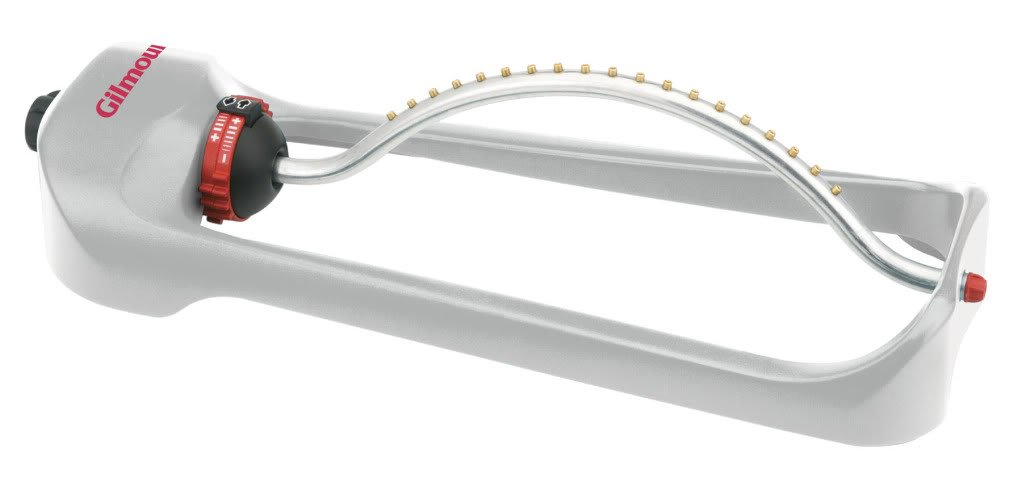
Image 1.1: The Gilmour 7900MM Metal Oscillator Sprinkler. This image shows the full sprinkler unit, highlighting its durable metal construction and oscillating spray bar with multiple jets.
2. Safety Information
Please read all safety instructions before using the sprinkler. Failure to follow these instructions may result in property damage or injury.
- Always ensure the water supply is turned off before connecting or disconnecting the sprinkler.
- Do not leave the sprinkler unattended for extended periods, especially in areas with high water pressure, to prevent flooding.
- Keep the sprinkler away from electrical outlets or devices.
- Store the sprinkler in a dry, protected area when not in use, particularly during freezing temperatures.
- This product is for outdoor watering use only.
3. Package Contents
Verify that all components are present upon unpacking:
- Gilmour 7900MM Metal Oscillator Sprinkler (1 unit)
- User Manual (this document)
4. Setup
- Positioning: Place the sprinkler on a flat, stable surface in the area you wish to water. Ensure the sprinkler is level for even water distribution.
- Hose Connection: Connect a standard garden hose to the inlet fitting located on the sprinkler. Hand-tighten the connection to prevent leaks. Do not overtighten.
- Water Supply: Slowly turn on the water supply from your faucet. Check for any leaks at the connection point.
5. Operating Instructions
The Gilmour 7900MM sprinkler is designed for simple operation.
- Initiate Watering: Once connected and positioned, turn on the water supply. The sprinkler will begin oscillating, distributing water over the designated area.
- Adjusting Coverage: The sprinkler features dials on each side to control the watering pattern. Adjust these dials to set the desired range and width of the spray, allowing for full or partial coverage. Experiment with the dial settings to achieve the optimal watering pattern for your lawn.
- Stopping Watering: To stop watering, turn off the water supply at the faucet.
6. Maintenance
The Gilmour 7900MM Metal Oscillator Sprinkler is designed for low maintenance.
- Cleaning Jets: Periodically inspect the 19 spray jets for any blockages from debris or mineral deposits. If blockages occur, gently clear them using a small brush or pin.
- Storage: Before storing for the winter or extended periods, drain all water from the sprinkler. Store in a dry, frost-free location to prevent damage.
- General Cleaning: Wipe down the exterior of the sprinkler with a damp cloth as needed to remove dirt and grime.
7. Troubleshooting
| Problem | Possible Cause | Solution |
|---|---|---|
| Uneven spray pattern or reduced coverage. | Blocked spray jets. Low water pressure. | Clean the spray jets. Ensure adequate water pressure from the source. Check for kinks in the hose. |
| Sprinkler not oscillating. | Insufficient water pressure. Internal mechanism obstruction. | Increase water pressure. Check for debris in the water inlet. If the issue persists, contact customer support. |
| Water leaking from hose connection. | Loose connection. Damaged hose washer. | Tighten the hose connection. Replace the hose washer if damaged. |
8. Specifications
- Model: 7900MM
- Brand: GILMOUR
- Material: Metal
- Coverage Area: Up to 4000 square feet
- Number of Jets: 19
- Dimensions (L x W x H): 55.4 x 17.8 x 8.9 cm (21.8 x 7 x 3.5 inches)
- Item Weight: Approximately 1.36 kg (3 Pounds)
- UPC: 034411079508
9. Warranty and Support
For warranty information or technical support, please refer to the official GILMOUR website or contact their customer service department. Keep your purchase receipt as proof of purchase.
GILMOUR Customer Service: Visit Gilmour.com/contact-us