
Leviton 5243
Contents
Leviton 15 Amp, 120/277 Volt, Duplex Style Two 3-Way Combination Switch User Manual
Model: 5243

Introduction
This manual provides detailed instructions for the installation, operation, and maintenance of your Leviton 15 Amp, 120/277 Volt, Duplex Style Two 3-Way Combination Switch, Model 5243. This commercial-grade device is designed for reliable performance in various electrical applications. Please read these instructions carefully before installation and use to ensure proper function and safety.
Product Overview
The Leviton 5243 is a duplex-style combination switch featuring two 3-way switches in a single unit, designed to save space in electrical boxes. It is suitable for 120/277 VAC, 15 Amp applications.
Key Features:
- Duplex Style: Combines two 3-way switches in one device.
- Commercial Grade: Built for durability and reliable performance.
- Voltage Rating: 120/277 VAC.
- Current Rating: 15 Amp.
- Side Wiring: Designed for easy wire connection.
- Thermoplastic Material: Durable construction.
- UL 20, CSA C22.2, NOM 057 Approved.
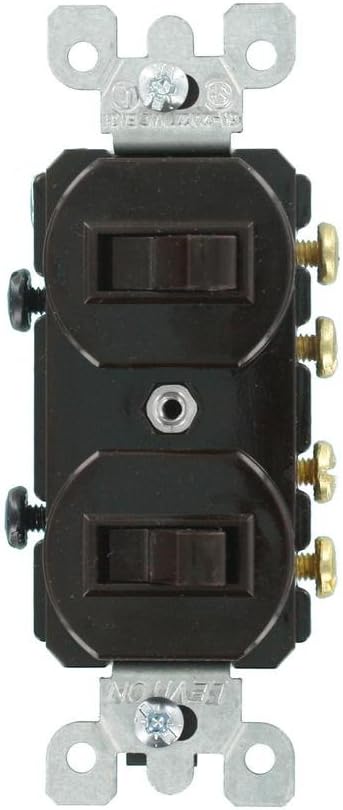
Image 1: Front view of the Leviton 5243 Duplex 3-Way Combination Switch, showing the two toggle switches and wiring terminals.
Installation Instructions
Safety Precautions:
- WARNING: To avoid fire, shock, or death, turn off power at the circuit breaker or fuse box and test that power is off before wiring.
- Installation should be performed by a qualified electrician or in accordance with local electrical codes.
- Use only copper wire.
- Ensure all connections are secure.
Wiring Diagram (General 3-Way):
A 3-way switch system controls a light or device from two different locations. This combination switch provides two independent 3-way circuits.
- Identify Wires: In a typical 3-way setup, you will have a common wire (usually black, connected to the darker screw), and two traveler wires (usually red or black, connected to the lighter screws). For this duplex switch, you will have two sets of these.
- Power Off: Ensure power is OFF at the circuit breaker.
- Connect Common Wires: Connect the common wire for the first switch to its designated common terminal (often a darker or isolated screw). Repeat for the second switch.
- Connect Traveler Wires: Connect the two traveler wires for the first switch to its traveler terminals. Repeat for the second switch.
- Ground Wire: Connect the bare copper or green insulated ground wire from the electrical box to the green ground screw on the switch.
- Remove Jumper Tab (if applicable): This switch may come with a removable tab connecting the two common terminals. If you are using the two switches on separate electrical circuits, this tab MUST be removed. If both switches are on the same circuit, the tab can remain.
- Mount Switch: Carefully fold wires into the electrical box and secure the switch to the box using the provided mounting screws.
- Install Wallplate: Attach the appropriate wallplate (not included) over the switch.
- Restore Power: Turn power back ON at the circuit breaker.
For specific wiring configurations or if you are unsure, consult a qualified electrician or refer to the National Electrical Code (NEC).
Operating Instructions
The Leviton 5243 Duplex 3-Way Combination Switch operates like two independent 3-way toggle switches.
- Each toggle switch controls a separate lighting fixture or device in conjunction with another 3-way switch in the circuit.
- To turn the connected device ON or OFF, simply toggle the switch lever up or down. The state (ON/OFF) depends on the position of both 3-way switches in the circuit.
Maintenance
The Leviton 5243 switch requires minimal maintenance.
- Cleaning: To clean the surface of the switch, wipe with a soft, damp cloth. Do not use abrasive cleaners or solvents.
- Inspection: Periodically inspect the switch for any signs of damage, loose connections, or excessive heat. If any issues are observed, turn off power immediately and consult a qualified electrician.
Troubleshooting
| Problem | Possible Cause | Solution |
|---|---|---|
| Light/Device does not turn ON/OFF. | No power to the circuit; Loose wiring connection; Faulty bulb/device; Incorrect 3-way wiring. | Check circuit breaker; Verify all wire connections are secure; Test bulb/device; Review 3-way wiring diagram and ensure correct connections. |
| Switch feels hot. | Overload on circuit; Loose connection; Internal fault. | Reduce load on circuit; Check and tighten all connections; If problem persists, replace switch. Turn off power immediately. |
| Switch makes buzzing sound. | Loose connection; Incompatible load (e.g., some LED drivers). | Check and tighten all connections; Consult an electrician if buzzing continues or if using specific types of lighting. |
Specifications
- Model Number: 5243
- Product Type: Duplex Style Two 3-Way Combination Switch
- Current Rating: 15 Amps
- Operating Voltage: 120/277 Volts AC
- Operation Mode: Toggle
- Circuit Type: 3-way
- Connector Type: Screw
- Terminal Type: Screw
- Contact Material: Silver
- Material: Thermoplastic
- Color: Brown
- Approvals: UL 20, CSA C22.2, NOM 057
- Item Weight: 1.6 ounces
- Item Dimensions (approx): 4.5L x 1.9W x 1.7H inches
- Thickness: 1 Inches
- International Protection Rating: IP00
Warranty and Support
Limited Warranty:
This Leviton device is backed by a limited two-year warranty from the manufacturer. Please retain your proof of purchase for warranty claims. The warranty covers defects in materials and workmanship under normal use.
Customer Support:
For technical assistance, troubleshooting beyond this manual, or warranty inquiries, please contact Leviton Customer Service.
Visit the official Leviton website for the most up-to-date contact information and additional resources: www.leviton.com
Additional Information

Image 2: Example of a modern living space featuring Leviton electrical solutions, demonstrating integration into home environments.
Ask a question about this manual
Ask about setup, troubleshooting, compatibility, parts, safety, or missing instructions. Manuals+ will review the question and use this page’s manual context to help answer it.